One Wallet for AI credits and guest SMS
Your AirQR Wallet is money you add in advance, in rupees, with a GST tax invoice for every top-up. It pays for your AI credits and for the SMS updates you send your guests, so you top up once and see one clear balance. It is made for owners who want pay as you use costs without surprise bills.
- Add money from ₹200, GST invoice each time
- One balance for AI credits
- Pays for guest SMS, pay as you use
What your Wallet pays for
One balance, shown in rupees, for the services that are paid by use.
AI credits
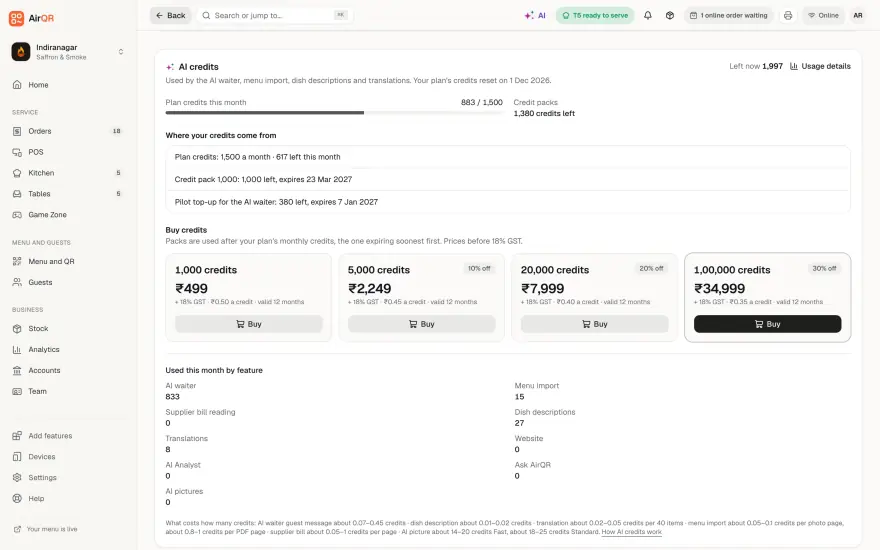
Buy AI credits from your Wallet, as a pack or in any amount you choose. They are added at once and power the AI waiter, the AI Analyst and the other AI tools. See AI tools and the AI Analyst.
Guest SMS
Order updates, e-bills and booking reminders that you send your guests by SMS are paid from the Wallet, message by message. A failed send gives its price back. See guest messages.
How to add money
Adding money takes a minute, and you see the full breakup before you pay.
- 01
Tap Add money
Use the Wallet card on your home screen or open Plan and billing, then Wallet. Pick an amount or type your own, from ₹200 up to ₹1,00,000 in steps of ₹100.
- 02
Read the breakup
In India the bill shows 18% GST on top. For example, adding ₹500 costs ₹590, and the full ₹500 goes into your Wallet. If an offer is running, you see how much extra you get.
- 03
Accept the Wallet terms once
The first time, you tick I agree to the Wallet terms. You are asked again only when the terms change.
- 04
Pay now or by bank transfer
Pay now takes UPI, card or netbanking, and the money shows in your Wallet within seconds. You can also pay AirQR's bank account yourself and tap I've paid, and it shows once AirQR confirms it, usually the same working day.
- 05
Download your GST invoice
Every top-up gets a GST tax invoice, so your accountant has a clean record of what you added.

See where the money went
A Wallet is only useful if you can read it.
Balance at a glance
See what you have now, how much of it is a gift or bonus, and how many days it lasts at your last 30 days' pace.
Where your money went
Look at this month, last month or the last 30 days, by service and by outlet, with a daily chart.
Every movement in Activity
Each top-up, gift, refund and AI credit purchase is its own row. Filter by what, outlet and dates, then download a CSV of every row.
Alerts and budgets
Choose the amount you want to be told at. By default it is about 7 days of your recent use, at least ₹100. Budgets cap a month's use of a service, and you are told when you near the cap.
Prices in plain view
The Wallet page lists what each paid service costs your business, in rupees, so there is nothing to work out.
Also on your phone
The Android apps show the Wallet card, the balance and recent activity, and you can add money there. The iPhone app shows the balance and activity, and you add money on the web.
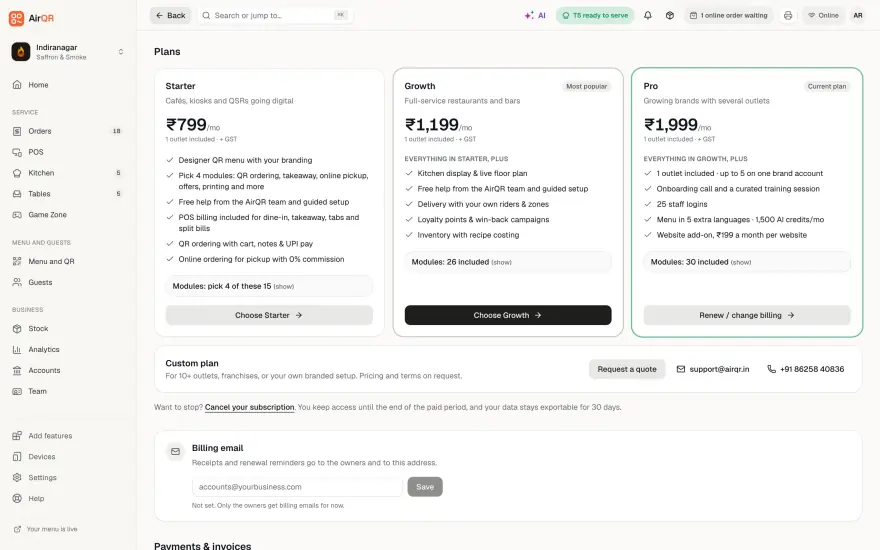
Wallet and plan, side by side
The two work together, and each has its own job.
| Question | Your plan | Your Wallet |
|---|---|---|
| How you pay | A flat price per outlet, monthly, every 6 months or yearly | Money you add when you like, from ₹200 |
| What it covers | The AirQR modules and features of your plan | Services that are paid by use, such as AI credits |
| Does it change with use | No, it is a flat price | Yes, you pay for what you use |
| Tax paper | Your plan billing | A GST tax invoice for each top-up |
AirQR is not a payment gateway for your guests. The Wallet is for what you pay AirQR. Guest payments still go straight to your own UPI ID or card machine.
Before you add money
- You are the owner or have billing access, because staff never see the Wallet
- Your business is in India, because Wallets are in rupees for now
- You know the amount you want, from ₹200, and your business details are ready for the GST invoice
- You have read the Wallet terms, which you accept the first time you add money
- You have chosen an alert amount, so you are told before the balance runs low
How wallet works in AirQR.
What the Wallet is
A Wallet is a prepaid balance. You add money when you like, and AirQR uses it only for things you switch on. Each business has one Wallet, shared by all its outlets, so a chain tops up once and does not manage a balance per outlet.
The Wallet is for the costs that depend on how much you use, such as AI credits. Your monthly plan stays a flat price. The Wallet sits beside it and never changes what your plan includes.
From 23 December 2026, each amount you add can be used for 12 months, the oldest first, and AirQR reminds you 30 and 7 days before any of it ends. You find the Wallet under Plan and billing, then Wallet. Owners and people with billing access see it. Your other staff never do.
Welcome bonus, refunds and what happens at zero
When your business first pays AirQR, you get a ₹50 welcome bonus. Bonus and gift money is spent first and is never refunded. Offers that give extra money on bigger top-ups are bonus money in the same way.
Money you added by mistake and have not used can be refunded within 7 days. Open Settings, then Ask for a refund, choose the top-up and tell us why. AirQR approves or declines, and an approved refund goes back the way you paid, with a credit note for the GST. Money already spent, bonus money and gift money are not refunded.
When your balance reaches zero, services that are paid from the Wallet wait. AI credits are never bought from a negative balance. Alerts on the Wallet page, the bell, email and, for urgent ones, a push tell you before and when this happens.
Asked about wallet, answered.
What is the AirQR Wallet?
It is one prepaid balance for your business, in rupees. You add money with a GST tax invoice, and it pays for AI credits. The SMS updates you send your guests use the same balance.
How much is the minimum top-up?
You can add from ₹200, in steps of ₹100, up to ₹1,00,000. In India GST of 18% is added to the bill, so adding ₹500 costs ₹590 and the full ₹500 goes into your Wallet.
Do I get a GST invoice when I add money?
Yes. Every top-up gets a GST tax invoice.
Is there a welcome bonus?
Yes. When your business first pays AirQR you get ₹50. It is bonus money, so it is spent first and is never refunded.
Does Wallet money expire?
From 23 December 2026, each amount you add, bonus money included, can be used for 12 months from the day you add it, and the oldest money is used first. Money already in your Wallet on that day gets its 12 months from then. You get a reminder in the app and by email 30 days and 7 days before any of it ends.
Can I get money back from my Wallet?
From 23 December 2026, money you added by mistake and have not used can be refunded if you ask within 48 hours of adding it. A payment charged twice is always refunded. Money already spent, bonus money, gift money and money that has expired are not refunded, and closing your account does not refund the Wallet.
Does the Wallet replace my plan?
No. Your plan stays a flat price. The Wallet pays only for services that are paid by use, so your costs follow how much you use them.
Is the Wallet a commission on my orders?
No. AirQR takes 0% commission on orders from your own channels. Guest SMS is pay as you use from your Wallet, and it is never a commission.



Your next service, on AirQR.
Import your menu from a photo, print your table cards, take orders today. 28 days free, no card.
Not sure which plan? See plans and prices