Restaurant billing software
Restaurant billing software that runs on the devices you already own
AirQR is restaurant billing software for India. Waiters and cashiers take dine-in, takeaway and delivery orders on a laptop, tablet or phone, send tickets to the kitchen, print GST bills and record cash, card and UPI. It runs in the browser on the Android tablets, phones, laptops and thermal printers you may already have, with no special billing machine to buy. The POS is included in every AirQR plan.
- Set up for your kind of venue
- Split bills, each one printed
- Works on tablet, phone or laptop
What restaurant billing software does for you
Restaurant billing software replaces the pen, the order pad and the calculator. A captain enters the order once. The kitchen gets the ticket, the bill is worked out with discounts, service charge and GST, and payment is recorded against the right table. At night the cashier closes the day and the numbers match.
AirQR calls this screen the Point of sale, or POS. Owners, managers, cashiers and waiters can all use it, with different permissions. It also links to everything else you may use, such as the QR ordering your guests do themselves and the kitchen display your cooks read.
Many owners say hotel billing software or billing machine when they mean a restaurant system, so here is the plain answer. AirQR bills food and drink for restaurants, cafés, bars and the food and beverage side of a hotel. It does not do room booking or room billing.
One screen for dine-in, tab, takeaway and delivery
The menu sits on the left and the check on the right. Search by name, tap a category or type a short code. Dishes that are sold out are greyed with an 86 badge, so nobody sells what the kitchen cannot make.
Pick the order type and the screen asks only for what that type needs. Dine-in takes a table, and a guest count if you want one. A tab keeps a running bill by name for the bar counter. Takeaway takes a name and phone and gets a daily token. Delivery takes an address and PIN code.
- Open checks listed with table, time and amount due
- Guests who asked for the bill are flagged
- Each send to the kitchen is a numbered round
- Move a check to another table when a party shifts
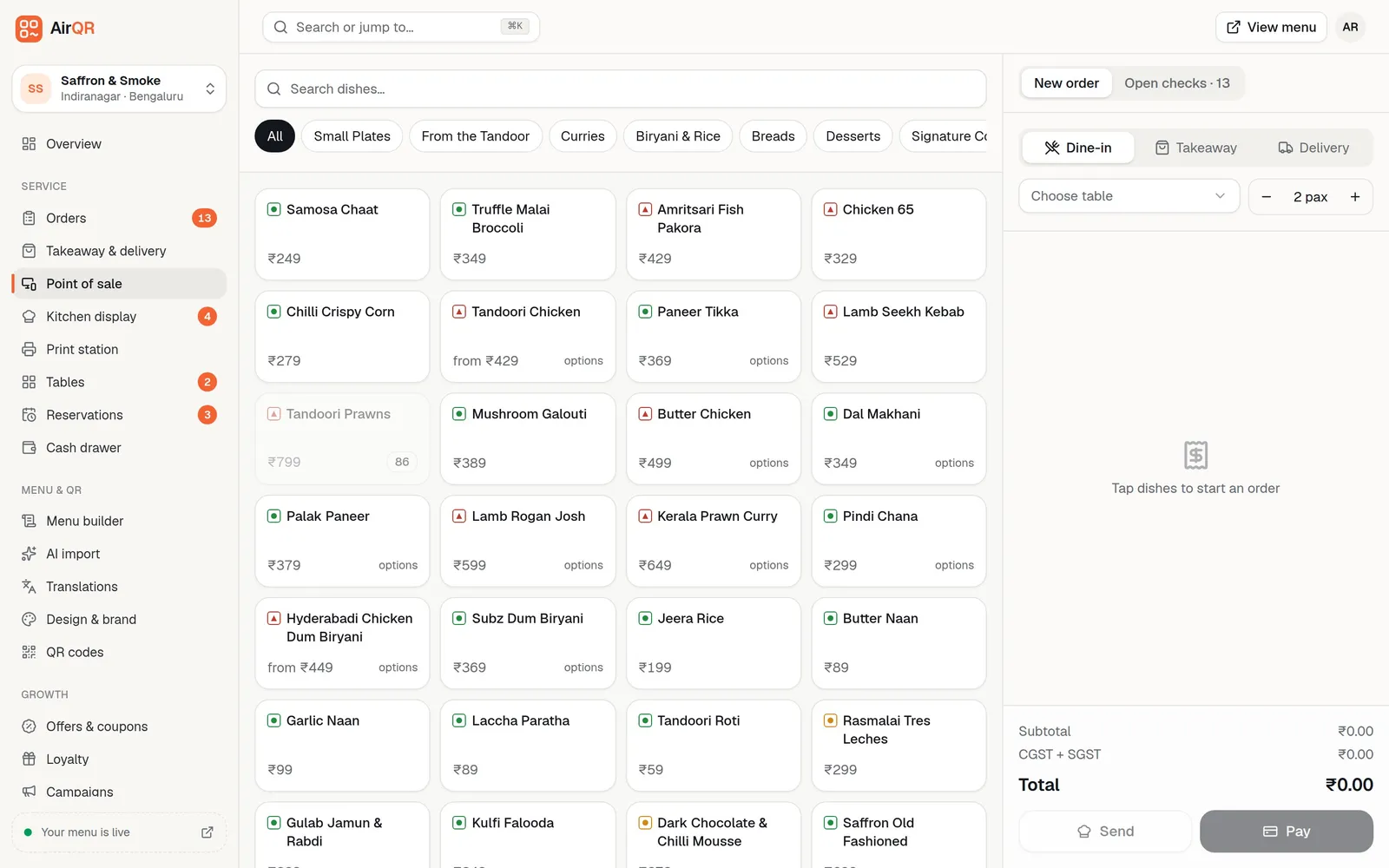
POS setups for restaurants, bars, cafés and shared tables
Not every venue bills the same way. A bar does not need a guest count and a counter café does not need tables. Settings, then POS settings, lets each outlet pick the setup that matches how it really works, and you can still switch any part on or off afterwards.
- Restaurant
- Made forTables, guests and courses
- What it setsDine-in, tab, takeaway and delivery, one check per table, guest count optional
- Bar
- Made forTabs and quick re-orders
- What it setsTab first, then dine-in and takeaway, guests not asked
- Café or counter
- Made forFast billing with no tables
- What it setsEat here and takeaway, a token on every bill, quick billing on
- Shared tables
- Made forSeveral bills at one table
- What it setsDine-in, tab and takeaway, several checks per table such as T4·A and T4·B
- Quick service
- Made forToken and counter
- What it setsEat here, takeaway and delivery, no tables, quick billing on
Tab needs the bar tabs module and delivery needs the delivery module. An outlet that has never saved these settings keeps working as before, with every order type and a table picker. The setup applies to the outlet you are working in, and only owners and managers can change it.
Order types, guest count and quick billing, your way
Under each setup you can change the parts that do not fit. Staff see only what you leave on.
Choose your order types
Switch dine-in, tab, takeaway and delivery on or off, and pick which one a new order starts as. A restaurant that never delivers can hide delivery from the top of the screen.
Ask for guests, or not
Set the guest count to not asked, optional or required. A bar can skip it. A restaurant can make it compulsory so covers are always counted.
No tables for a counter
With tables switched off there is no table picker. A dine-in order becomes Eat here and gets a daily token. Service charge applies as it does for dine-in.
One-tap quick billing
A big Charge button adds the items, takes the money and prints. The send button shows only when a kitchen display or printer needs telling.
Walk-in by default
Start every takeaway and tab order as a walk-in, so no name or phone is kept. Staff can still add details when they want to.
Tab limit warning
Set an amount and the POS warns when an open tab reaches it. It is a warning only. See bar tabs.
Do I need a kitchen display to use the POS?
No. If your outlet has no kitchen display, the POS runs the whole check. The send button becomes Add to check, the list is headed On the check, and nothing shows as in the kitchen. Kitchen tickets still print on your kitchen printers when printing is on.
If you have no kitchen printer either, a Print kitchen ticket button appears after each send. You can also let the POS open the browser's print window by itself. When you later want screens in the kitchen, the kitchen display adds on to the same check.
Split a restaurant bill by person, by items or by amount
When guests want to pay separately, open the check, press Pay and choose how to split. Splits are saved on the check, so they are still there after a reload or on another device.
- 01
By person
Enter the number of people, from 2 to 50. The amount still due is shared out equally, and any rounding left over goes to the last share.
- 02
By items
Tick what one guest had. For a dish ordered three times, such as three beers, give them just one. Their bill carries their share of tax and service charge, with food GST and liquor VAT kept separate. The last guest pays exactly what is left, so the bills always add up.
- 03
By amount
Type an amount for one guest. You cannot go over what is still unclaimed.
- 04
Print and pay each one
Every split has its own Print bill button, or Print all bills for the table. Each is paid in full on its own, with its own payment method and tip. The check closes when the last split is paid.
Shared tables for several parties and bills at one table
In a restaurant with long communal tables, two parties can sit at the same table and want separate bills. Choose the shared tables setup and a table can hold more than one check. When staff pick a table that already has a bill, the POS asks whether to add to T4·A, add to T4·B or start a new check at T4.
Each check is printed and paid on its own. On the live floor the table shows how many checks it holds and the combined amount due, and a guest who orders from their own phone by QR gets their own check. Without the shared tables setup, the POS keeps one check per table and asks staff to add to it, so nobody opens a second bill by mistake.
On the live floor you tap a table to go straight to the POS, and hold it to see options such as seat, hold, move and merge. Press T and type a table name or number, then Enter, to jump to a table from the keyboard. See the live floor help.
Built for a busy counter
These are the things that save seconds on every order and add up across a shift.
Short codes
Give Butter Chicken the code BC. Type BC and press Enter to add it, or 2*BC for two. See short codes.
Barcode scanner
A USB or Bluetooth scanner adds a bottle or packet the moment it is scanned, anywhere on the screen. Handy for bars and packaged items. See barcode scanner.
Keyboard shortcuts
Jump to search, jump to a table with T and its number, send to the kitchen and pick a category without the mouse. Press the question mark key to see them. See keyboard shortcuts.
Sizes, add-ons and kitchen notes
Half or full, 30 or 60 ml, extra cheese, and a note such as no onion. The note prints on the kitchen ticket.
Parcel by dish
Pack a whole round or a single item. Parcel prices and the packing charge follow the rules you set.
Void and change with a reason
Items already sent can be changed or removed by a cashier or manager, with a reason. The kitchen sees the old line struck through.
Restaurant billing software for Android, mobile and tablet
AirQR is not a separate app to install on one special machine. It runs in the browser, so it works on a laptop, a tablet or a phone. In Chrome or Edge you can also install the POS to the home screen. It then opens in its own window like an app.
That means a restaurant billing software for Android that uses the Android tablet or phone you already have. Waiters can take orders from their own phones, and the counter can use a tablet or a laptop. Getting them started does not need an email. The owner or manager creates a login from the Staff page that uses the waiter's mobile number and a password, and the waiter signs in with those, with no OTP. See staff logins. If you prefer one device at the counter and one in the kitchen, that works too.
For printing, AirQR works with the standard 58 mm and 80 mm thermal printers used in Indian restaurants, over USB, Bluetooth or Wi-Fi. A print station page runs in Chrome on a computer or an Android tablet and prints to USB and Bluetooth printers. A small free helper on an always-on computer drives Wi-Fi printers. An iPhone or iPad, and Safari or Firefox on any device, cannot connect to USB or Bluetooth printers. Connect those printers to an Android, Windows or Mac device running Chrome or Edge, or use a Wi-Fi printer through the helper. See how printing works and devices.
Taking payment, discounts and tips
AirQR records payments and does not hold your money. You choose cash, card, UPI or other, enter the amount and add a tip if the guest left one. For cash it shows the change to return. For UPI it shows a QR for the exact amount, and your cashier presses mark as paid only after the money shows in the UPI or bank app. One check can be paid in parts, by different people and in different ways. Card payments are recorded against your own card machine. A payment gateway for cards is not available yet. A bill printed before payment carries a Scan to pay QR for the exact amount due, and a settled bill prints as a GST tax invoice, covered on the GST billing page. See recording payments.
Discounts are given with a reason, as a percentage or an amount, and every discount and void is saved with the staff member's name. Waiters can add dishes and take payment but cannot discount or void. Which roles can, and up to what limit, is decided by the owner. The service charge can also be removed from any dine-in bill. In India AirQR marks it optional, and anyone allowed to give discounts can take it off one bill while the check is open, with a reason. Each removal is saved with the staff member's name in the audit log. Details are in discounts, voids and tips.
Tips are recorded with the payment. Managers can share them fairly by hours worked, and download a payroll CSV from the time clock. AirQR does not pay anyone. See tips split and payroll.
A cash drawer you can count at night
Open the drawer in the morning with your float. Record petty cash in and out with a reason. At closing, count the cash note by note and AirQR shows balanced, over or short. Closing prints a Z report with sales, payments by method, refunds, voids and the cash count. Print it and keep it with the cash.
- Open drawer with the float you counted
- Cash in and out always carry a reason
- Count by note or enter a total
- Z report is frozen once the drawer closes
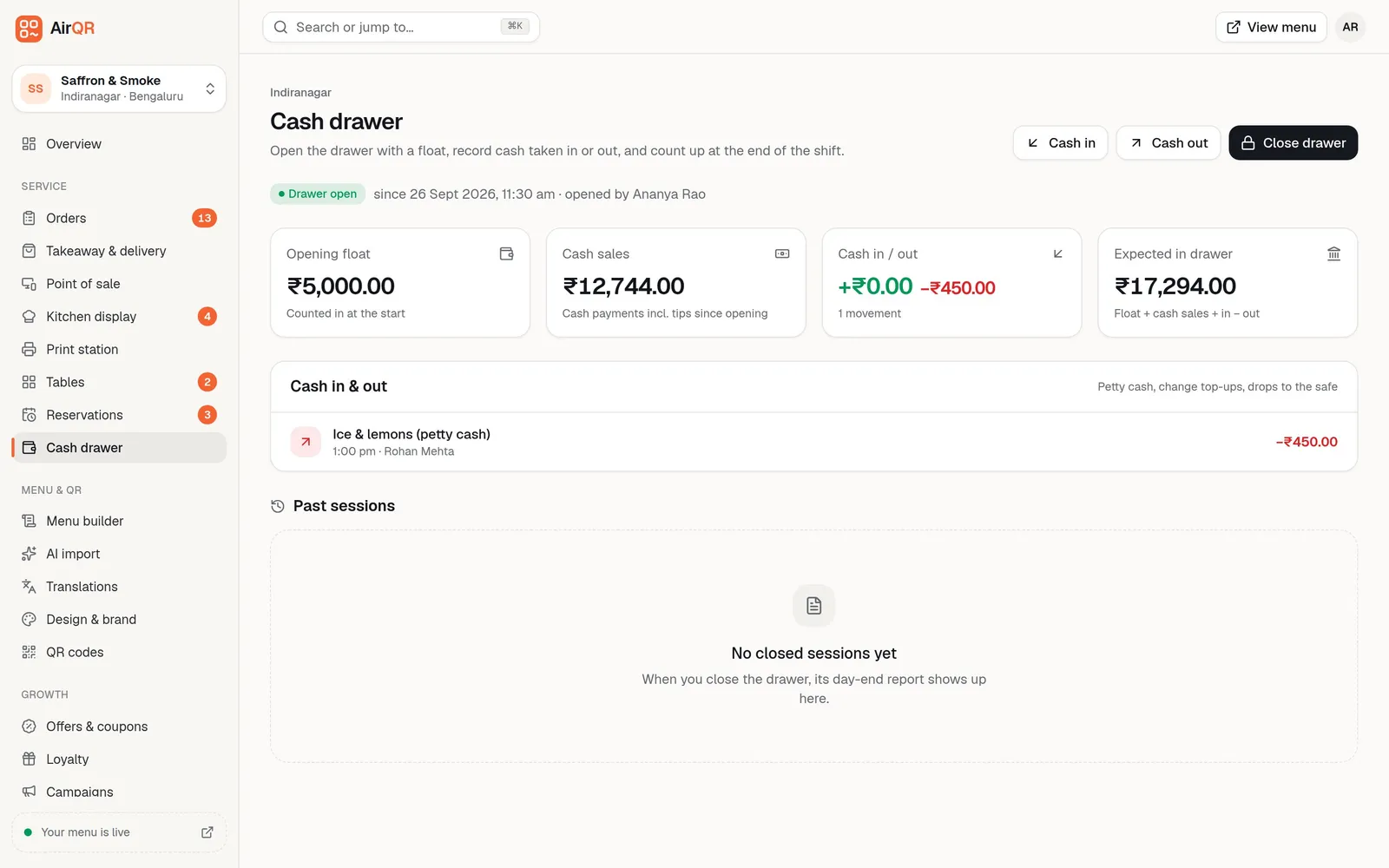
A day with AirQR billing
- 01
Open
Open the cash drawer with the float. Start the kitchen screen and printers. Switch off any sold-out dishes.
- 02
Serve
Take orders on the POS or let guests order from the QR. Send rounds to the kitchen and print bills as tables finish.
- 03
Close
Settle or cancel every open check, record petty cash, count the drawer and print the Z report. See the daily opening and closing routine.
If the internet drops during dinner
A good billing machine for a restaurant should not stop when the broadband does.
- The POS keeps taking orders and printing kitchen tickets and bills on the same device
- Cash, card, UPI and part payments can still be recorded
- Everything syncs once the connection returns
- Each device must open the POS once while online to be ready
- Refunds, changes to items already sent, moving tables and the split bill screens wait for the internet
Questions
Can I use restaurant billing software on an Android phone or tablet?
Yes. AirQR runs in the browser, so an Android phone or tablet works as a billing counter or a waiter's order device. Waiters and captains without an email sign in with their mobile number and a password. In Chrome you can install the POS to the home screen.
Do I need a special billing machine for my restaurant?
No. You need a screen to bill on, such as a laptop or tablet, and a standard 58 mm or 80 mm thermal printer if you want paper bills and kitchen tickets.
Does it work for hotel billing?
It bills food and drink, including a hotel's restaurant and bar. It does not do room booking or room charges.
Will it keep working if the internet goes down?
Yes, on a device that opened the POS while online. It takes orders, prints and records payments, then syncs when the connection returns.
Can I split a restaurant bill by items or by person?
Yes. Press Pay on the check and split by person, by items or by amount. Each guest gets their own printed bill and pays on their own, and the check closes when the last split is paid. Split bills need an internet connection.
Do I need a kitchen display to use the POS?
No. Without a kitchen display the POS runs the whole check, and kitchen tickets still print on your kitchen printers. You can add a kitchen display later if you want one.
Can staff remove the service charge from a bill?
Yes. In India AirQR marks the service charge optional, and anyone allowed to give discounts can remove it from one dine-in bill while the check is open. The removal is saved with their name and a reason.
How much does restaurant billing software cost in India?
The POS is included in every AirQR plan. See pricing for current prices, and the 28-day free trial lets you try it on your own tablet first. For a wider look, read the restaurant POS cost guide.
Keep reading
Try AirQR in your restaurant
Set up in minutes on the phones, tablets and printers you already have. 28-day free trial.