For pizzerias and pizza shops
Pizzeria software for sizes, toppings and your own delivery
AirQR is pizzeria POS software for pizza shops that sell by the counter, by takeaway and by delivery. A pizza has sizes with their own prices and toppings the guest chooses, orders arrive by QR or your own online ordering page with 0% commission, and delivery runs on your own riders and zones.
- Sizes and toppings on every pizza
- Your own online orders, 0% commission
- Takeaway tokens and your own riders
What a pizzeria needs from its software
A pizzeria has a simple menu with a complicated order. One pizza comes in three sizes, takes extra cheese, a stuffed crust and four toppings, and the kitchen must read all of it at a glance. Most orders leave the shop in a box, so takeaway and delivery matter more than tables.
AirQR handles this with sizes and add-ons. A size is a named price, such as Regular, Medium and Large, and the menu shows the lowest price as from. Toppings are add-on groups, where you decide how many a guest must pick and how many they can pick, and what each one costs. Orders then arrive complete, with no phone call to ask what was meant.
Good to know before you start. AirQR does not offer half and half pizzas, where one pie carries two different toppings. If you sell them, offer them as their own named items. Everything else on this page works today.
A Friday night at a pizza shop
Here is how the evening can run when the counter, the phone and the delivery riders share one system.
- 01
Before opening
The manager marks the pepperoni as sold out because the delivery has not come. It greys out at the till and on the online ordering page, so no guest orders it.
- 02
7 pm, orders from the link
Guests open your own online ordering link or scan the QR code on the box from last time. They choose a size, tick toppings and pick pickup or delivery. The order reaches the kitchen printer, or the kitchen display on Growth and above (an add-on on Starter).
- 03
The counter
A guest walks in for a slice and a drink. The cashier bills them on the point of sale and the order gets a takeaway token. The guest watches the order-ready screen for their number.
- 04
The oven
The cook sees each pizza with its size, toppings and any note. On the kitchen display, tickets turn amber and then red against the target time you set, so a late order cannot hide.
- 05
Out for delivery
Delivery orders go to your own riders. Guests enter their PIN code, see the fee and time for their delivery area, and staff note the rider's name when the order goes out.
- 06
Closing
The cashier closes the drawer and prints the Z report. The owner sees sales by channel, so it is clear how much came from the counter, the QR code and online orders.
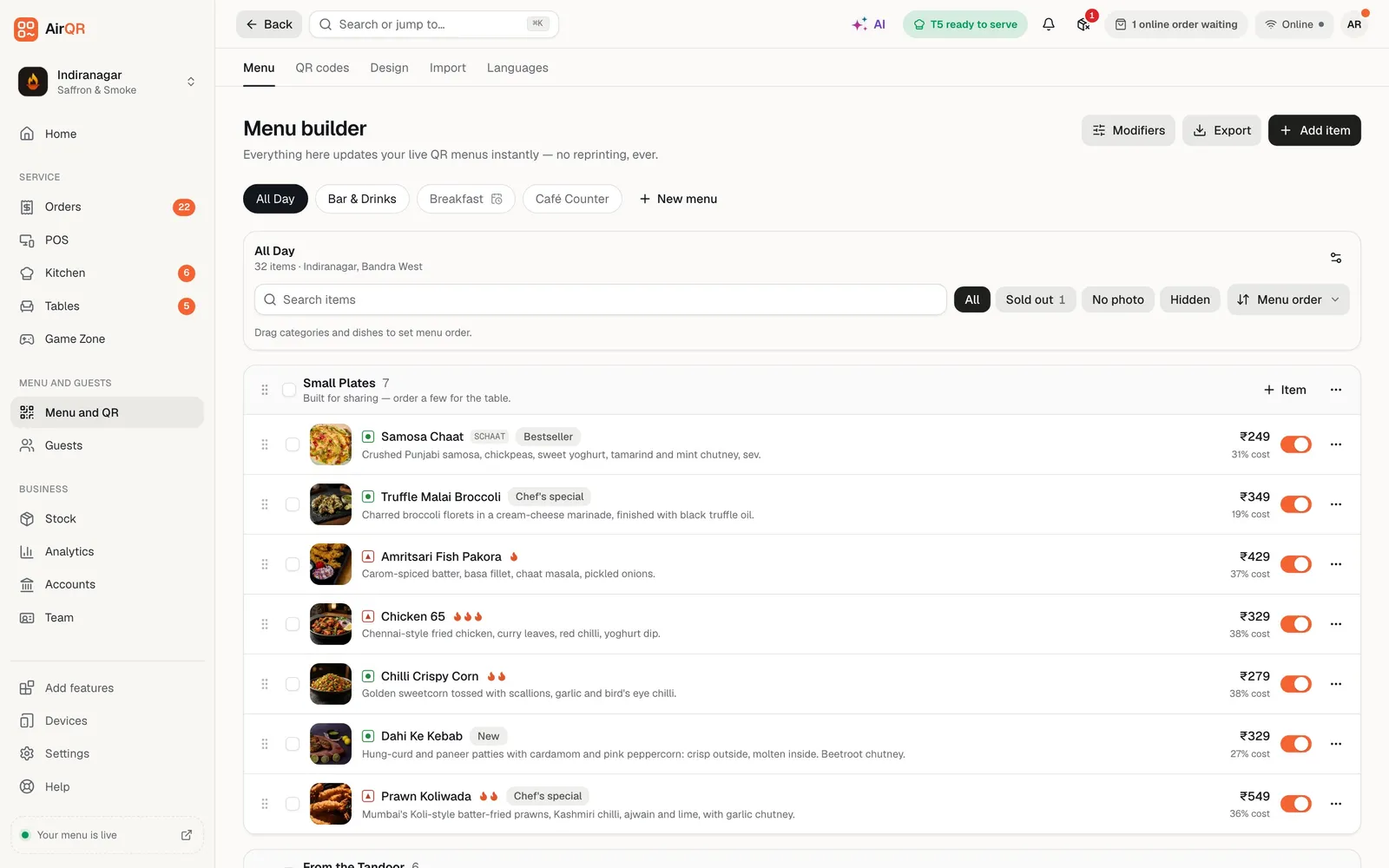
Sizes and toppings in the menu builder
Open a dish and click Add sizes to give it a price for each size, such as Regular, Medium and Large. Then build a group in Modifiers for toppings. Set the least and most a guest can choose, give each topping its extra price, and attach the group to every pizza that uses it. Edit the group once and every pizza follows. See sizes and add-ons.
Mark a group required when a choice must be made, such as the crust. Each topping has its own switch, so when the olives run out you switch them off and guests see them greyed out as sold out.
- A price for each size
- Toppings with a minimum and a maximum
- A switch for each topping when it runs out
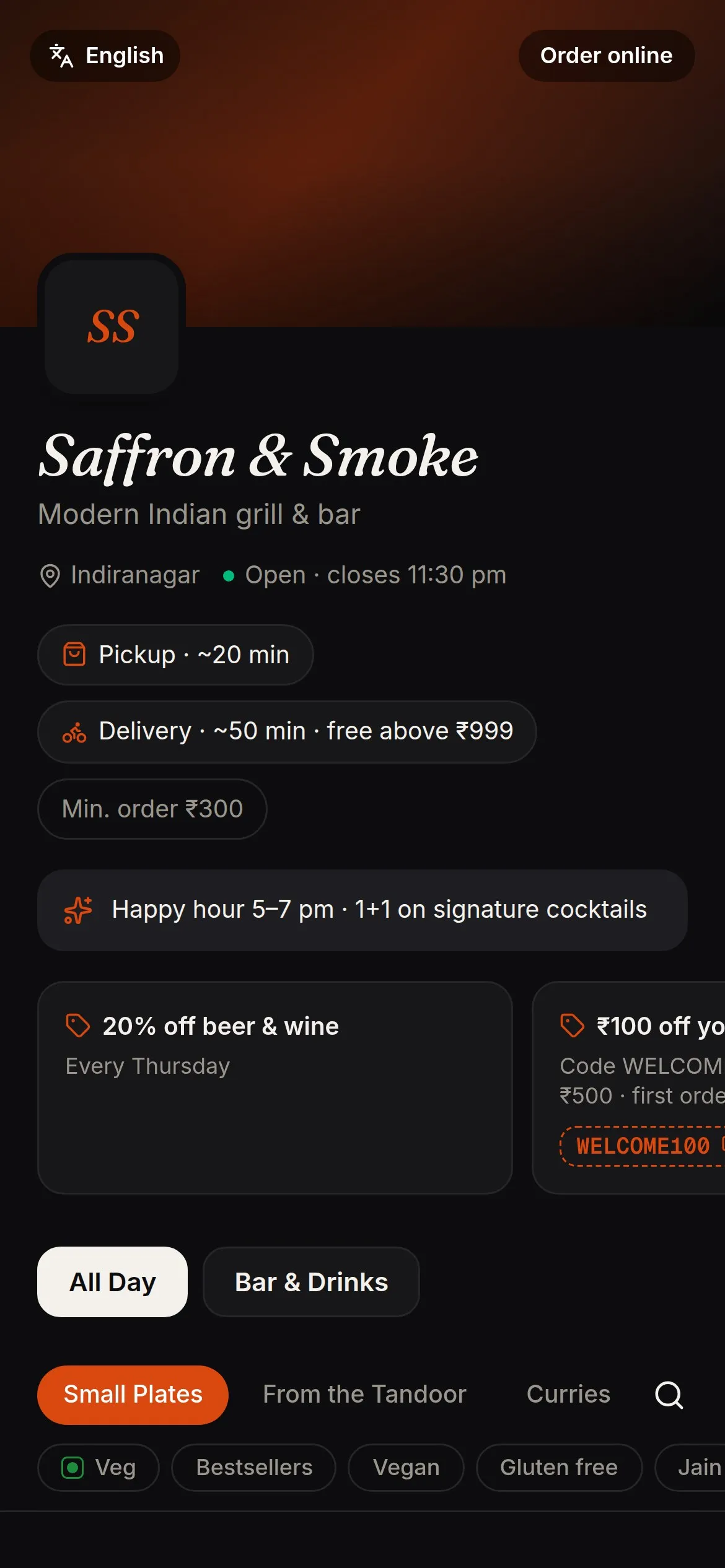
Your own online ordering page, with 0% commission
Your online ordering page lets guests order pickup or delivery from their phone, with your menu and your prices. AirQR takes 0% commission on every order, and the guest pays your outlet directly. Guests can pay on pickup or delivery, and in India they can pay by UPI into your own UPI ID. AirQR is not a payment gateway, and staff confirm the payment. See online ordering.
Switch on scheduled orders and a guest can book a pickup time, up to seven days ahead, which suits a party order for the weekend. You can cap the number of orders per slot so the oven is never swamped.
- Pickup and delivery from one link
- Scheduled orders up to 7 days ahead
- An orders per slot limit to protect the oven
Takeaway, delivery and the counter
Each of these has a help page that explains the steps.
Takeaway tokens
Every counter and takeaway order gets a token for the day, which prints on the bill and shows on the kitchen ticket. See takeaway tokens.
Your own delivery
On Growth and above, or as an add-on on Starter, you deliver with your own riders and delivery zones. See online ordering setup.
Short codes at the till
Give each pizza a code and type it with a quantity, so a busy counter keeps moving. See short codes.
Packing and boxes
Set a packaging charge, and a parcel price on dishes that cost more to pack. See parcel pricing.
Swiggy and Zomato orders
AirQR does not connect to those apps. Staff can enter an order from them by hand on the POS and label it by platform, so it shows in your orders and on the kitchen screen. See platform orders.
Tables when you need them
Tables is optional. A pizza shop with a few tables for dine-in can switch it on, and a takeaway shop can leave it off.
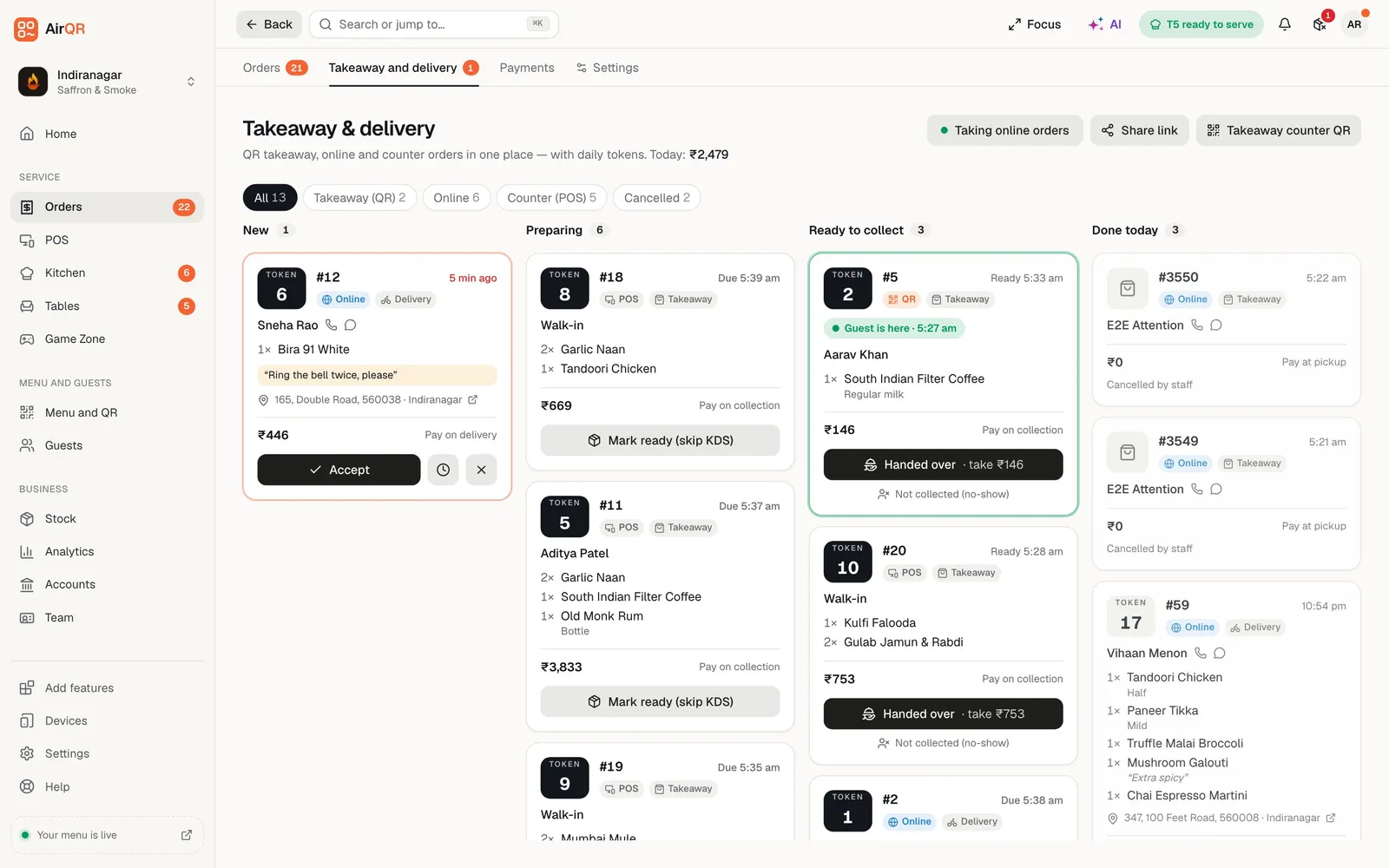
One board for takeaway and delivery
The Takeaway and delivery board shows every order that leaves the shop in four columns, from New to Preparing to Ready to collect to Done today. Counter, QR and online orders sit side by side with their tokens, so the person at the door knows which box is whose.
Staff press one button to move an order along. When delivery is on, an order for a rider shows up there too. See the takeaway token system and online orders board.
Setting up your pizzeria
Most of this is done once.
- Add your pizzas with photos and give each a short code
- Add sizes such as Regular, Medium and Large to each pizza
- Build a toppings group with a minimum and a maximum and attach it
- Make a required group for the crust or the base
- Turn on online ordering and choose pickup and delivery
- Add your delivery areas by PIN code, with a fee and minimum order for each
- Turn on counter takeaway and choose pay first
- Add your UPI ID so guests in India see a QR for the exact amount
Questions
What is the best POS software for a pizzeria?
Pick the one that handles sizes, toppings, takeaway and delivery without extra phone calls. Try it on your own menu during the free trial and check how fast the counter can bill.
Can I sell pizzas in different sizes?
Yes. Give each pizza named sizes with their own prices. The menu shows the lowest price as from, and the guest picks a size before adding it to the cart.
Can guests choose their toppings?
Yes. Build a toppings group, set how many a guest must and may choose, and give each topping an extra price. The choices print on the kitchen ticket.
Does it support half and half pizzas?
No. A pie with two different halves is not supported, so sell it as its own named item.
Can I take delivery orders with my own riders?
Yes, on Growth and above, or as an add-on on Starter. You set delivery areas by PIN code, each with a fee and a minimum order, and your own riders deliver. See pricing.
Is there a commission on online orders?
No. AirQR takes 0% commission on every order from your own ordering page, and the guest pays your outlet directly.
Does it connect to Swiggy and Zomato?
No. AirQR does not connect to those apps. Staff can enter their orders by hand on the POS and label them by platform.
Can a guest order a pizza for later?
Yes. Turn on scheduled orders and guests can pick a time up to seven days ahead, with a cap on orders per slot.
Keep reading
Try AirQR in your restaurant
Set up in minutes on the phones, tablets and printers you already have. 28-day free trial.