For full service restaurants
Restaurant management software for India's dine-in restaurants
AirQR is restaurant management software for dine-in restaurants in India. Captains take orders on a tablet or phone, guests can order from the QR on the table, the kitchen reads tickets on a screen, and the bill carries your GST. Owners see the floor, the bookings and the day's numbers in one place.
- Captains, QR and kitchen on one check
- Live floor with bookings and waitlist
- GST bills and files for your CA
What restaurant management software does in a full service restaurant
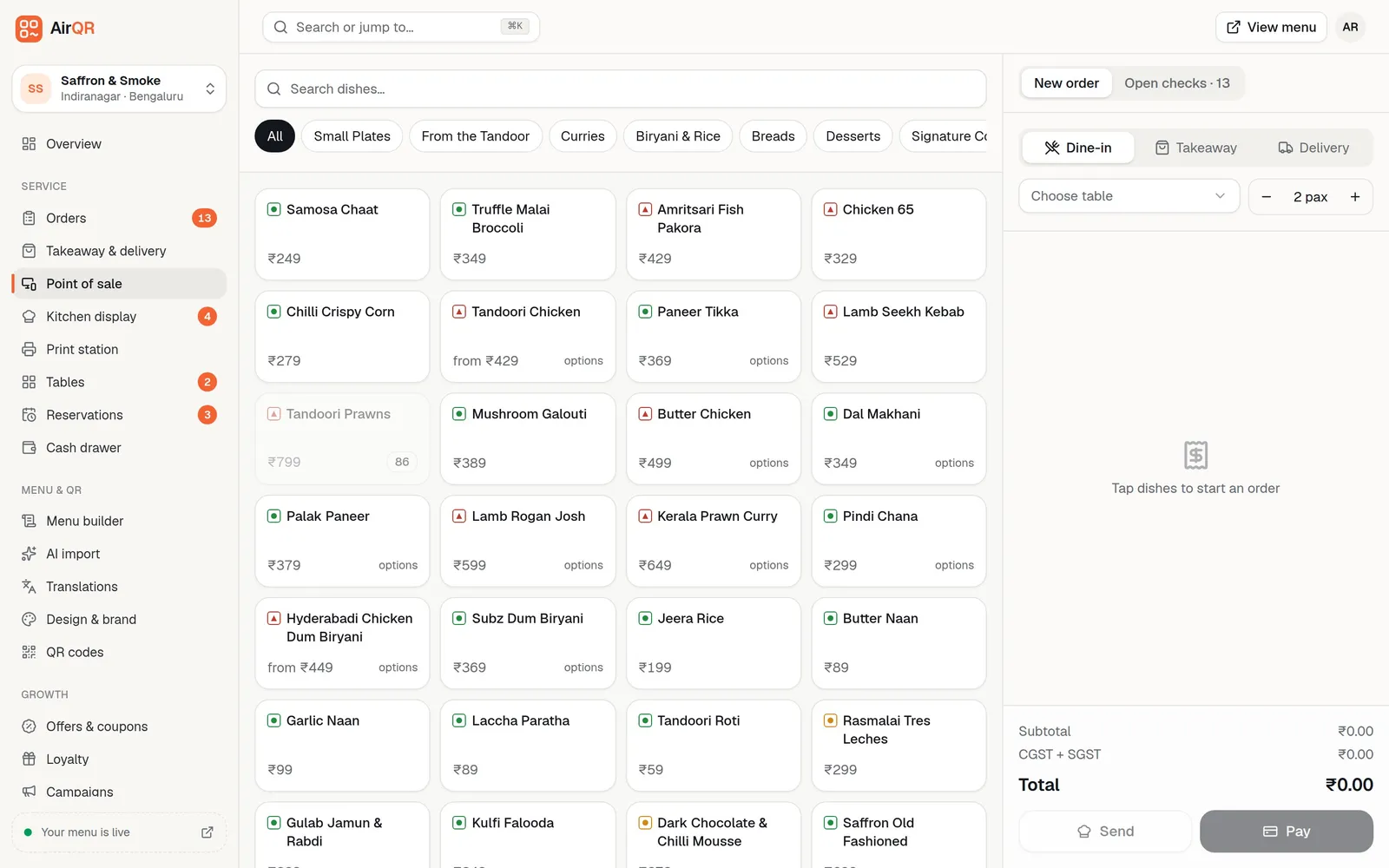
A full service restaurant has more moving parts than a counter. A host seats the party, a captain takes the order, the kitchen cooks in rounds, the guest asks for more water and then the bill, and the cashier has to match all of it to cash, card and UPI at night. Restaurant management software keeps those people looking at the same table instead of shouting across the floor.
AirQR does this with an open check per table. Whatever is added reaches that check, whether a captain typed it on the point of sale or a guest sent it from the table QR. The kitchen gets each addition as its own round, and the bill is always one bill. If two parties share a long table, the shared tables setup lets that table hold a check for each party.
Each person signs in and lands on the screen for their job, so a host, a captain, a cook and a cashier each see what they need and nothing more. The table further down shows the usual split.
A day of service from opening to the last table
Here is how a typical lunch and dinner runs when the floor, kitchen and counter all use AirQR.
- 01
Before doors open
The manager checks the Overview for ingredients running low and marks any dish the kitchen cannot make today as sold out, so neither guests nor captains can order it. The host looks over tonight's bookings on the timeline.
- 02
12.30 pm, lunch fills up
The host marks tables as seated on the live floor. Captains take orders on tablets and press Send. Guests who prefer to order themselves scan the QR on the table. Both land on the same check.
- 03
The kitchen works in rounds
Each send prints a KOT and appears on the kitchen display for its station, such as the kitchen, the tandoor or the bar. Each station has its own screen and its own target time, and clears only its own items. Cooks tap Start and Ready, and the captain sees which table has food waiting once every station is done.
- 04
8 pm, the dinner rush
Reserved parties arrive and walk-ins join the waitlist with a quoted wait. The host taps Notify to send a WhatsApp message when a table is about to free up.
- 05
The bill and the payment
A guest taps Ask for bill or the captain prints it. The bill shows each tax line, and the table pays by cash, card or a UPI QR for the exact amount. A party that wants separate bills splits the check, and each guest pays their own.
- 06
After the last table
Settled tables turn to Needs cleaning until someone marks them clean, and the cashier counts the drawer. At month end the owner downloads the GST files for the CA.
See every table at a glance with the live floor
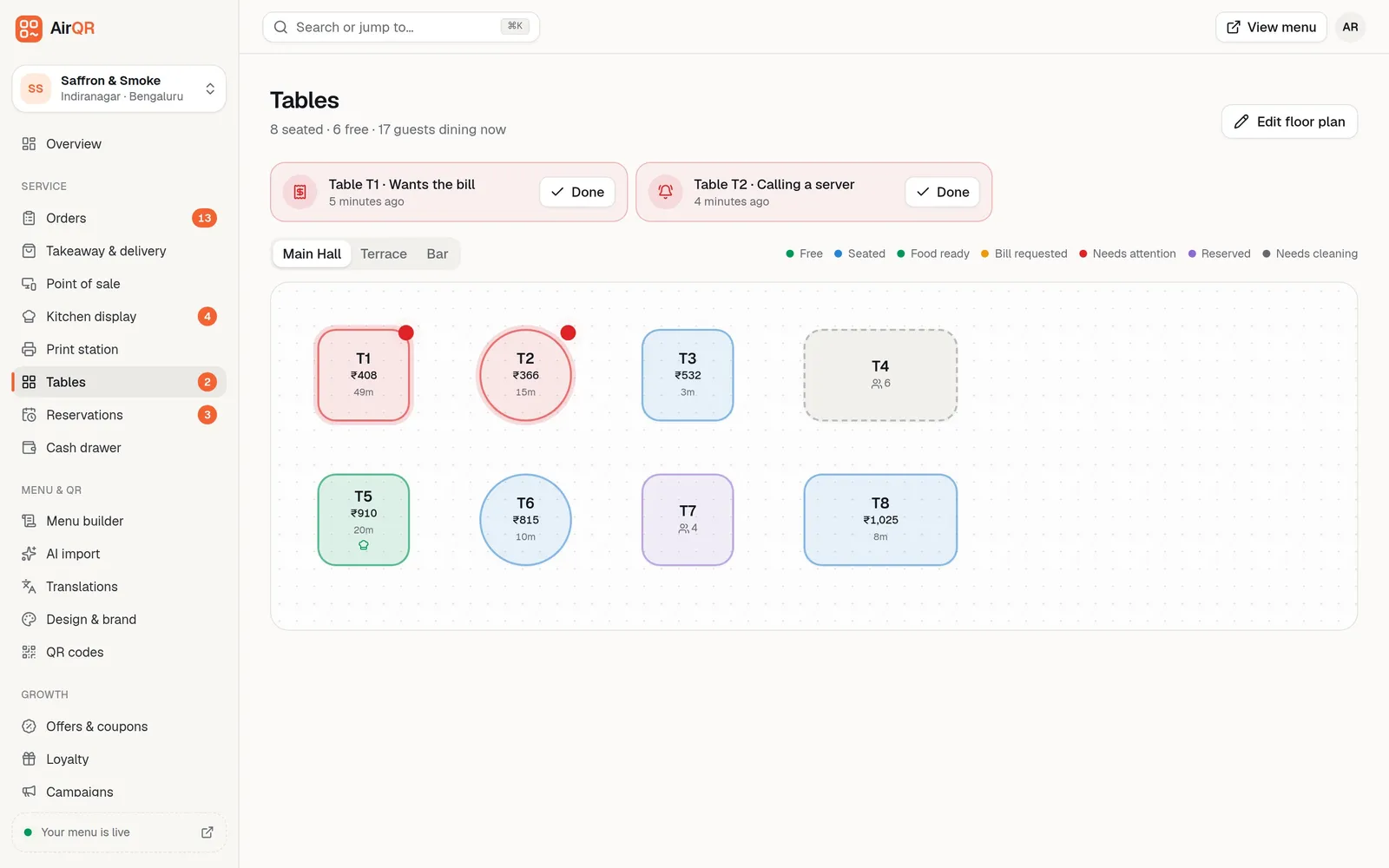
You draw your dining room once with round, square and long tables, and add areas such as Terrace or Private dining. After that the floor updates by itself. A table shows free, seated, bill requested, food ready or needs cleaning, along with the amount due and how long the guests have been there.
When guests tap Call a waiter, Get the bill or Water on their phone, the table turns red and the request shows at the top. Staff tap Done once they have helped. A party that changes tables is moved with their check, so nothing is re-entered. Tap a table to go straight to the point of sale, and hold it for options such as seat, hold, move and merge.
- Tap a table to open the POS, hold it for options
- Seat, hold or free a table in one tap
- Move a running check to another table
- Waiter calls and bill requests in red
- The Terrace, Rooftop or Private dining area as its own tab
What full service restaurants use most
You do not need to switch on everything. These are the pieces dine-in owners reach for first.
Captains with limits
A Captain role sees tables, orders and waiter calls, and can give discounts up to 15 percent. Owners and managers have no limit. Every discount and void is saved with the staff member's name and reason.
Table QR that adds to the check
Guests order more rounds from the table, add a note such as no onion, and see their bill. You can switch on approval so a waiter confirms each QR order first. See QR ordering.
Reservations and waitlist
Guests book from your booking page and get a table automatically. Your team adds phone bookings with occasion and allergy notes. See table reservations.
Kitchen tickets that keep up
If a captain voids an item, the kitchen screen shows it struck through with a Cancelled tag, so nobody cooks it. Every ticket shows the name of the captain who took it. Printed KOTs follow each station. See KOT printing.
Allergies and notes
A kitchen note on every item and a note on every booking, so allergies are written down and not just said. On the kitchen screen a note that mentions an allergy raises a red ALLERGY tag, and each dish's allergens show under the item.
Billing that survives a bad connection
If the Wi-Fi drops mid-dinner, captains keep adding rounds to checks already open on a prepared device. KOTs print at the counter, bills print as provisional, and everything syncs once the connection returns. See offline billing.
Shared tables, split bills and the POS set up for your floor
Full service rooms do not all work the same way. Settings, then POS settings, lets each outlet set the POS up as a Restaurant, or as Shared tables if your tables seat several parties. The POS is included in every AirQR plan, and you can see pricing for what else you may add.
One bill per table, or several
In the Restaurant setup a table has one check, and staff add to it. In the Shared tables setup, choosing a table that already has a bill asks whether to add to T4·A, add to T4·B or start a new check at T4. Each check is paid and printed on its own.
Split by person, by items or by amount
Press Pay on the check and split it. By person shares what is due equally. By items gives each guest only what they ate, with their share of tax and service charge. By amount takes a figure you type. Each guest's bill prints separately and is paid in full on its own.
Guest count your way
Ask for guests as optional, make it required so covers are always counted, or switch it off. A restaurant normally keeps it optional.
Order types you actually sell
Switch dine-in, tab, takeaway and delivery on or off and choose which one a new order starts as. Tab needs the bar tabs module and delivery needs the delivery module.
Jump to a table from the keyboard
At the till, press T, type a table name or number such as 4, T4 or B2, and press Enter. It opens that table's check, or starts a new order if it is free. See keyboard shortcuts.
Works without a kitchen display
If you have no kitchen display, the POS runs the whole check and kitchen tickets still print on your kitchen printers. Add the kitchen screen later when you want it. See POS basics.
Bookings and walk-ins for busy nights
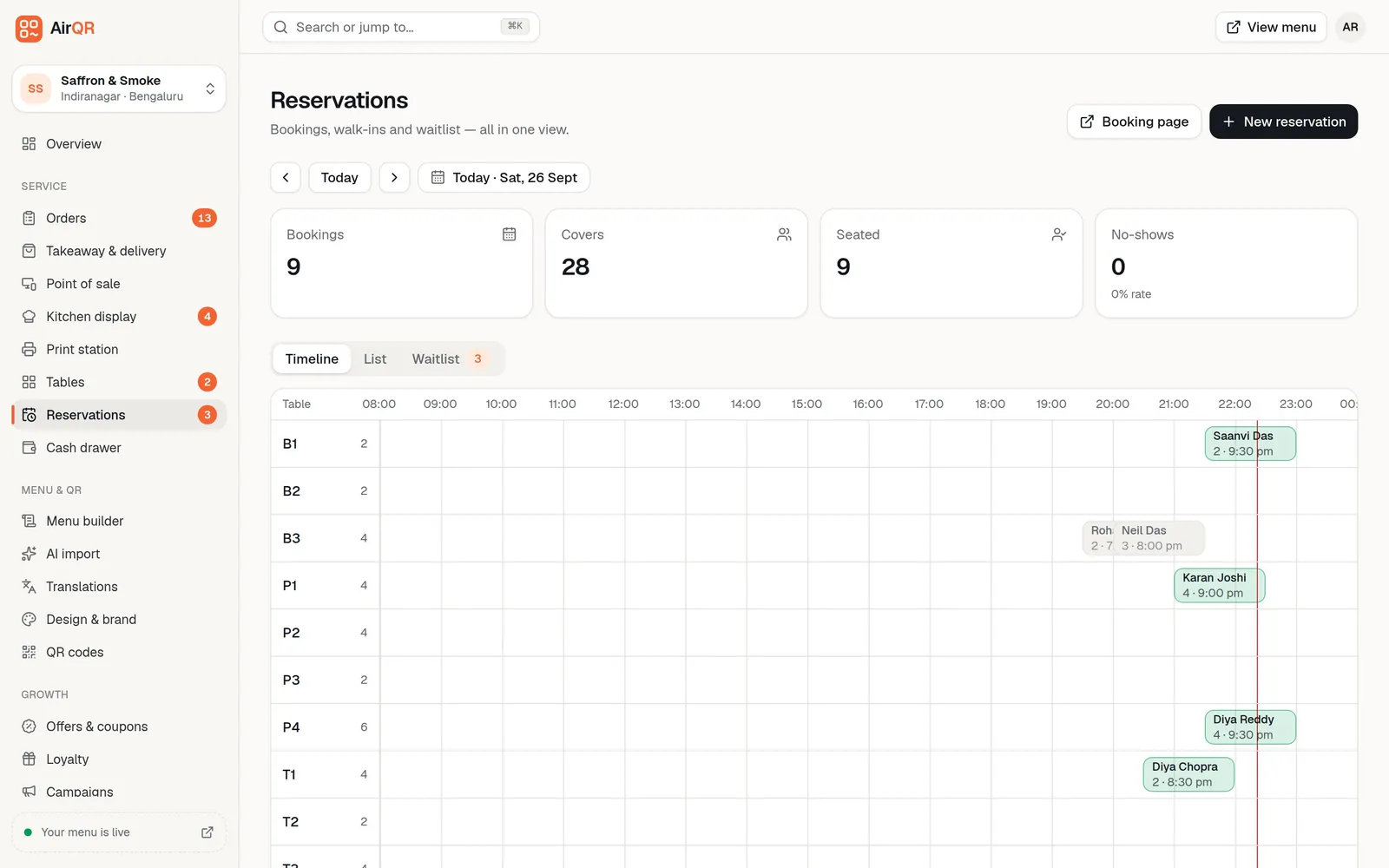
The Reservations page shows each table as a row and each booking as a block of time, with a red line for now. Online bookings are given the smallest free table that fits the party, and two bookings can never overlap on one table. If you are full, pause online bookings with one switch and your team can still add their own.
- Set how long a booking holds a table
- Cap the party size guests can book online
- Count covers and no-shows for the day
Who on your floor sees what
Each person signs in and lands on their own screen. This is the usual split in a full service restaurant.
- Host
- Opens onReservations
- DoesBookings, waitlist, seating and guest lookup
- Captain
- Opens onTables
- DoesOrders, rounds, voids, waiter calls, small discounts
- Waiter
- Opens onTables
- DoesTheir tables and rounds, with no money totals
- Kitchen
- Opens onKitchen display
- DoesTickets, and marking dishes sold out
- Cashier
- Opens onPOS
- DoesBills, payments to verify, discounts, refunds up to a limit
- Manager
- Opens onOverview
- DoesEverything except plan and billing
You can also create your own roles, such as a senior waiter. See staff roles.
GST, service charge and splitting the bill
A standalone restaurant charges 5 percent GST as 2.5 percent CGST plus 2.5 percent SGST, without input tax credit. You set the tax lines for your outlet and your CA confirms the rate. Bills show each tax line and print your GSTIN. Read more in GST billing.
Under the CCPA's 2022 guidelines, which the Delhi High Court upheld in March 2025, a restaurant cannot add a service charge by default or make it compulsory, though guests can choose to tip. The restaurant associations appealed, so check the latest position. AirQR marks the service charge as optional on guests' bills in India, and staff who are allowed to give discounts can remove it from a single dine-in bill when a guest asks. Each removal is saved with the staff member's name and a reason. Tips are recorded with the payment.
Splitting is normal on a table of eight. Split the check by person, by items or by amount, and every guest gets their own printed bill, with their share of tax and service charge, and pays on their own. Splitting needs an internet connection. AirQR records payments and does not collect them, so staff confirm each UPI payment in their own UPI or bank app before recording it.
At month end, AirQR prepares GSTR-1 files, a sales register and Tally files from your settled bills. It does not file the return for you, so your CA reviews them first.
Questions
What is restaurant management software?
It is the software that runs a restaurant's daily work, from taking orders and kitchen tickets to bills, payments, tables, bookings and reports. AirQR covers all of these in one place for dine-in restaurants in India.
Is AirQR suitable for fine dining?
Yes. Orders go in as rounds, so courses reach the kitchen when you send them. Items and bookings carry notes for allergies and occasions, and the guest menu has a Fine Dining theme.
Can captains take orders on a phone or tablet?
Yes. The point of sale runs in the browser on a phone, tablet or laptop. A Captain role gives them tables, orders and waiter calls, with a discount limit you control.
Can we split one table's bill between guests?
Yes. Press Pay and split the check by person, by items or by amount. Each guest gets a separate printed bill and pays on their own.
Can two parties share a table and get separate bills?
Yes, with the Shared tables setup in POS settings. A table can hold several checks, shown as T4·A and T4·B, and each is printed and paid on its own.
Can AirQR file my GST return?
No. It prepares GSTR-1 CSV files, a sales register and Tally files from your settled bills, and your CA reviews and files the return.
What happens if the internet goes down during dinner?
The POS keeps taking orders, printing kitchen tickets and bills, and recording payments on that device. Everything syncs when the connection returns. Open the POS once online on each device beforehand.
How do I know a restaurant management system can be trusted?
Test it with your own menu, tables and printer before paying. AirQR has a 28 day free trial. Ask any vendor how it behaves when the internet drops and who confirms UPI payments.
Sources
- GST Council press release, 56th meeting (PIB), restaurant rate unchanged · checked 10 October 2026
- Delhi High Court judgment of 28 March 2025 on service charge (NRAI and FHRAI petitions) · checked 10 October 2026
- LiveLaw report on the Delhi High Court service charge ruling · checked 10 October 2026
- LiveLaw report on the August 2025 appeal hearing · checked 10 October 2026
Keep reading
Try AirQR in your restaurant
Set up in minutes on the phones, tablets and printers you already have. 28-day free trial.