Inventory and recipe costing
Restaurant inventory management software that costs every dish
AirQR tracks your store room and takes ingredients off stock every time a dish is sold. You add ingredients and recipes once, record purchases and wastage, and see each dish's food cost percentage and your low stock before the shelf runs empty. It is for owners and managers who want to know where the paneer, chicken and spirits went.
- Stock drops automatically on every sale
- Food cost % for each dish
- Wastage and stock counts with reasons
What restaurant inventory management software should do
Most restaurants lose money quietly. A supplier raises the price of paneer, a cook over-portions the biryani, a tray of cut vegetables spoils overnight. None of it shows on the bill, so you only notice when the month's margin looks thin. Inventory software makes these leaks visible while you can still fix them.
In AirQR, sales deduct stock by themselves, so you only record three things. What comes in, what gets thrown away, and what you actually count on the shelf. That is a small daily habit instead of a monthly spreadsheet.
Inventory works alongside the point of sale and the QR menu. It runs as the Inventory module, which an owner switches on in settings, and the pricing page shows where it is included. Owners, managers and inventory clerks can use it.
Stock, cost and low stock on one page
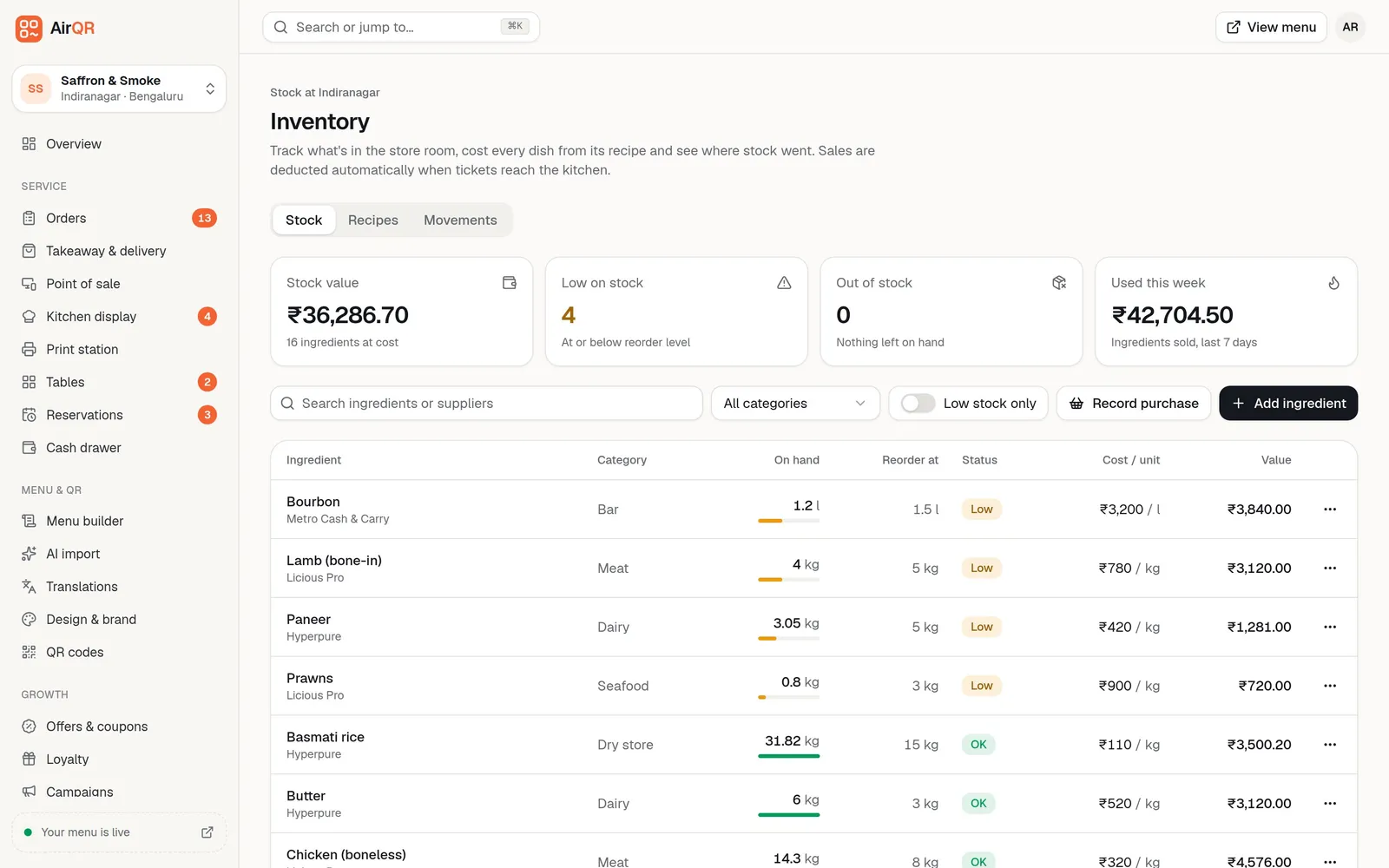
The Stock tab opens with four cards. Stock value shows what everything on hand is worth at today's cost. Low on stock counts ingredients at or below their reorder level. Out of stock counts what is finished. Used this week shows the cost of ingredients sold in the last 7 days.
Below them, each ingredient shows what is on hand, the level where you want a warning, its status (Out, Low or OK), cost per unit and value. The most urgent items come first. When something runs low, the Overview page shows a Running low alert at the start of the day.
- Units in kg, g, l, ml, pcs, dozen or pack
- Supplier noted against each ingredient
- Search by ingredient or supplier, or show low stock only
- Separate stock and reorder levels for each outlet
How stock goes up and down
You never type sales into inventory. These are the movements AirQR records, each with who made it and a link to the order. See inventory basics for the full list.
Sales deduct stock automatically
When a ticket reaches the kitchen, AirQR looks up each dish's recipe and takes the ingredients off stock at that outlet. POS and QR orders are deducted when sent to the kitchen. Orders that need approval are deducted when staff accept them.
Purchases move your cost
Record the quantity received and the total paid. AirQR moves the ingredient's cost to a weighted average of what you had and what just arrived, for example ₹300 to ₹310 per kg, and re-costs every dish that uses it.
Voids and cancels put stock back
Void an item, reject a pending ticket or cancel an order and the stock returns to the shelf. A ready takeaway marked Not collected is the exception. The food was made, so it is booked as wastage.
Stock counts fix the shelf
Count what is really there and AirQR records the difference as a Stock count movement, so you can see later how much went missing. A weekly count of paneer, meat and spirits is a good habit.
Recipe costing software built into your menu
A recipe lists the ingredients in one portion of a dish. With recipes in place, AirQR works out what every dish costs you. Details are in recipes and food cost.
Cost per portion and food cost %
Food cost % is the recipe cost of one portion divided by the selling price, times 100. The Recipes tab lists every dish with its cost and percentage, and flags anything above 35% in red.
Sizes and add-ons have their own lines
Half and full plates, 30 ml and 60 ml pegs, or extra cheese. A recipe row can apply to every portion, only one size, or only one add-on. Stock is deducted using the base recipe plus what was actually ordered.
Costs follow your suppliers
When you record a purchase or edit an ingredient's cost, every dish using it is re-costed straight away. Each sale remembers the cost at the time, so last month's figures don't change when prices move.
Start with the dishes that have no recipe
A No recipe filter shows what is still to be costed. Dishes without a recipe don't deduct any stock, so fill these in first.
A food cost calculator for restaurant dishes, worked through
This is illustrative maths to show how the percentage works. Your own prices and quantities will differ.
- Plate costing ₹95 to make
- Ingredients per portion₹95 of ingredients added from the recipe
- Selling price₹299
- Food cost %31.8%, inside the usual range
- Same plate after paneer goes up
- Ingredients per portion₹115 of ingredients
- Selling price₹299
- Food cost %38.5%, flagged red above 35%
- Same plate, price raised
- Ingredients per portion₹115 of ingredients
- Selling price₹329
- Food cost %About 35%, just under the red flag
Most restaurants aim for 25% to 35%. A high figure is a prompt to check the portion size, the price or the supplier.
Wastage tracking that shows why stock went missing
Wastage is stock that left the shelf without being sold. Spoiled, expired, dropped, over-prepped, returned by a guest or eaten as a staff meal. Record it on the ingredient the same day, pick a reason such as Spoiled or Dropped or spilled (or type your own, like Staff meal), and AirQR takes it off stock at the current cost. A preview shows what it is worth, for example about ₹150.
Every entry appears on the Movements tab with a red Wastage badge, the quantity, value, reason and who recorded it. Filter by Wastage and review it weekly. The same ingredient spoiling again and again usually means you are ordering too much or storing it badly. Wastage entries can't be edited, so correct a mistake with a stock count and a note. See recording wastage.
Keep wastage and stock counts apart. Use wastage when you know what was lost and why. Use a stock count when the shelf doesn't match and you don't know why.
From dish costs to menu decisions
Recipe costs do not stay on the Inventory page. Each sale records what the dish cost you at that moment, so the Analytics page can show food cost as a share of net sales and margin per plate for every dish. With real costs behind them, menu engineering sorts your dishes into Stars, Plowhorses, Puzzles and Dogs, and the reports and analytics page explains what to do with each group.
This is where the store room pays for itself. When paneer goes up and your paneer dishes slide from Star to Plowhorse, you see it in the numbers and can decide whether to change the price, the portion or the supplier. See menu engineering for the method.
Getting started with stock tracking
You do not need a perfect list on day one. Start with the ingredients that cost you the most.
- Add your top 20 ingredients with unit, cost and a reorder level
- Enter opening stock for this outlet from a real count
- Build recipes for your best sellers first, then everything else
- Record each delivery as a purchase with the total paid
- Record wastage the same day, with the same reason words every time
- Count your expensive items weekly and review the Movements tab
- Download your inventory, stock movements and recipes as CSV files from exporting your data whenever you need them
Questions
How do I calculate food cost percentage in a restaurant?
Divide the cost of one portion by its selling price and multiply by 100. If a plate costs ₹95 in ingredients and sells for ₹299, the food cost is about 31.8%. AirQR does this for every dish that has a recipe.
Does stock reduce automatically when I sell a dish?
Yes, for dishes that have a recipe. When a ticket reaches the kitchen, AirQR takes the recipe's ingredients off stock at that outlet. Dishes without a recipe don't deduct anything.
What is a good food cost percentage for a restaurant?
Most restaurants aim for 25% to 35%. AirQR flags any dish above 35% so you can check the portion, the price or the supplier.
Can I track stock separately for each outlet?
Yes. The ingredient list and recipes are shared across your brand, but stock quantities and reorder levels are kept separately for each outlet. Switch outlet at the top of the dashboard to see another shelf.
Can I track spirits and bar stock?
Yes. Ingredients can be counted in litres or millilitres as well as kg, grams, pieces, dozens or packs. Sizes such as 30 ml and 60 ml can have their own recipe lines so each peg deducts the right amount.
What if my stock shows a negative number?
It means more was sold or wasted than the system thought you had, usually because a purchase wasn't recorded. Record the missing purchase or do a stock count to set the real quantity.
Does AirQR work out my GST or Tally entries from inventory?
No. Inventory tracks stock and cost. GST files and Tally vouchers come from your settled bills. See GST billing.
Keep reading
Try AirQR in your restaurant
Set up in minutes on the phones, tablets and printers you already have. 28-day free trial.