Online ordering
An online ordering system for restaurants, with 0% commission
AirQR gives your restaurant its own ordering page for pickup and delivery. Guests open your link or QR, order from your menu and pay by UPI or on delivery. Orders land on the same board as your counter orders, and AirQR takes 0% commission on orders from your own link, so you keep the margin and the customer.
- 0% commission on your own link
- Pickup and delivery in one page
- Same menu, same kitchen, same bill
What is an online ordering system for restaurants?
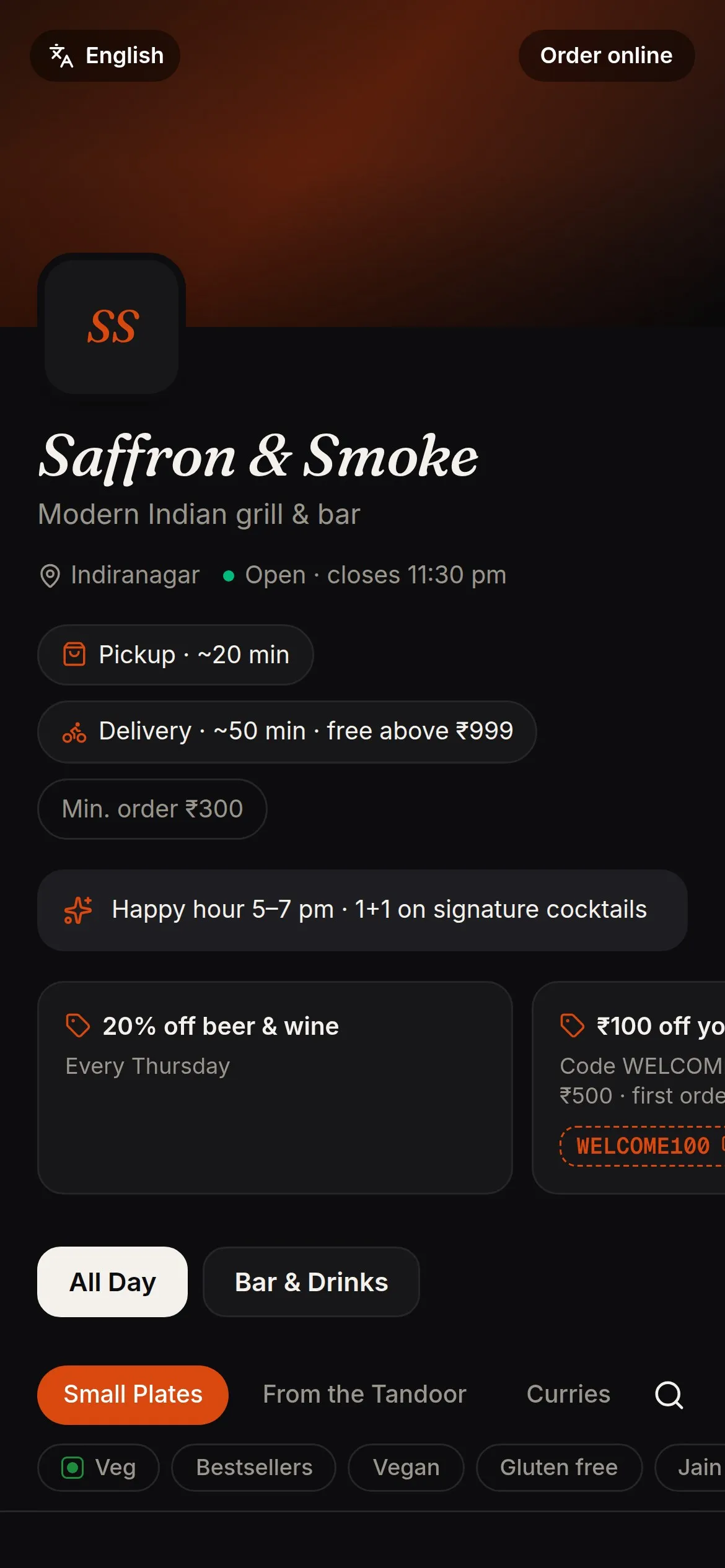
An online ordering system lets guests order your food from a link, without calling and without an app. They pick dishes, choose pickup or delivery, give an address if needed and pay. You accept the order, cook it and hand it over or send a rider.
With AirQR the ordering page is yours. It carries your menu, your prices and your branding, and it sits on a link you can put on Google Maps, Instagram, WhatsApp and the bags you deliver in. There is no marketplace listing in between, so there is no commission on those orders.
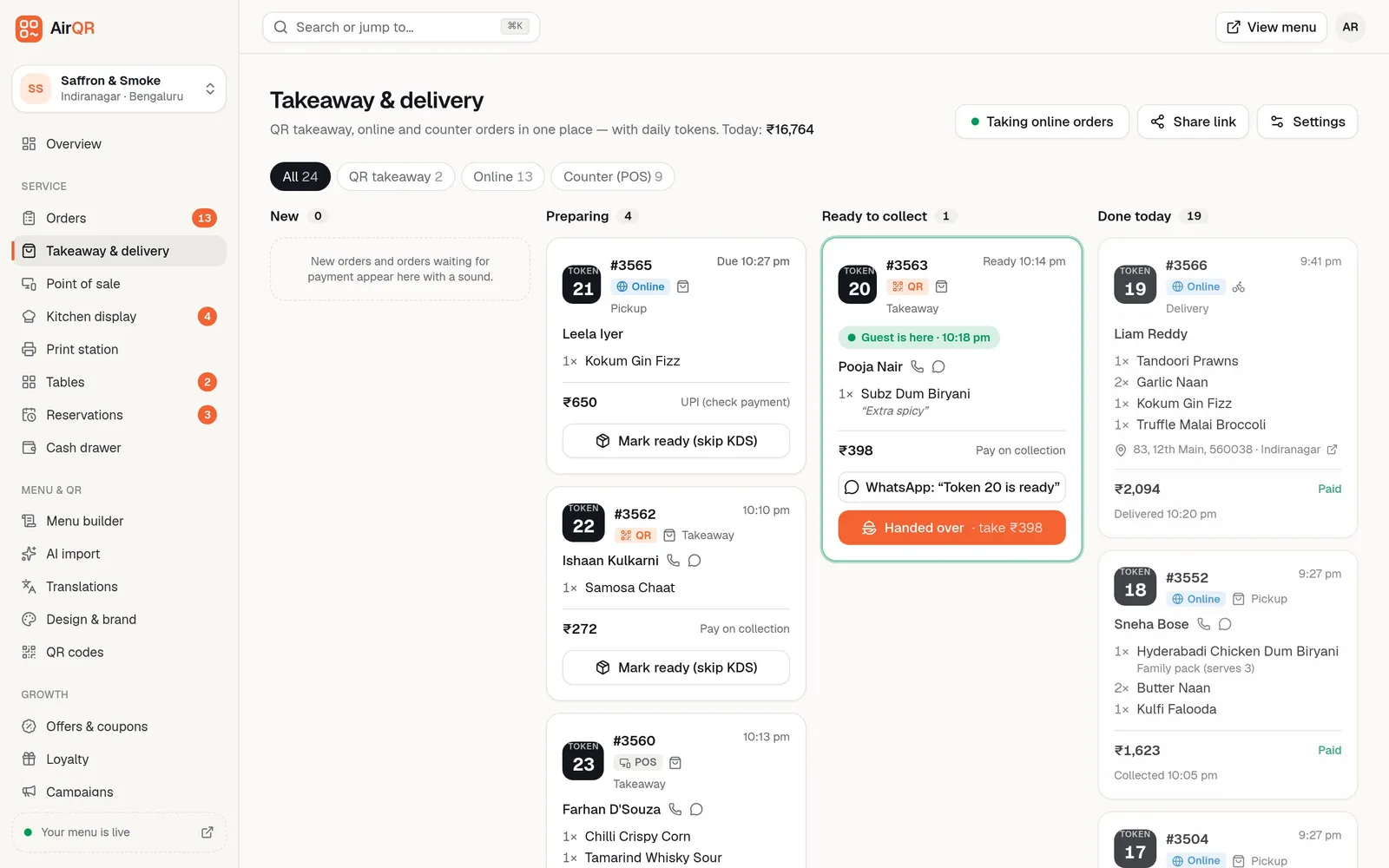
It is also a restaurant POS with online ordering built in. The order from the link arrives on the same Takeaway and delivery board as QR takeaway and counter orders, goes to the same kitchen display, and prints on the same bill printer. You do not copy orders from a tablet into your billing.
Takeaway and online orders without the commission
Orders through food delivery apps carry the app's commission on every bill. Orders from your own link and QR codes are different. AirQR takes 0% commission on them, and you pay a flat subscription instead, shown on the pricing page. Menu prices can stay the same as in your outlet, because there is no fee to mark them up for.
You also keep the customer. Every online order comes with the guest's name and phone number, which builds your own guest book, so you can reward regulars with points or bring them back with an offer. UPI payments go straight to your bank account, with no gateway fee from AirQR.
Be fair to the apps, though. They bring discovery, and people searching for dinner tonight may find you there first. For a new restaurant or a new area, that reach can be worth paying for. Many owners use both, the apps to be found and their own link for regulars, office lunch orders and families who come every Sunday, with a card in the bag or a QR on the table. The zero commission guide goes through the sums for your own numbers.
AirQR does not supply delivery riders. Delivery is with your own riders, and you decide the areas you serve. If you do not run riders, you can offer pickup only.
How a guest orders from your link
- 01
Open your link or scan the QR
A Pickup and Delivery switch sits at the top of the page. Guests who scan your menu QR can also choose Order ahead (pickup) or Delivery from the How are you ordering today screen.
- 02
Choose dishes
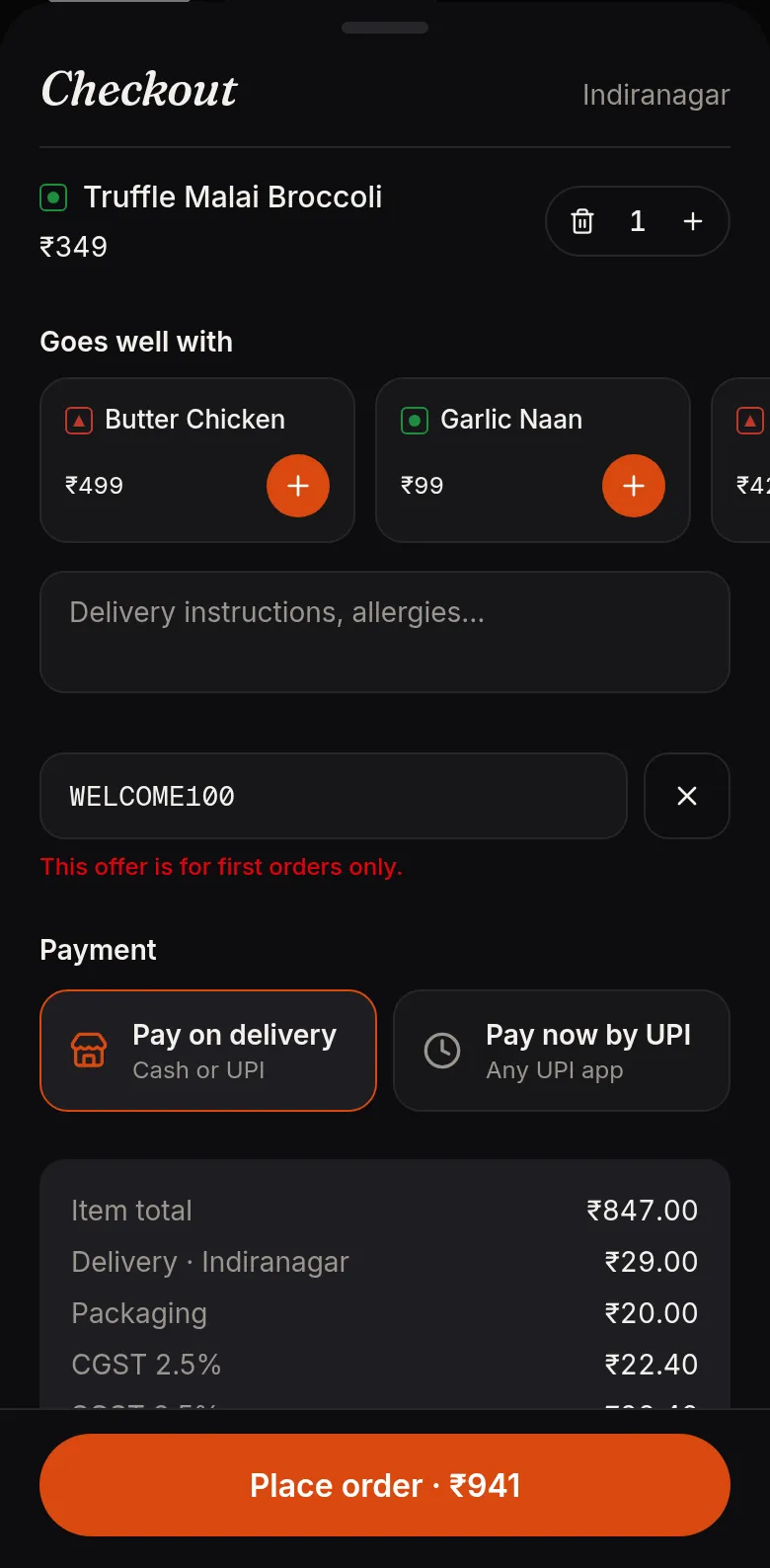
The same menu as your outlet, with photos, sizes, add-ons and cooking notes. A Goes well with strip suggests extras in the cart. See smart upsell.
- 03
Say when and where
Order as soon as possible or pick a time slot. For delivery, the guest enters a PIN code and sees the fee and time for that area.
- 04
Pay
Pay on delivery or pickup, or pay now by UPI. After a UPI payment the guest taps I've paid and waits while you verify it.
- 05
Follow the order
The guest's page shows confirmed, preparing, ready, and the rider's name once it is out for delivery.
Run every pickup and delivery from one board
Orders move across four columns, New, Preparing, Ready to collect and Done today. Each card shows the daily token, where the order came from, the items, the address with a map link and how the guest will pay. A sound plays when a new order arrives.
Accept an online order with the promised time, or give a different one such as ready in 30 minutes. Reject with a reason like an item is sold out. Call or WhatsApp the guest from the card. When it is packed, send it out with a rider name and the guest sees who is coming. Details are in the online orders board.
- Busy mode pauses new online orders for a short spell and resumes by itself
- Pay first orders wait for your confirmation
- No-shows are recorded on the guest's profile
- Cash on delivery is recorded when the rider hands the money over
Settings that match how you really deliver
You set these once in Online ordering settings. See setting up online ordering for the steps.
Delivery areas by PIN code
List the PIN codes you serve, each with its own fee, minimum order and travel time. Outside them, guests are offered pickup instead.
Time slots and limits
Let guests order ahead, set the slot length and cap orders per slot so the kitchen is not swamped.
Charges you control
A minimum order, a packaging charge per order, a delivery fee, and free delivery above an amount of your choice.
Parcel prices
A dish can cost a little more or less when packed. Set it by dish, category or outlet. See parcel pricing.
Accept by hand or automatically
Start with manual acceptance so you set the promised time. Switch to automatic when the kitchen is steady.
Tokens for pickup
Pickup guests get a daily token, shown on their phone and on the order-ready TV. See takeaway tokens.
Payment with UPI, straight to your account
Guests can pay on delivery or pickup, or pay now by UPI. The UPI screen shows a QR for the exact amount and a Pay with UPI app button. The money goes to your own account, not through AirQR. See payments for how it is verified.
A paid order is accepted only after you see the credit in your UPI or bank app. If nobody pays within the time you set, the order cancels itself and the guest is told nothing was charged. It is never cancelled once money has arrived or the guest has tapped I've paid. Card payments through a gateway are not available yet.
Fake orders are a real problem for delivery. Order protection limits open orders per phone, can ask first-time guests or big orders to pay first, and lets you block numbers. See order protection.
Getting your first online orders
- Switch on Online ordering and copy your link from the settings page
- Add your delivery PIN codes, or choose pickup only if you have no riders
- Put the link on Google Maps, Instagram and WhatsApp
- Print a QR with Opens online ordering for flyers and delivery bags
- Add a note for guests such as we deliver with our own riders
- Start with manual acceptance and a preparation time you can keep
Questions
Does AirQR take a commission on online orders?
No. AirQR takes 0% commission on pickup and delivery orders from your own link and QR codes. You pay a flat subscription, and riders and packaging are still yours to manage. See pricing and the 28-day free trial.
Should I stop using food delivery apps?
Not necessarily. The apps bring new customers who are still discovering you, while your own link saves the commission on guests who already know you. Many restaurants use both.
Can I have a restaurant website with online ordering?
You get an ordering page and link that you can share anywhere, including your website and Google Business profile. It carries your menu and branding.
Does AirQR provide delivery riders?
No. Delivery is with your own riders. You set the PIN codes you serve, fees and minimum orders, and you enter the rider's name when you send an order out.
How do guests pay for online orders?
On delivery or pickup, or now by UPI. UPI goes straight to your account and you verify it before the order is accepted. Card payments through a gateway are not available yet.
What if I get fake or prank orders?
Order protection refuses obviously fake phone numbers, limits open orders, can make new guests or large orders pay first, and lets you block numbers.
Can I pause orders when the kitchen is busy?
Yes. Busy mode pauses online orders for a spell you choose, up to a couple of hours, and resumes by itself. Guests can still schedule for later.
Keep reading
Try AirQR in your restaurant
Set up in minutes on the phones, tablets and printers you already have. 28-day free trial.