For cloud kitchens and delivery-only brands
Cloud kitchen software with your own ordering link
AirQR is cloud kitchen software for India. It gives your kitchen its own ordering page for pickup and delivery with 0% commission on those orders, delivery areas by PIN code, parcel pricing and a kitchen display with a packing screen. Use it next to Swiggy and Zomato to build repeat orders you own.
- Own ordering link, 0% commission
- Delivery zones by PIN code
- Kitchen display with a packing screen
What cloud kitchen management software should do
A cloud kitchen has no dining room, no tables and no walk-in guests. Everything is a parcel. Cloud kitchen management software therefore needs a way to take orders, a way to cook and pack them without mistakes, a way to get them out of the door and a way to see what each order cost you.
AirQR covers those jobs. A cloud kitchen outlet starts with a Kitchen station and a Packing station, and you can remove the default dining tables you will never use. Orders from your own link arrive on one board with a sound, the kitchen display shows what to cook, and your own riders take the packed parcel out. See online ordering for the guest side in detail.
Your riders can have their own Delivery rider login. It shows only their pickups and deliveries with the guest's address and phone, and lets them mark an order delivered and record the cash or UPI they collected.
Swiggy and Zomato, and your own link
Most cloud kitchens depend on Swiggy and Zomato, and for good reason. They bring customers who have never heard of you. Some billing platforms, Petpooja among them, bring those aggregator orders into their billing, which makes them easier to run. The orders are still placed through the aggregator, though, and still carry the aggregator's commission.
AirQR focuses on a different job, the channel you own. It does not find new customers or supply riders, and it does not bring Swiggy and Zomato orders into its bills, so you keep handling those through the aggregator. What it gives you is your own ordering link and QR for your Google Maps listing, Instagram, WhatsApp and delivery bags. A customer who found you on an app can order directly next time, with 0% commission from AirQR, and your menu prices stay the same as your menu. Read the guide to zero commission online ordering for how owners think about the mix.
On tax, the two channels work differently. Since 1 January 2022, Section 9(5) of the CGST Act makes the operator, not the restaurant, responsible for paying GST on restaurant service supplied through it, and cloud kitchens are covered. Orders on your own link are your own sales, billed by you. Aggregator orders are not in AirQR's bills, GST reports or Tally files, so your CA reports them separately.
Delivery settings a cloud kitchen sets once
These live in Online ordering settings. The example values are illustrative, so pick numbers that suit your kitchen.
- Preparation time
- What it controlsThe ready time guests see and the earliest slot they can pick
- Example20 minutes
- Delivery time (travel)
- What it controlsAdded on top of preparation time for delivery orders
- Example25 minutes
- Delivery areas by PIN code
- What it controlsWhich PIN codes you serve, each with its own fee, minimum order and travel time
- ExampleIndiranagar, two PIN codes
- Packaging charge per order
- What it controlsAdded once to every online order
- ExampleRs 20
- Free delivery above
- What it controlsThe order value above which delivery is free, or Never
- ExampleRs 999
- Orders per slot
- What it controlsHow many scheduled orders each time slot can take
- Example8 per 15-minute slot
- Cancel unpaid orders after
- What it controlsHow long a pay-now UPI order waits for payment, from 5 minutes to 2 hours
- Example15 minutes, the default
The full list of settings, and what guests see for each, is in the online ordering setup help article.
A day in a cloud kitchen on AirQR
Here is how an order from your own link moves through the kitchen.
- 01
Before lunch
The manager marks the dishes that are not available as sold out and checks stock. The link is live. Your prep time is set, for example 20 minutes, and delivery adds travel time on top.
- 02
An order arrives
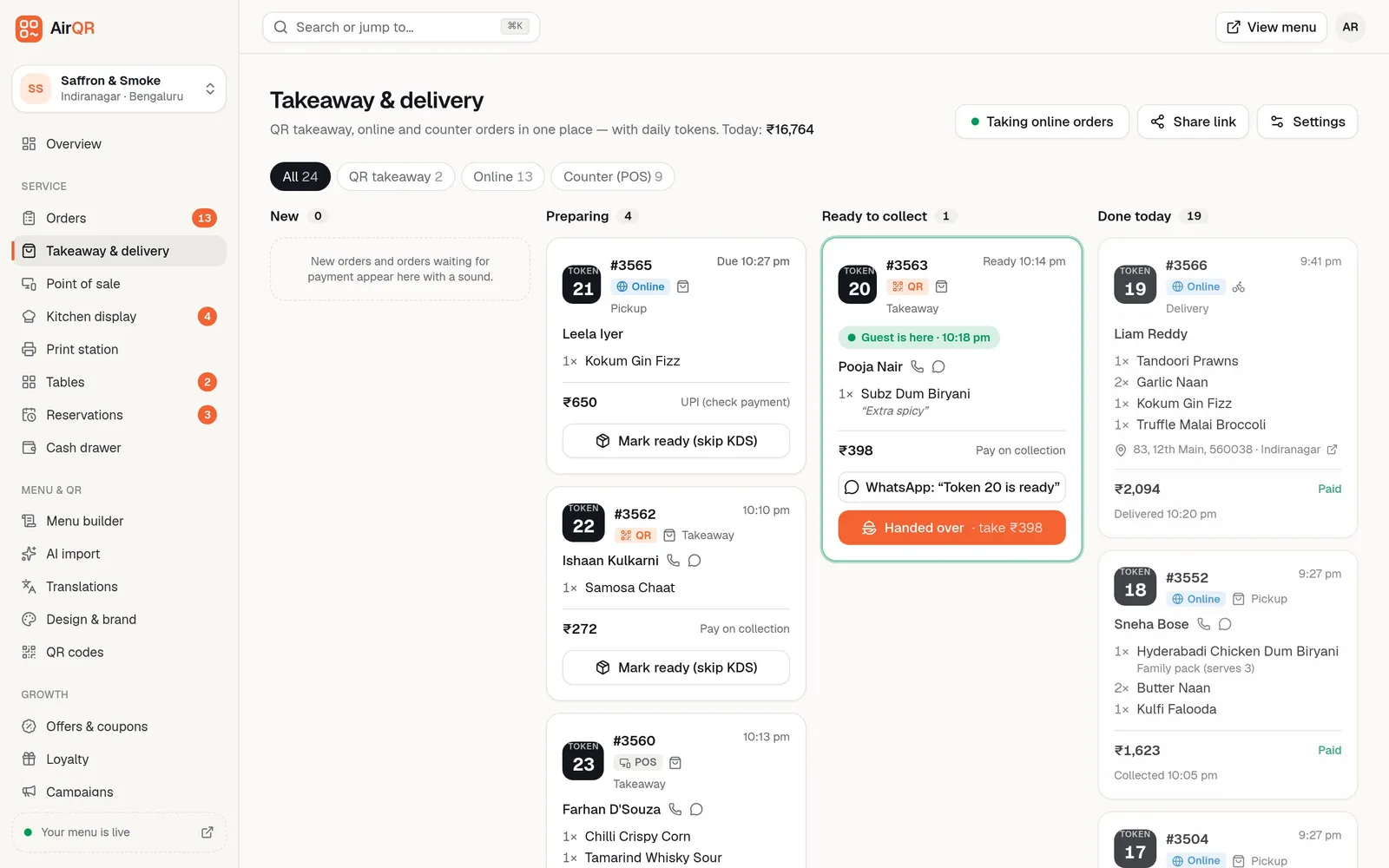
It lands on the Takeaway and delivery board with a sound, marked Online with the guest's address and how they will pay. Staff press Accept and a promised time is shown to the guest, or pick a longer prep time on a busy day.
- 03
Cooking and packing
The kitchen display shows the ticket. When the kitchen is done, the Packing screen lists the order so the packer can assemble it before the bag is sealed.
- 04
Out for delivery
Staff press Send out, enter the rider's name and optional phone, and WhatsApp opens with an on the way message and tracking link. You press send yourself. The guest sees the rider's name.
- 05
Handing over the money
For cash on delivery, the rider hands over the cash and staff record how it was paid. UPI orders are confirmed against your own UPI app.
- 06
A rush at 8 pm
Pause new online orders for 15 minutes to 2 hours instead of rejecting them one by one. They restart by themselves.
Your ordering page, delivery fees and minimum order
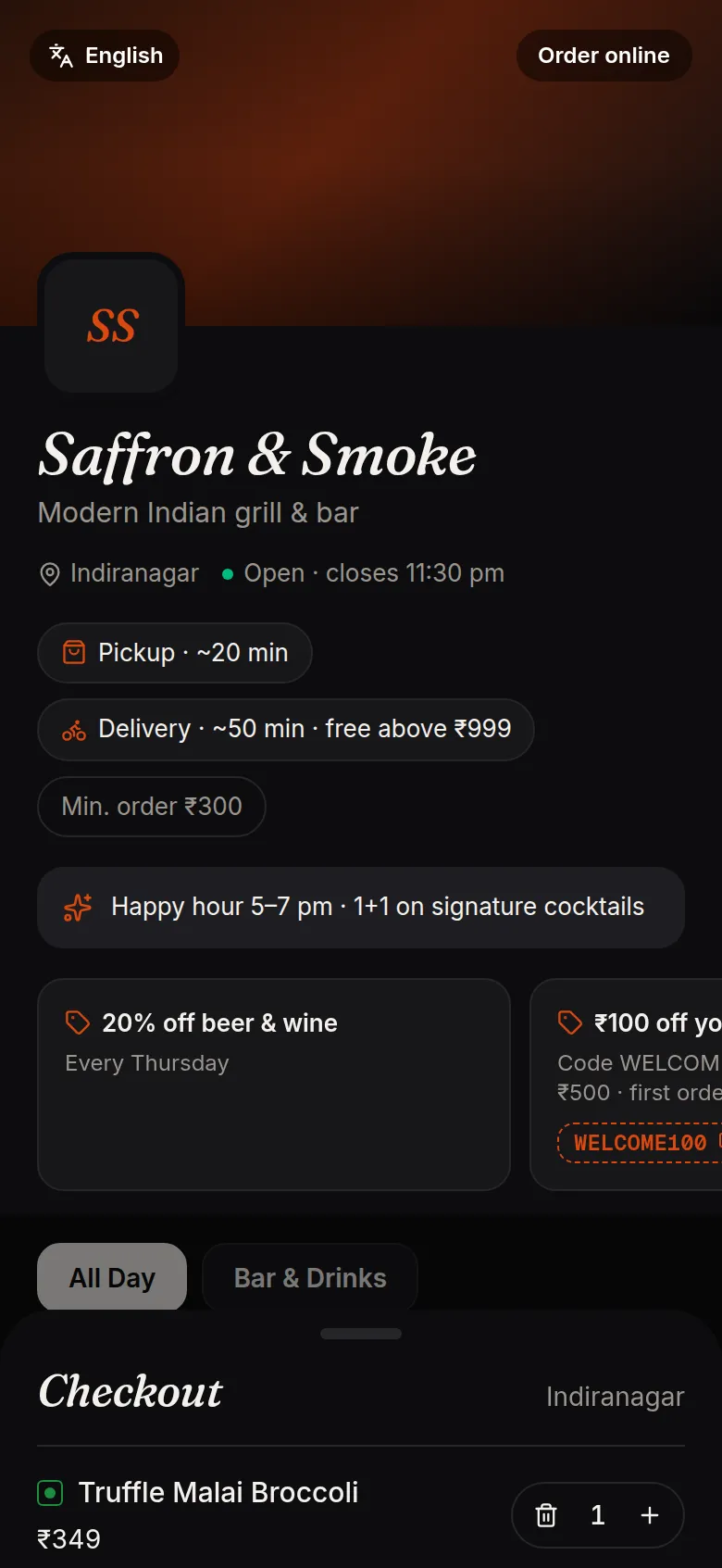
Guests see the pickup time, the delivery time, the minimum order and any free-delivery threshold before they add a dish, along with your current offers. They enter their PIN code at checkout. A guest outside your areas is told you do not deliver there yet and can choose pickup instead.
If you leave the delivery areas empty, any address is accepted and you check it when accepting. Scheduled orders let a lunch crowd book a slot in the morning, so the 1 pm rush is spread out.
- Offers and coupon codes show on the ordering page
- Slots of 10 to 60 minutes, up to 7 days ahead
- Pay on delivery or pay now by UPI
Packing, parcels and protection
The details that decide whether a cloud kitchen makes money on each order.
Parcel pricing
A dish can cost a little more or less when packed, and a packaging charge is added once per online order. A biryani in a big box and a samosa can carry different parcel prices. See parcel pricing.
Kitchen display and stations
Set up separate stations, such as the kitchen, the tandoor and the packing table, each with its own screen and KOT printer. See kitchen display.
Order protection
Guard against prank orders and no-shows with open-order limits, pay-first rules for repeat offenders and a record of guests who never collect. See order protection.
Several menus
Run more than one menu in an outlet, such as Biryani and Healthy bowls, each with its own days and times. Guests see them as tabs.
Food cost per dish
Add recipes and see the cost of each dish as stock comes off with every order. See inventory.
Guest records
Every guest who orders is saved by phone number, with their favourite dishes and order history, so you know who your repeat customers are.
One board for pickup, delivery and counter orders
Every order shows its token, where it came from, the guest's name, the items and how they will pay. Filter by Online, QR takeaway or Counter, and see today's sales at the top. Each card has Call and WhatsApp buttons. Cancelled orders show who cancelled and why.
Running more than one brand from one kitchen
Many cloud kitchens sell under several brand names from one kitchen. Here is exactly what AirQR supports today. Inside one account you can run several menus and give each a schedule, but they share one brand identity, logo and design.
A second brand, with its own menu and plan, is set up as a separate account on your login. You contact AirQR for this and then switch between brands from the sidebar. Branches of one brand, such as two kitchens in different areas, are handled as outlets. They share the menu, keep their own orders and settings, and can set a different price or availability for a dish. See multiple outlets.
Questions
What is the best cloud kitchen software in India?
It depends on how you sell. If you rely only on aggregators, you need their integrations. If you want your own repeat orders, look for an ordering link with no commission, delivery zones, a packing screen and a kitchen display. You can try AirQR free for 28 days.
Does AirQR connect to Swiggy and Zomato?
No. AirQR is built around your own ordering channel, so Swiggy and Zomato orders are not brought into its bills. It runs your own link beside the apps, and you keep handling aggregator orders through the aggregator.
Does AirQR charge commission on my online orders?
No. Orders from your own link carry 0% commission from AirQR. Guests pay you directly by UPI or cash, and AirQR records the payment without collecting it, so the money goes to your own account.
Does AirQR provide delivery riders?
No. You use your own riders. You enter the rider's name and phone when you send an order out, and a rider login can show them their pickups and deliveries.
How do I limit delivery to my area?
List the PIN codes you deliver to, each with its own fee, minimum order and travel time. Guests outside them are asked to choose pickup.
Is cloud kitchen GST different from restaurant GST?
For orders through Swiggy and Zomato, the operator pays GST under Section 9(5). For orders on your own link you bill GST yourself like any restaurant. Ask your CA to confirm the rate and the reporting.
Can I use it as a cloud kitchen POS for phone orders?
Yes. Ring up phone and WhatsApp orders on the POS as takeaway or delivery, with the guest's name, phone, address and PIN code. They get a token and appear on the same board.
Sources
- Petpooja online order management (aggregator integration) · checked 10 October 2026
- CBIC GST rate notifications, including Notification 17/2021 on Section 9(5) for restaurant service through e-commerce operators · checked 10 October 2026
- ClearTax explainer on GST on restaurant service supplied through e-commerce operators · checked 10 October 2026
Keep reading
Try AirQR in your restaurant
Set up in minutes on the phones, tablets and printers you already have. 28-day free trial.