QR ordering
A QR code ordering system for restaurants, with UPI at the table
AirQR lets guests scan the QR code on their table, order from their own phone and pay by UPI straight to your bank account. Every order goes to the kitchen tagged with the right table, and guests can order again, call a waiter or ask for the bill without waving at anyone. Guests need no app and you pay no gateway fee.
- Order from the table QR
- UPI straight to your bank
- Call waiter and bill, no waving
What a QR code ordering system does at your table
A QR code ordering system lets a guest do three jobs from one scan. They read the menu, place the order and pay the bill, all on their own phone. The waiter is no longer the only way an order reaches the kitchen.
With AirQR the guest scans the code on the table and the menu opens in the browser, with the table name shown at the top. Nothing is installed and nobody signs up. They pick dishes, choose a size or add-on, leave a note such as "less spicy, no onions" and tap place order. The ticket prints or appears on the kitchen screen at once.
This is a table ordering system for restaurants that already have a QR menu, and also for those starting fresh. If you only want a menu guests can read, see the QR code menu page. This page is about the ordering and payment that sit on top of it.
How a guest orders and pays, step by step
This is what happens on a busy Saturday night, with no waiter involved until the food arrives.
- 01
Scan the table QR
The camera opens the menu with the table name on top. Guests can search, filter by Veg, and switch language if you have added translations.
- 02
Choose dishes
Each dish shows its photo, description, allergens and price. Sold-out dishes cannot be added, so the kitchen never gets an order it cannot make.
- 03
Place the order
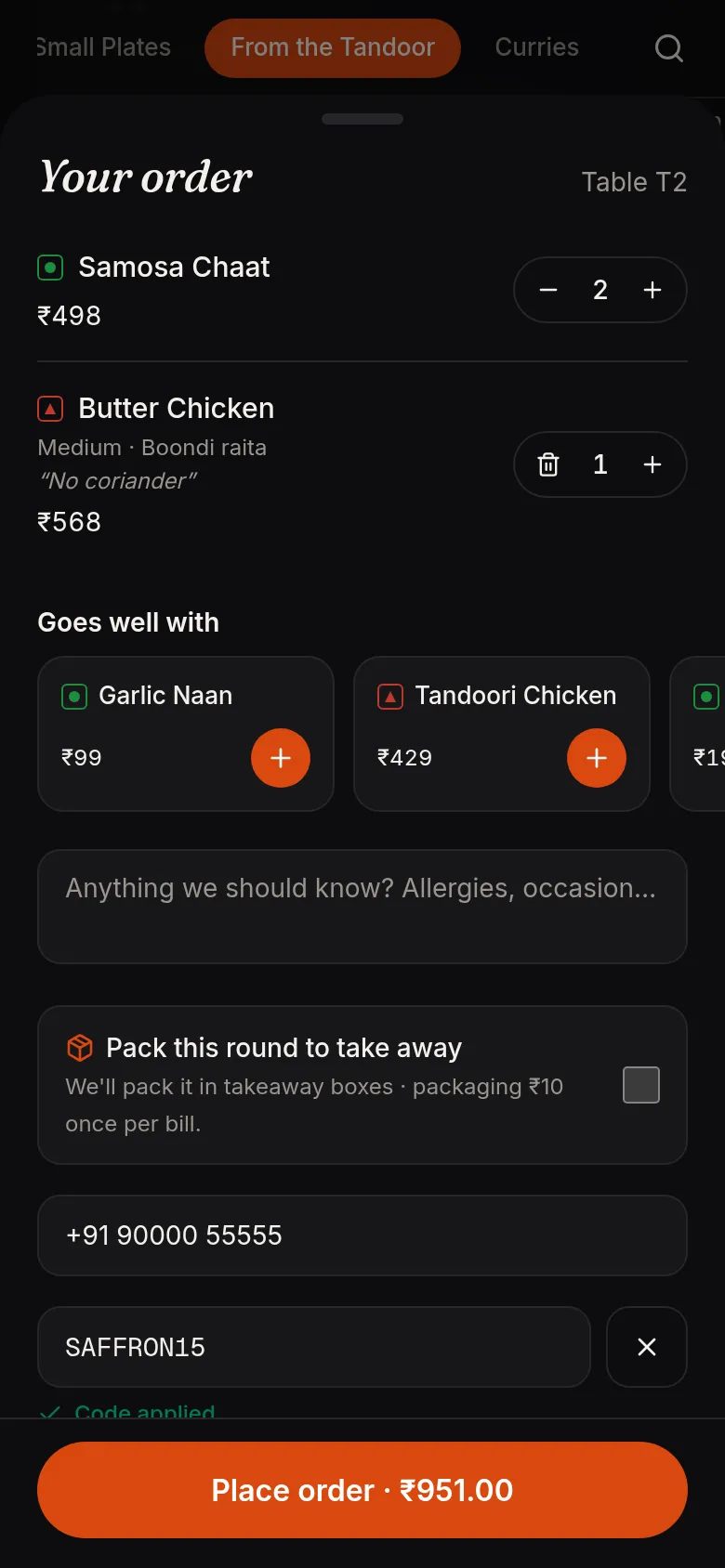
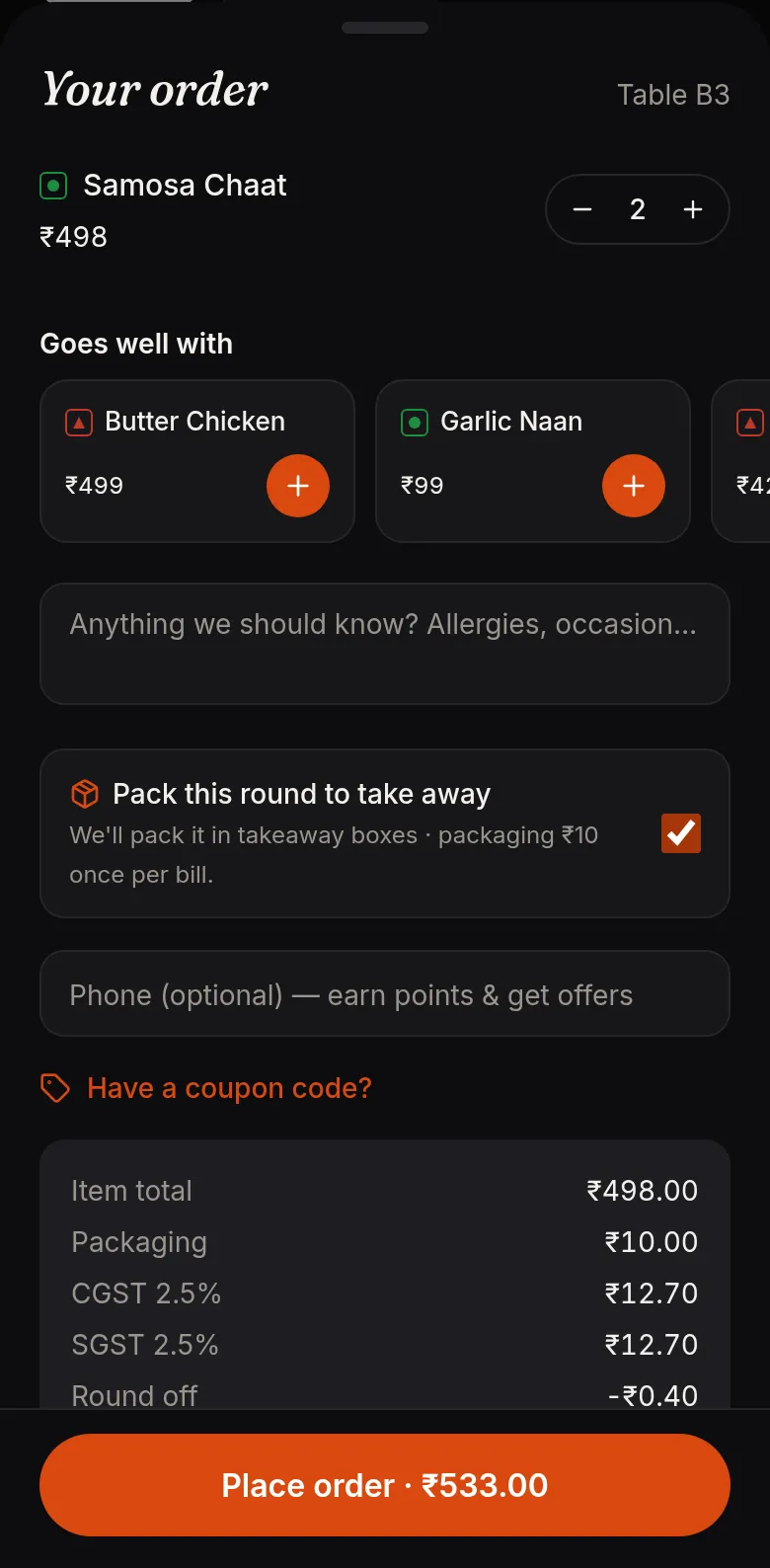
The cart shows the item total, discounts, service charge, GST, round off and the amount to pay. AirQR checks every price and tax again when the order is placed, so a guest cannot change a price on their phone.
- 04
Order more, any time
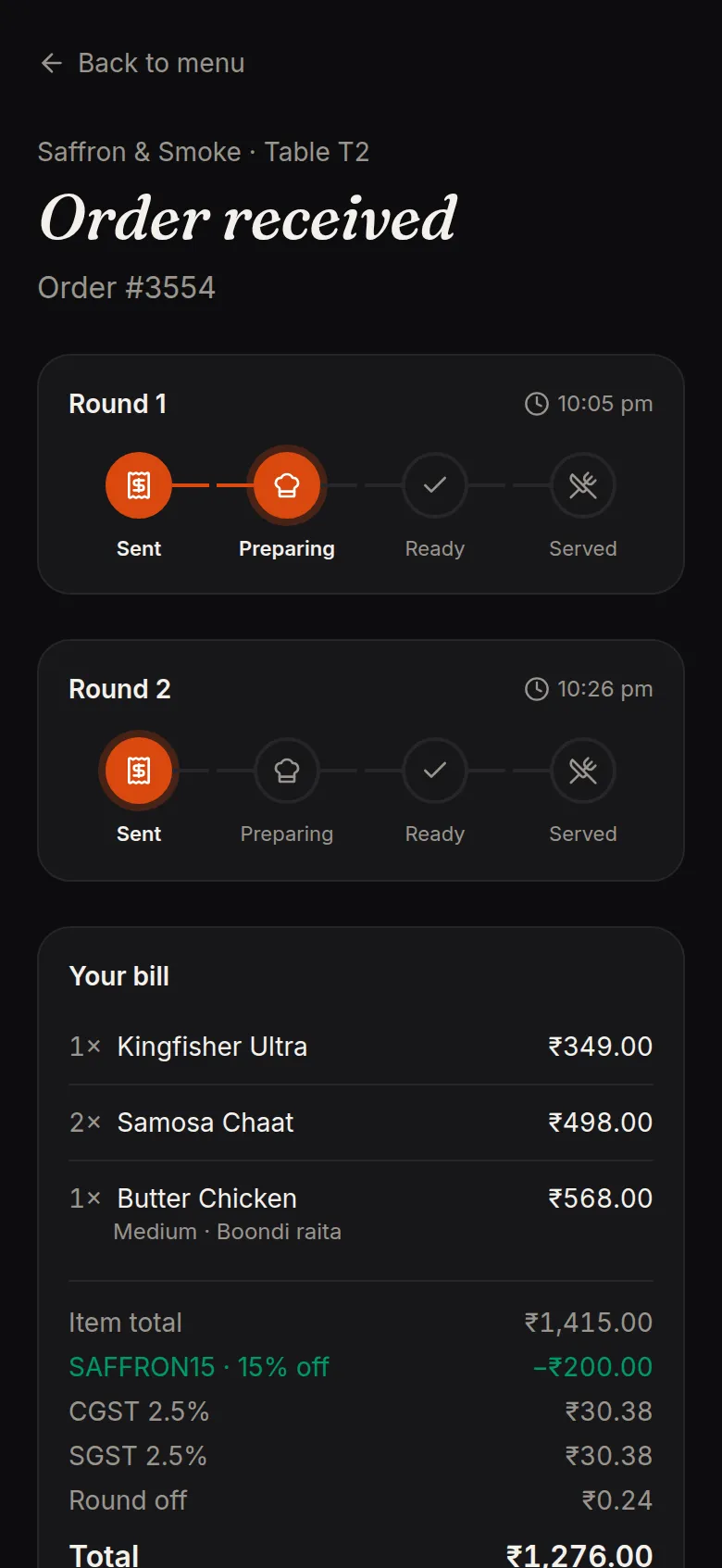
Each table has one open check. A second order becomes Round 2 on the same bill and goes to the kitchen as its own ticket, so the cooks see only what is new.
- 05
Pay by UPI or at the counter
The guest pays by UPI from the order page, or settles with the waiter or cashier. Either way it all lands on one bill.
Orders that guests can follow from their seat
After ordering, the guest lands on a live order page. Each round shows Sent, Preparing, Ready or Served. The bill is on the same page with every line, discount, tax and what has already been paid.
From here they can order more, call a waiter, ask for the bill or ask for water. The page updates by itself, so nobody has to ask the table next door how long the biryani will take.
- Status for every round
- A running bill with GST and service charge
- Order more, call a waiter, ask for the bill
- A short feedback form after the meal
QR code menu and payment, without a payment gateway
Add your UPI ID once and AirQR shows guests a UPI QR for the exact amount due, plus a Pay with UPI app button on phones. The money goes directly from the guest to your own bank account. AirQR records payments and does not hold your money, so there are no gateway fees to pay.
That also means a payment only counts once you see it arrive. When a guest taps I've paid, the claim shows up in the Payment center. Your cashier checks the credit in the UPI or bank app and then verifies it. A screenshot from the guest is never treated as proof. The guest's page changes to Payment received only after you confirm.
Bills can be split, so four friends can pay four different amounts, and part payments by cash and UPI work on the same check. Some UPI apps limit amount-filled QR codes to roughly ₹2,000 for unverified merchants. In that case guests scan your shop's own UPI QR and type the amount, or pay in two parts. Card and wallet payments through a payment gateway are not available yet. Read more in recording payments.
Everything around the order that staff used to do by hand
Call waiter, bill and water
A bell button on the menu sends the request to staff with the table name. Repeat taps from the same table are merged, so staff are not flooded. See service requests.
Approve orders first, if you like
Turn on staff approval and each new round waits for a waiter or cashier to accept it before the kitchen sees it. Useful for a lounge or a hall where you want a human check.
Pause ordering in a rush
One switch stops new orders for a busy spell. Guests can still browse the menu. Switch it back on when the kitchen catches up.
Goes well with
A short strip in the cart suggests a lassi with the biryani or fries with the burger, from your own pairings and from what guests order together. See smart upsell.
Coupons and loyalty points
Guests apply a coupon code or use their points in the cart, and the bill summary shows the discount before they place the order.
An AI waiter, if you want one
A chat assistant can answer questions, suggest dishes and build an order in English, Hindi or Hinglish. The guest always confirms before anything is sent. See the AI waiter.
Parcel from the table, priced the way you choose
When parcels at the table are allowed, a guest can switch on pack this round to take away. Staff can also pack a single item from the point of sale, so one guest can take home half a naan basket while the rest stays on the table.
Parcel prices can differ from dine-in prices, by a fixed amount or a percentage, set per dish, category, menu or outlet. See parcel pricing for how the most specific rate wins.
Why a table QR is hard to misuse
Every table code is a long random secret, not a table number. Someone at home cannot order to table 5 by guessing a web address. A guest who opens the plain menu link without scanning a table can only browse, or order takeaway if you have turned that on. The same rule covers calling a waiter and asking for the bill.
Takeaway and online orders have their own guard rails, such as pay first for new guests and blocks for numbers that place fake orders. Those are in order protection. For how links stay private and how to keep staff logins safe, see private links and security.
Is QR ordering right for your restaurant?
It suits most places that serve at tables. It helps most when you can say yes to a few of these.
- Your captains are stretched at lunch or dinner rush
- Guests wait to catch a waiter's eye to order or ask for the bill
- You want every order to carry the right table without handwriting
- You want more dessert, drinks and sides added to each order
- You prefer UPI straight into your bank over gateway fees
- You have tourists or families who read Hindi, Tamil or another language better than English
Questions
Do guests have to download an app to order?
No. They scan the table QR with the phone camera and order in the browser. It works on Android phones and iPhones.
How does the guest pay after ordering by QR?
They pay by UPI from the order page, or pay the waiter or cashier. With a UPI ID added, the page shows a QR for the exact amount due. The money goes straight to your bank.
Does AirQR charge a fee on each QR payment?
No. Guests pay you directly by UPI, so there is no gateway fee, and AirQR charges 0% commission on your orders. You pay a flat subscription, shown on the pricing page.
What if a guest says they paid but I see no money?
Press Not received in the Payment center and add a note. The order stays on hold and the guest sees that the payment was not received. Nothing is marked paid until you verify it.
Can the restaurant approve orders before the kitchen sees them?
Yes. Switch on staff approval and each new round waits for a waiter or cashier to accept or reject it.
Can I pause QR ordering when the kitchen is overloaded?
Yes. One switch pauses new orders. Guests can still read the menu, and you can take orders on the point of sale until you turn it back on.
Is there a QR ordering system that works in India with GST bills?
AirQR is built for Indian restaurants. The cart shows GST and service charge before the guest orders, and the bill can be printed as a tax invoice.
How do I pick the best QR code ordering system for my restaurant?
Check that guests need no app, payments go to your own account, orders reach the kitchen on their own and staff can pause or approve orders. Start the 28-day free trial and test it on one table.
Keep reading
Try AirQR in your restaurant
Set up in minutes on the phones, tablets and printers you already have. 28-day free trial.