For cafes and coffee shops
Cafe billing software for a counter that never stops
AirQR is cafe billing software for India. Guests order at the till or scan a counter QR, pay at the counter or by UPI, and get a token. The coffee counter sees the order on a screen, and a TV tells guests when it is ready. Regulars earn points on their phone number, with no app or card to carry.
- Counter QR with a token for every order
- A coffee counter screen and ready TV
- Loyalty points by phone number
What a cafe needs from billing software
A cafe is a counter business with a few tables attached. Orders are small and quick, guests want a flat white and a croissant in two minutes, and the person at the till is also the person answering questions. A cafe POS system has to be fast to tap, easy to teach to a new hire and clear about which order belongs to whom.
AirQR treats a cafe that way. A cafe outlet starts with a Coffee counter station and a Kitchen station, so drinks and food go to different screens. Orders are called by token number, so staff never shout names across the room. If you only have a counter, switch tables off in the POS settings and staff never see a table picker.
A cafe till has to be easy for a new hire to learn. Each person can switch their screens to Hindi, and a shared till or counter screen can be set to Hindi for that device alone. See restaurant POS and billing for how the till works.
A morning rush and a quiet afternoon
This is how a day looks in a cafe that takes orders at the counter and by QR.
- 01
Before opening
The oat milk has run out, so the manager switches that milk option off and nobody can pick it. A Breakfast menu is set to show only until 11.30 am.
- 02
8 to 10 am, the queue
Staff type a short code like FW and press Enter to add a flat white, then press Charge. With quick billing on, that adds the items, takes payment and issues the token. Guests who do not want to queue scan the counter QR, choose items, give a name and phone, and pay at the counter or by UPI.
- 03
The coffee counter works by token
Drinks show on the coffee counter's station screen with the order's token. The barista makes the drink and marks it ready on that screen. Once the order is ready, the token moves to Ready on the TV near the counter, with a chime.
- 04
Handing over
Staff match the token on the guest's phone or receipt, then press Handed over. If a guest has not paid, the button asks how they paid.
- 05
Afternoon laptop crowd
People at tables scan the QR on the table, order a second coffee without leaving their seat and pay at the end. Rounds add to one bill. A parcel for the road can be packed from the same check.
- 06
After closing
The owner looks at which hours were busiest and which drinks sold most, and decides whether the afternoon needs a second barista.
Set up the POS for counter quick billing
Settings, then POS settings, has a Café or counter setup for exactly this. The POS is included in every AirQR plan.
No tables, a token on every bill
The setup shows Eat here and Takeaway, hides the table picker and gives every bill a daily token. Service charge applies to Eat here as it does to dine-in.
One-tap Charge
Quick billing puts one big Charge button on the screen. It adds the items, takes the money and issues the token. The send button appears only when a coffee counter screen or printer needs telling.
An optional guest count
Guests can be switched to not asked, optional or required. Optional gives staff a small stepper they can leave empty at a busy till, and counts heads on the days it matters.
Walk-in by default
Turn on Start every order as a walk-in so a takeaway order keeps no name or phone unless staff tap Add details.
No kitchen display needed
If you have no kitchen display, the POS runs the whole check. Send becomes Add to check, and kitchen tickets still print when printing is on. With no kitchen printer, a Print kitchen ticket button appears after each send.
Add tables back later
If you add a few seats, change the tables setting and staff get a table picker. A shared tables setup lets two groups share one long table.
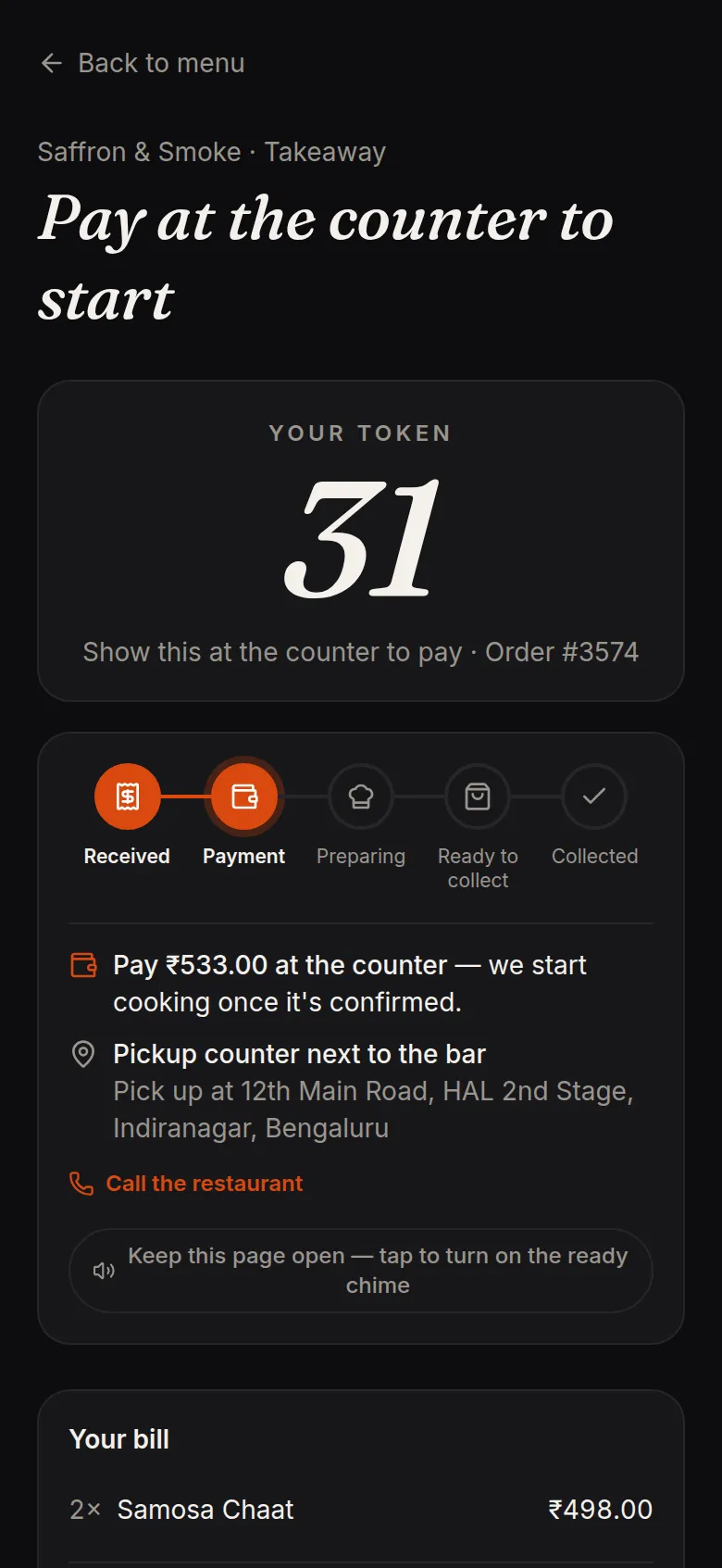
Counter QR with pay first and a token
Print a Takeaway counter QR and stand it at the till or on the window. A guest scans it, orders and gets a daily token that restarts at 1 each day. Most cafes use pay first. The order waits on the board marked Waiting for payment, and the barista does not start until the cashier confirms cash or UPI.
If someone never pays, the order cancels itself after a time you set, 15 minutes by default, so the board does not fill with ghosts. You can also let a trusted regular send an order without paying first.
- Guests give a name and phone so you can call them
- The guest's phone shows each step until Ready to collect
- WhatsApp button for a guest who stepped out
Quick billing and coffee-shop details
Small things that make the counter faster. Each links to a page that explains it fully.
Sizes and add-ons
Small, regular and large, plus extras such as milk choice, an extra shot or syrup. Required choices must be made before a drink is added, so orders come in complete.
Short codes at the till
Type a code and a quantity, such as 2*CAP, and press Enter. No scrolling through a menu with a queue behind you. See short codes.
Pickup counter screen
A screen type made for cafes that lists orders by token with the progress of each station. Staff press Call token and then Handed over. See stations.
The order-ready TV
A browser page on any TV or tablet shows Preparing and Ready by token and first name. It shows no amounts and no phone numbers. See takeaway tokens.
Goes well with
The guest's cart suggests a pairing such as a bun maska with masala chai. You choose up to three pairings per item, and AirQR learns more from your orders.
Parcel prices
A coffee in a to-go cup and a biryani in a box need different charges. Set a parcel price per dish, and a packaging charge once per order.
Loyalty by phone number for your regulars
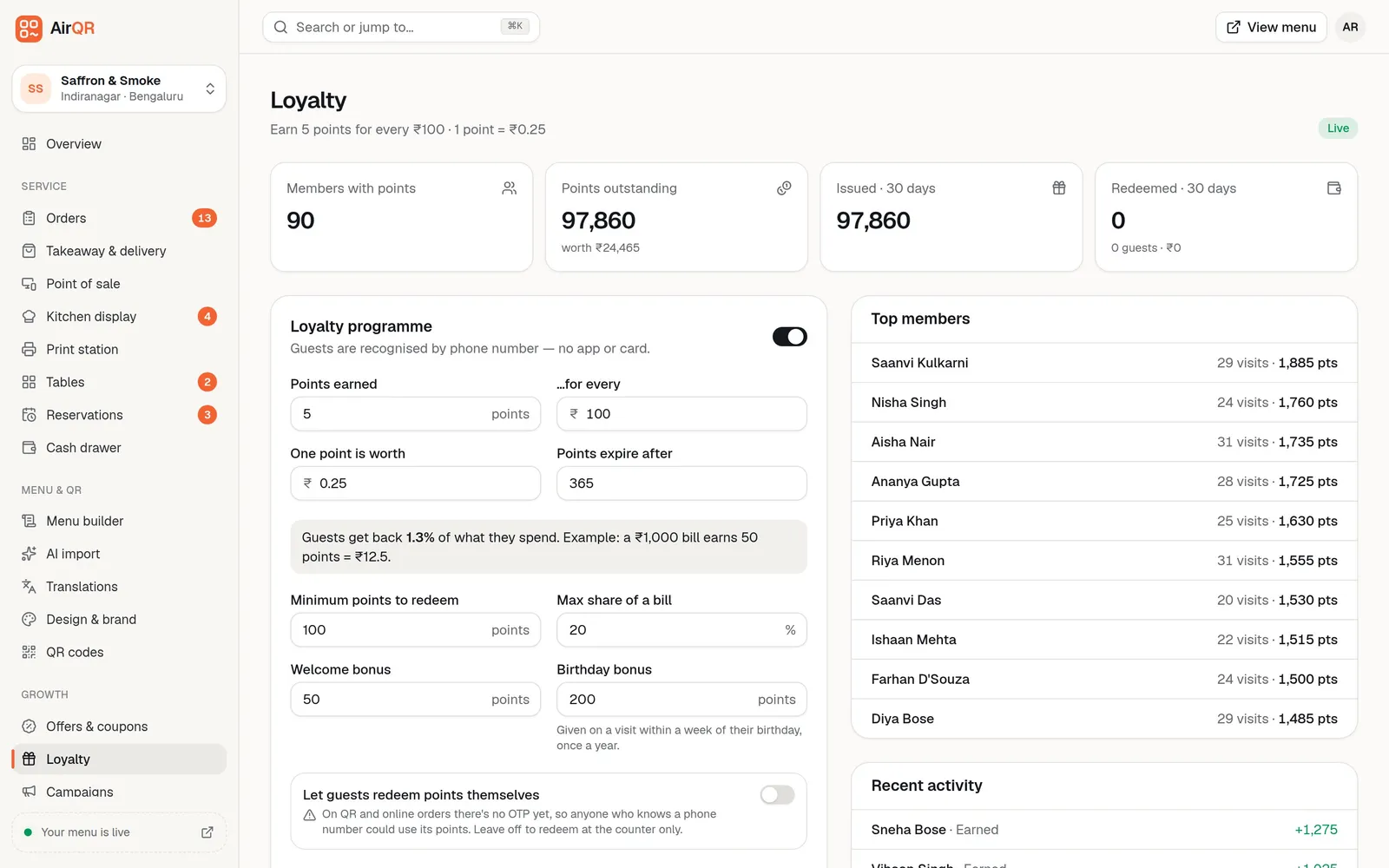
A cafe lives on regulars. AirQR recognises guests by phone number, so there is no app to install and no card to lose. When a bill with their number is paid, they earn points. You set the earn rate, what a point is worth, the minimum to redeem and the share of a bill points can pay for.
As an illustration, the default setting earns 5 points for every ₹100 and values a point at 25 paise, which gives about 1.3 percent back. Most restaurants keep it between 2 and 10 percent, and AirQR will not save a rate above 25 percent. See loyalty and guest records.
- A welcome bonus on the first bill and a birthday bonus
- Points can expire after the days you choose
- Redeem at the till, or let guests redeem themselves if you accept the risk
Setting up your cafe counter
Most of this is done once, before your first morning rush.
- Bring in your menu from a spreadsheet, a PDF or photos of the printed card
- Add sizes and a milk choice group, then give each drink a short code
- Turn on counter takeaway and choose pay first
- Print the counter QR and a few table QRs
- Add your UPI ID so guests see a QR for the exact amount
- Open the order-ready link on a TV near the counter
- Add your staff with a Cashier or Waiter role
Questions
How much does cafe billing software cost?
It depends on your outlets and the modules you switch on. See pricing for the current plans. You can try everything free for 28 days before you pay.
What is the best POS for a cafe in India?
The best one is the one your staff can use at peak hour. Check that it handles tokens, sizes and milk choices, UPI at the counter and works with the devices you own. Try it on your own menu during a trial.
Can guests order at the counter without a table?
Yes. The counter QR works without any table. Guests give a name and phone, get a daily token and track the order on their phone. Staff can also ring up walk-ins on the POS.
Do guests have to pay before the barista starts?
That is your choice. With pay first on, the order waits for the cashier to confirm payment. With it off, the order goes straight to the coffee counter and the guest pays on collection.
Can regulars earn points without installing an app?
Yes. Points attach to the guest's phone number, entered on their order or added by staff at the till. They can redeem at the till.
Can my cafe use the POS without tables?
Yes. The Café or counter setup in POS settings hides the table picker, shows Eat here and Takeaway and gives every bill a token. You can add tables back later if you need them.
Do I need a kitchen display to use the POS in a cafe?
No. Without a kitchen display the POS runs the whole check, and kitchen tickets still print on your printers. The coffee counter screen is something you can add when you want it.
Is this a cafe POS system or just a QR menu?
Both. You can start with the QR menu and counter ordering, and add the till, the coffee counter screen and the ready TV when you want them.
Keep reading
Try AirQR in your restaurant
Set up in minutes on the phones, tablets and printers you already have. 28-day free trial.