Table reservations and waitlist
Restaurant reservation software for bookings, walk-ins and the live floor
AirQR gives your restaurant a booking page guests use without calling, a timeline of every booking by table, a waitlist for walk-in parties and a live floor plan to seat them. Online bookings pick a table for you, phone bookings go in from the same screen, and nobody needs a paper diary or a WhatsApp group to avoid double booking.
- Booking page guests fill in themselves
- Walk-in waitlist with WhatsApp notify
- Timeline and live floor in one place
What restaurant reservation software replaces
On a busy Saturday most restaurants run reservations from three places. A diary at the host stand, phone calls the manager answers while serving, and a few WhatsApp messages from regulars. Two parties end up promised the same table, and a walk-in who waited 40 minutes gets forgotten.
Table booking software puts all of it in one view. Every booking, whether it came from the booking page, a phone call or a walk-in, sits on the same timeline against the same tables. AirQR will not let two bookings overlap on one table, and it ties bookings to your floor plan and to the guest's profile in your guest list.
Reservations sit next to the rest of AirQR, including the QR menu and the point of sale. When online booking is on, your QR menu also shows a Book a table button.
A booking page that fills tables for you
Every outlet has its own booking page. Share its link on Instagram, Google or WhatsApp, and guests book without calling.
Guests book in a few taps
They choose how many are coming, pick a day and a free time slot, and add their name, mobile number, an occasion and special requests. They get a booking code with Add to calendar and Share buttons.
The right table, picked for you
Online bookings get the smallest free table that fits the party. If no table is free at a time, that slot is not offered, so the page cannot overbook you.
Your rules
Set the gap between slots, how long a booking holds a table and the biggest party that can book online. Larger groups are asked to call you.
Guards against fake bookings
Last-minute slots are not offered online, and one phone number can only make a few online bookings a day.
See the whole day on a timeline
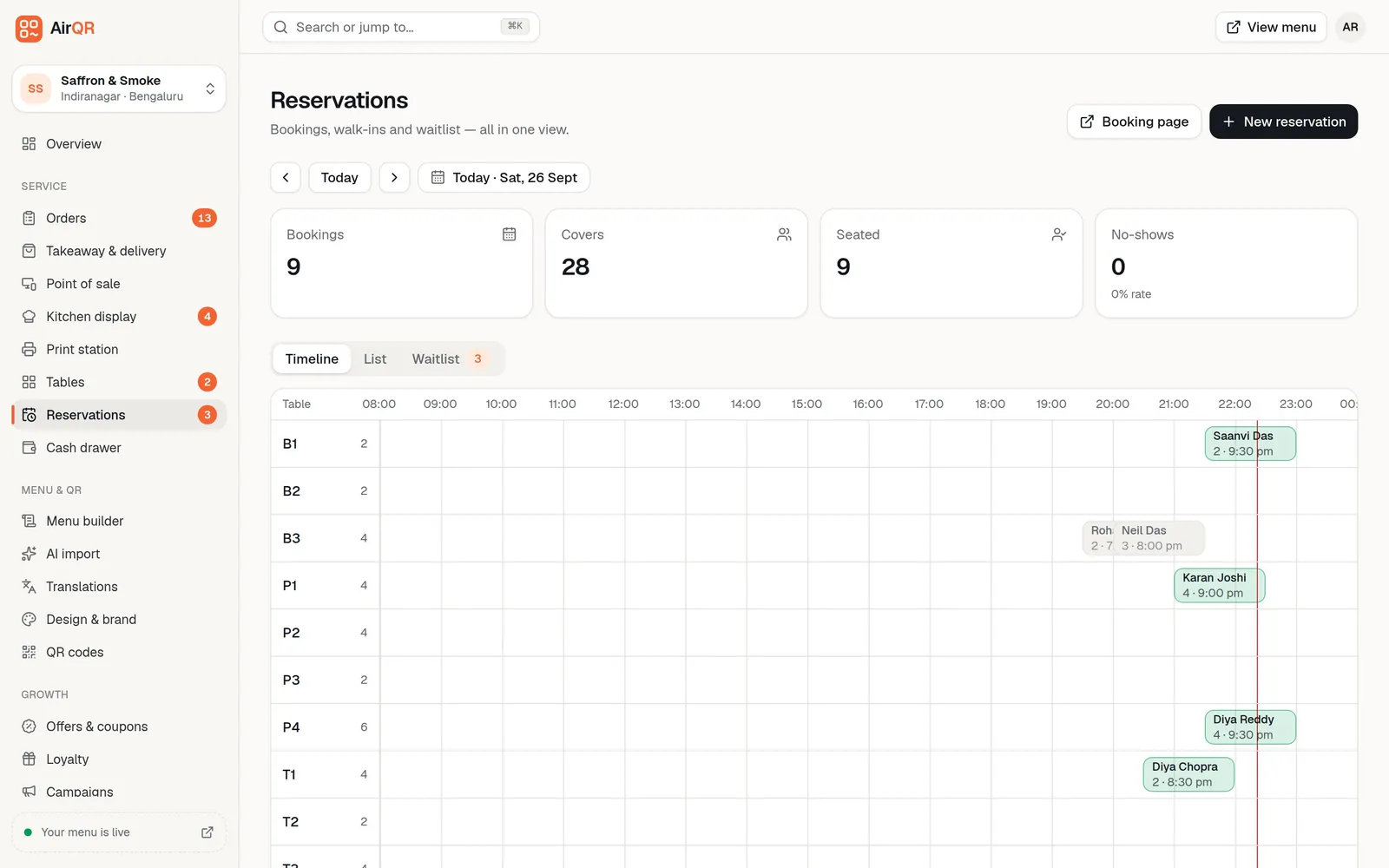
The Reservations page opens with four cards for the day. Bookings, covers, seated and no-shows with the no-show rate. Below them, the Timeline has one row per table with each booking drawn from its start time for its length and a red line for the time now. Bookings without a table wait in an Unassigned row. The List tab shows the same day in time order with notes, phones and status.
The page refreshes on its own, so new online bookings appear without a reload. Add a phone booking with New reservation. Choose a table or leave it to assign later, and add the occasion and notes such as allergies, a high chair or a window seat. See reservations and table bookings for every field.
From booking to seated guest
Each booking moves through a few simple statuses, so the host always knows what to do next.
- Booked
- What it meansMade online, not yet checked by your team
- How it gets thereA guest books on the booking page
- Confirmed
- What it meansChecked by staff
- How it gets thereYou press Confirm, or your team adds the booking
- Seated
- What it meansThe party has arrived
- How it gets thereYou press Seat now and the table turns occupied on the floor
- Completed
- What it meansThe party has left
- How it gets thereYou press Complete
- No-show
- What it meansThe party never came
- How it gets thereYou press No-show and it counts on the day's card
- Cancelled
- What it meansBooking called off
- How it gets thereYou press Cancel booking
For bookings with a phone number, a WhatsApp button opens a ready confirmation message with the party size, date, time and booking code. You press send yourself. AirQR does not send it for you.
A restaurant waitlist app for walk-ins
When you are full, the waitlist keeps walk-ins in order instead of on a scrap of paper. It lives in the Waitlist tab of Reservations and always shows today's parties. See waitlist for walk-ins.
Add a party in seconds
Name, party size, an optional phone number and the wait you quoted, say 15 or 30 minutes. They join the queue with their place number.
Quoted time against real time
Each party shows how long they have waited against the time you quoted. The line turns red once they pass it, so you know whom to update.
Notify when the table is ready
Tap Notify and WhatsApp opens with a message asking them to come to the host stand. You press send. AirQR marks the party as notified.
Seat from the list
Tap Seat and pick from the tables that are free right now with enough seats. The table turns occupied on the live floor plan. Tap Left if a party gives up.
A live floor plan that matches the bookings
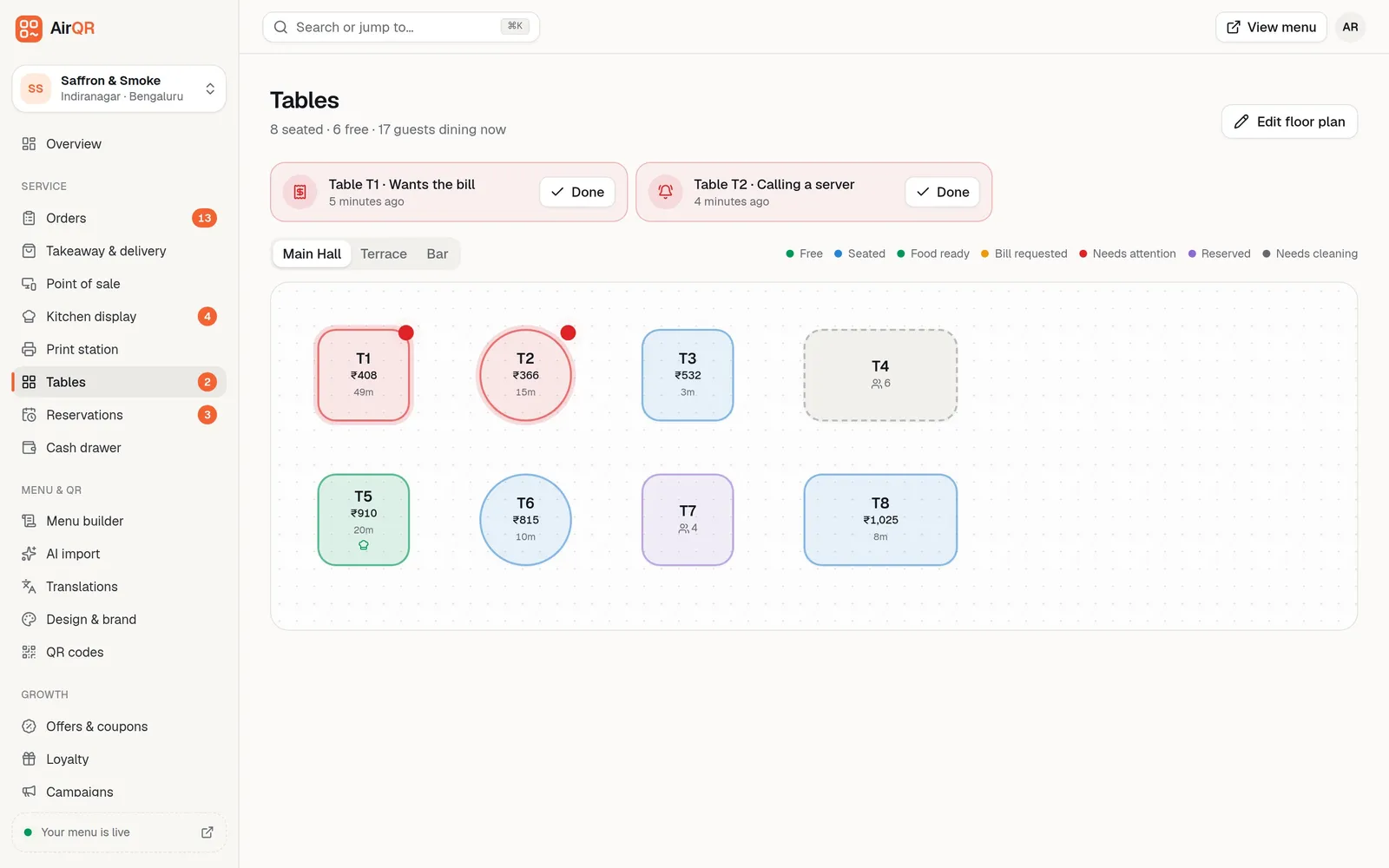
The Tables page is a live map of your dining room. Each table shows whether it is free, seated, reserved, has food ready, wants the bill or needs cleaning, along with the running amount and minutes since the check opened. It updates every few seconds. Tables with a booking due within the next few hours show as Reserved, and you can also Hold a table by hand. See the live floor plan.
When guests tap Calling a waiter or Wants the bill on the QR menu, the request appears in red at the top. After a check is settled, the table turns to Needs cleaning until someone marks it clean. Seating a booking or a waitlist party updates the same map, so the host and the captain see the same thing.
- Seat, hold or free a table in a click
- Move a check to another table without opening a second one
- Areas such as Main Hall, Terrace and Bar as separate tabs
- Start an order from the table for staff with POS access
Set up reservations for your restaurant
- 01
Lay out your tables
Add round, square or long tables in the floor plan editor, name them the way staff call them and group them into areas like Terrace or Rooftop. Each table also gets its own QR code.
- 02
Set opening hours and booking rules
Booking times are built from your opening hours. Choose the slot gap, table time and the biggest party that can book online, then save.
- 03
Share your booking page
Open Booking page at the top of Reservations and share the address. Check new online bookings and press Confirm.
- 04
Pause when you are full
Switch on Pause bookings and the booking page says online booking is closed and shows your phone number. Existing bookings stay and your team can still add some.
What the host stand gets
- Bookings from the page, the phone and walk-ins in one list
- No overlapping bookings on one table
- Bookings linked to the guest's profile when a phone number is added
- A no-show count and rate for every day
- A Coming up list of today's bookings on the Overview page
- Reservation and waitlist records included in your full data export
Questions
Can guests book a table online at my restaurant?
Yes. Every outlet has a booking page where guests choose party size, day and time and confirm with their name and mobile number. You can share the link on Instagram, Google or WhatsApp, and your QR menu can show a Book a table button.
How does AirQR avoid double bookings?
Online bookings are given the smallest free table that fits the party, and a slot with no free table can't be chosen. AirQR also refuses to let two bookings overlap on one table if your team picks a table by hand.
Does AirQR send confirmation messages to guests?
Not automatically. A WhatsApp button opens a ready confirmation message and you press send. The waitlist Notify button works the same way. Guests who book online get a booking code with Add to calendar and Share buttons on screen.
How do I run a waitlist for walk-ins?
Add the party's name, size and quoted wait in the Waitlist tab, and tap Notify when a table frees up. When you seat them, pick a free table and it turns occupied on the live floor plan.
Can I stop online bookings when I am fully booked?
Yes. Switch on Pause bookings on the Reservations page. The booking page then says online booking is closed and shows your phone number. Bookings already made stay as they are.
How far ahead can guests book?
Up to three weeks ahead on the booking page. Your own team can add bookings for any date from New reservation.
How much does table booking software cost?
Reservations and the waitlist are part of AirQR, with no per-booking fee. See pricing for the current price, and try them during the 28-day free trial.
Keep reading
Try AirQR in your restaurant
Set up in minutes on the phones, tablets and printers you already have. 28-day free trial.