GST billing and reports
GST billing software for your restaurant, with files your CA can use
AirQR prints a GST tax invoice on every bill and turns your settled bills into the monthly files a restaurant needs. You get GSTR-1 CSVs for the GST offline tool, a sales register, day-wise and payment summaries, and Tally Prime vouchers. It is built for owners who file through a CA and don't want to retype bills.
- GST tax invoice on every bill
- GSTR-1 CSVs and a ZIP for your CA
- Sales vouchers for Tally Prime
What GST billing software does for a restaurant
Every bill you hand a guest has to carry the right GST. Every month your CA needs the same sales in a different shape, for GSTR-1 and for your books. GST billing software does both from one set of bills, so the numbers on the printed invoice and the numbers in the return come from the same place.
With AirQR you take orders on the point of sale, by QR at the table or online, and each bill is taxed using the rates you set for the outlet. When a bill is settled it prints as a tax invoice. At month end the same settled bills become reports on the GST and accounts page.
AirQR does not decide your GST rate and it is not tax advice. It reports what your bills charged, using the tax you set up. Ask your CA to check the files in the first month and whenever you change tax settings.
A GST invoice on every bill
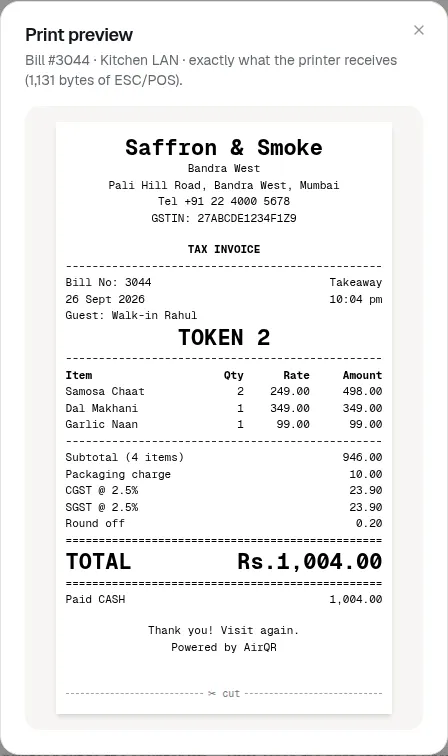
A bill printed on a 58 mm or 80 mm thermal printer is headed TAX INVOICE once the check is settled, and just INVOICE if the outlet has no GSTIN yet. It shows your brand and outlet name, address, phone and GSTIN, the bill number, date and time, and each item with quantity, rate and amount.
Taxes print as separate lines such as CGST @ 2.5% and SGST @ 2.5%, followed by round off, any tip and the total. Payments show as Paid CASH or Paid UPI, and a bill that still has money due prints a UPI QR for the exact amount. You can add your FSSAI number or a thank you note in the receipt header and footer. See print settings and receipts.
- GSTIN, bill number, date and time on top
- Item rate and amount, with sizes and add-ons
- CGST and SGST lines, round off, tip and total
- Reprints are marked DUPLICATE so nobody mistakes a copy for a new bill
GST reports and GSTR-1 files for restaurants
Open GST and accounts in the back office, pick the outlet and the period, and everything below is ready. Last month is the default, because GSTR-1 is usually filed for the month just gone.
B2CS, Table 7
Sales to customers without a GSTIN, totalled by place of supply and rate, in the GST offline tool's CSV format.
HSN summary, Table 12
A rate-wise summary for the B2C tab. Restaurant service uses SAC 996331 by default, and you can change it for a bar or outdoor catering.
Documents issued, Table 13
The lowest and highest bill numbers for the period, with total issued, cancelled and net issued.
Sales register
One row per bill, with discounts, charges, taxable value, each tax, round off, tips and how it was paid. Cancelled bills show with zero amounts.
Day-wise, payment and tax-rate summaries
The same sales cut by day, by cash, card and UPI, and by GST rate. The day-wise view matches your cash drawer day-end figures.
Download all as a ZIP
Every CSV, both Tally files and a short readme, ready to send to your CA. The files open in Excel with the rupee sign and Indian-language names intact.
From settled bills to GSTR-1
The GST reports help article has every detail. In short, the monthly routine looks like this.
- 01
Choose the outlet and period
Each outlet reports on its own GSTIN. A brand with outlets in two states files two GSTR-1 returns. Only bills settled in the period are counted, by the outlet's local time.
- 02
Check that everything reconciles
AirQR checks every bill adds up, that each tax line matches its rate and that payments equal the total. A green Everything reconciles means the files agree with each other. Bills that don't add up are listed so you can fix them before filing.
- 03
Download and import
Download the B2CS, HSN and documents CSVs and import them into the GST offline tool, or send the ZIP to your CA. Add anything AirQR doesn't know about, such as B2B invoices, then generate the JSON and upload it.
What is in the files and what stays with your CA
AirQR covers the sales it bills. A few things are deliberately left for you or your CA, and the help article says so plainly.
- Dine-in, takeaway, QR and own online orders to guests without a GSTIN
- What AirQR doesIncluded in B2CS and the HSN summary.
- Orders through food delivery apps
- What AirQR doesNot in AirQR's bills. The platform pays the GST on those, and your CA reports them separately.
- B2B invoices to a customer's GSTIN, exports
- What AirQR doesNot produced here. Add them in the offline tool yourself.
- Refunds on settled bills
- What AirQR doesNetted off B2CS and HSN in the month the refund was given, at the original bill's rate.
- Liquor and tax-free items
- What AirQR doesLeft out of B2CS and HSN and shown on their own Non-GST and VAT tab.
- Cancelled bills
- What AirQR doesNever counted as sales. They appear only in Documents issued and the sales register.
Bill numbers run continuously for each outlet and don't restart on 1 April. Tell your CA if they want a new series each financial year.
Food at GST and liquor at state VAT on one bill
Bars have a special problem. Alcohol for drinking is outside GST and states tax it through VAT or excise, while the food on the same bill is taxed under GST. AirQR handles this with tax classes. You set food and drinks at GST 5% (CGST 2.5% and SGST 2.5%) and liquor at your state's VAT rate, then give a whole category or a single item a tax class in the menu builder.
The bill shows each tax on its own line, for example CGST 2.5%, SGST 2.5% and VAT 20% on Liquor. A discount on the whole bill is shared across classes in proportion to each class's value. In the reports, liquor stays out of GSTR-1 B2CS and HSN, and a Non-GST and VAT tab shows its value and a VAT sales report by day and rate for your state return. VAT rates differ by state and AirQR charges the rate you set, so confirm it with your accountant. Setup is in tax classes and liquor VAT, and AirQR for bars covers the wider picture.
Tally export for restaurants
If your accountant keeps books in Tally Prime, nobody needs to key in the day's sales. The Tally export gives you two files to import.
Ledger masters
Import these first, once. They create the sales, tax, charge and payment ledgers. If your Tally already has ledgers, type your own names in settings and Tally matches them exactly.
Sales vouchers, one per bill
The voucher number is the bill number, dated the day it was settled. Best when your accountant wants detailed books.
Sales vouchers, one per day per payment mode
One voucher a day for each of cash, card, UPI and other. Best for lighter books. Import only one of the two formats for any period, or sales are counted twice.
Credit Note vouchers for refunds
Each refund on a settled bill becomes one Credit Note voucher that reverses sales and tax in the original bill's proportions.
Day-end and month-end, in one place
GST is one part of closing the books. These are the other reports a restaurant usually keeps with it.
- A Z report every time you close the cash drawer, with sales, tax lines, payments, refunds and the cash count. Print it on A4 or a thermal printer. See X and Z reports
- The GST and accounts reconciliation before you file or post to Tally
- A full data export as a ZIP of CSV files, including GST by month and by rate. See exporting your data
- Tips shown separately, because tips are never taxed
- Owners and managers only. Cashiers and waiters can't open the GST page
The GST rules in brief
A standalone restaurant charges GST at 5%, split as 2.5% CGST and 2.5% SGST, without input tax credit. The September 2025 rate changes did not alter this. Restaurants inside hotel premises that fall under the specified premises rule are taxed differently, at 18% with input tax credit. Orders you take on your own QR menu, website or delivery are billed by you. Orders placed through food delivery apps are different, because the platform pays the GST on them.
E-invoicing applies to B2B invoices once a business crosses Rs 5 crore turnover, and plain bills to walk-in guests are outside it. This page keeps the law short on purpose. For rates, composition scheme, invoice fields, service charge and the specified premises test, read our guide on GST for restaurants in India.
Questions
Does AirQR print a GST invoice for a restaurant bill?
Yes. A settled bill prints as a TAX INVOICE with your GSTIN, bill number, items, separate CGST and SGST lines, round off and total. If the outlet has no GSTIN set, the title is just INVOICE.
Can I file GSTR-1 for my restaurant from AirQR?
AirQR prepares the files and you file them. It gives you the B2CS, HSN and documents CSVs in the GST offline tool's format, which you import, then you generate the JSON and upload it on the portal. Ask your CA to review the first month.
What GST rate does a restaurant charge?
Most standalone restaurants charge 5% (2.5% CGST and 2.5% SGST) without input tax credit. AirQR charges whatever you set up for the outlet and does not choose the rate for you, so confirm yours with your CA.
How do I get restaurant sales into Tally?
Set your ledger names in settings, import the ledger masters once, then import the sales vouchers as XML in Tally Prime. Choose one voucher per bill or one per day per payment mode, never both for the same period.
How does AirQR handle liquor, which is outside GST?
You make a Liquor tax class at your state's VAT rate and give it to the right categories or items. Food stays at GST on the same bill, and liquor is kept out of GSTR-1 B2CS and HSN and reported on its own VAT tab.
Are food delivery app orders in the GST reports?
No. Aggregator orders are not in AirQR's bills and are not exported. The platform pays the GST on them, and your CA reports them separately.
Do I need e-invoicing for walk-in customers?
No. E-invoicing covers B2B invoices above the turnover limit, and a normal bill to a guest without a GSTIN is outside it. AirQR does not produce B2B invoices, so add those yourself.
Sources
- GST Council, 56th meeting press release (restaurant rate unchanged) · checked 10 October 2026
- CBIC FAQ on restaurant service at specified premises · checked 10 October 2026
- GST Council, e-invoicing threshold of Rs 5 crore · checked 10 October 2026
- CBIC, Rule 46 of the CGST Rules (tax invoice) · checked 10 October 2026
- West Bengal AAR ruling quoting the exclusion of alcoholic liquor from GST · checked 10 October 2026
- CBIC, Notification 17/2021 on e-commerce operators paying GST under Section 9(5) · checked 10 October 2026
Keep reading
Try AirQR in your restaurant
Set up in minutes on the phones, tablets and printers you already have. 28-day free trial.