Fine dining billing software that keeps service unhurried
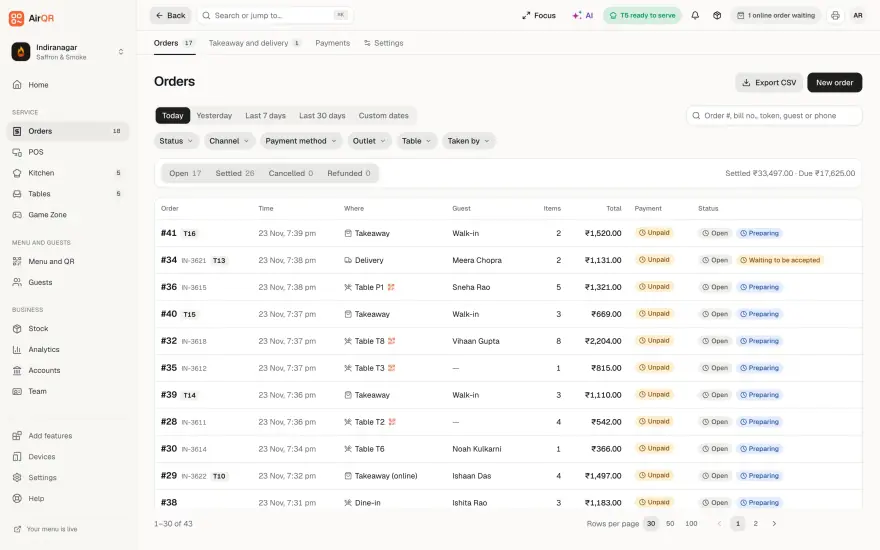
AirQR is fine dining billing software for restaurants in India where the evening is paced by the table. Captains send each course as its own round, the kitchen sees every allergy on the ticket, and the host runs bookings and the waitlist from one timeline. Bills carry GST on every line and can be split by person, by items or by amount.
- Courses sent as rounds
- Allergies and notes on every ticket
- Bookings, waitlist and split bills
A Friday dinner at a fine dining restaurant
This is how a full evening can run when the bookings, the captains and the kitchen share one system.
- 01
Before service
The manager looks at tonight's bookings on the timeline. A table of six has a note for a birthday and a nut allergy. A dish the kitchen cannot make tonight is marked as sold out, so no captain can order it.
- 02
Guests arrive
The host seats the booked tables from the live floor. A walk-in party joins the waitlist with a quoted wait, and the host messages them when a table is about to free up.
- 03
The first course
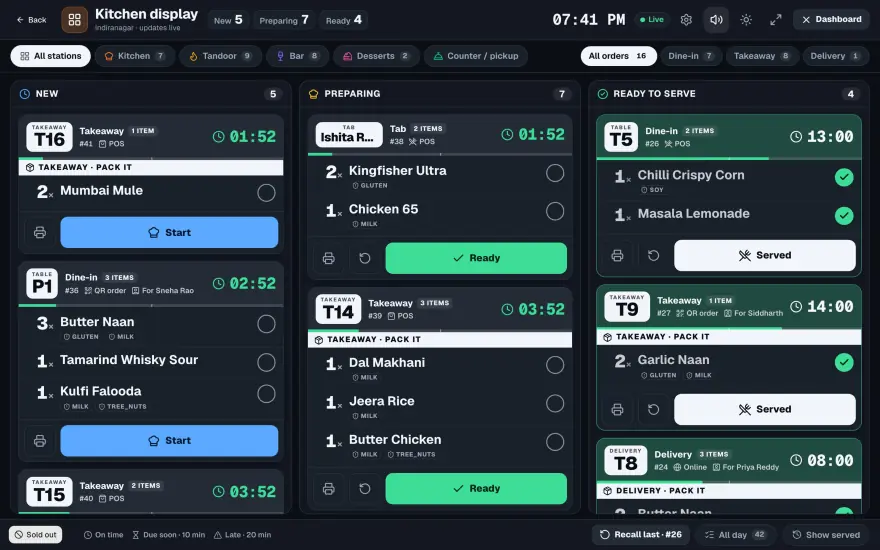
The captain takes the order on a tablet and presses Send. The starters appear on the kitchen display. The allergy note on the ticket raises a red ALLERGY tag, so the cook sees it at the pass.
- 04
Course by course
When the table is ready for mains, the captain adds them to the same check and presses Send again. They go to the kitchen as round 2. Wine and cocktails go to the bar station on their own screen or printer.
- 05
A change at the table
A guest swaps a dish after it was sent. The captain voids it with a reason. The kitchen screen shows the item struck through with a Cancelled tag, and the void is saved with the captain's name.
- 06
The bill
The captain prints the bill. The table asks to pay separately, so the captain splits the check by items and each guest pays their own share. A tip is entered with the payment.
- 07
After the last table
Settled tables turn to Needs cleaning until staff mark them clean. The cashier counts the drawer, and the owner sees the evening in reports.
Service that stays calm at the table
Each of these has a help page that explains the steps.
Rounds for each course
Every send is a numbered round on the same check. Captains add the next course when the table is ready and the kitchen sees it as a fresh ticket. See POS basics.
Captains with limits
A Captain role sees tables, orders and waiter calls and can give discounts up to 15 percent by default. Owners and managers have no limit. Every discount and void is saved with the staff member's name and a reason.
Stations that match your kitchen
Set up the pass, the tandoor, the pastry section or the bar as stations. Each has its own screen or printer and its own target time. See stations.
Allergies are written down
Add a kitchen note to any item and a note to any booking. On the kitchen screen a note that mentions an allergy raises a red ALLERGY tag, and each dish shows its allergens.
Split the check any way
Split by person, by items or by an amount you type. Each guest's bill prints on its own with their share of tax and service charge. See split bills.
Service charge and tips
Service charge applies to the bill and can be removed from one bill when a guest asks. Tips are recorded with the payment. See discounts, voids, service charge and tips.
Bookings, the waitlist and the room
The host and the manager work from the same live view as the captains.
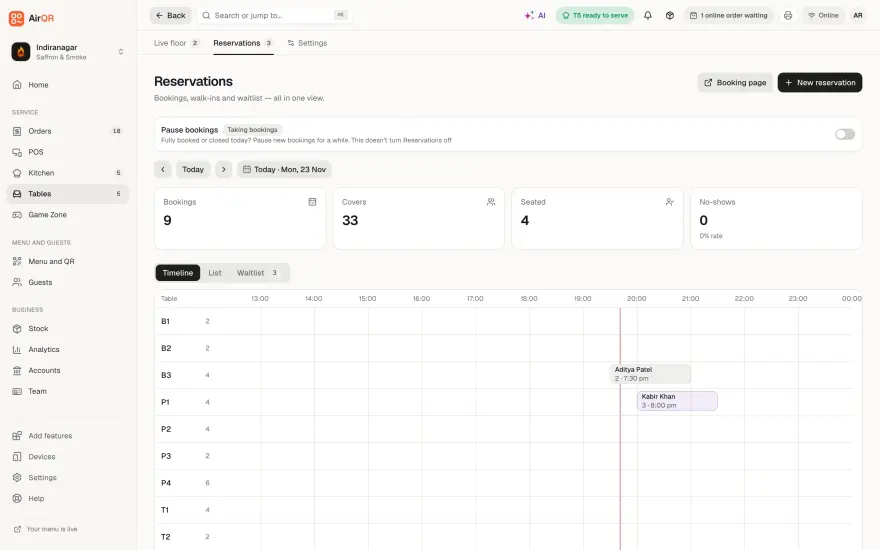
A booking timeline
Guests book from your booking page and get a table automatically. Your team adds phone bookings with occasion and allergy notes. Staff seat guests and mark no-shows. See reservations.
A waitlist that quotes a wait
Add walk-in parties when the room is full, quote a wait and message them when a table frees up. See the waitlist.
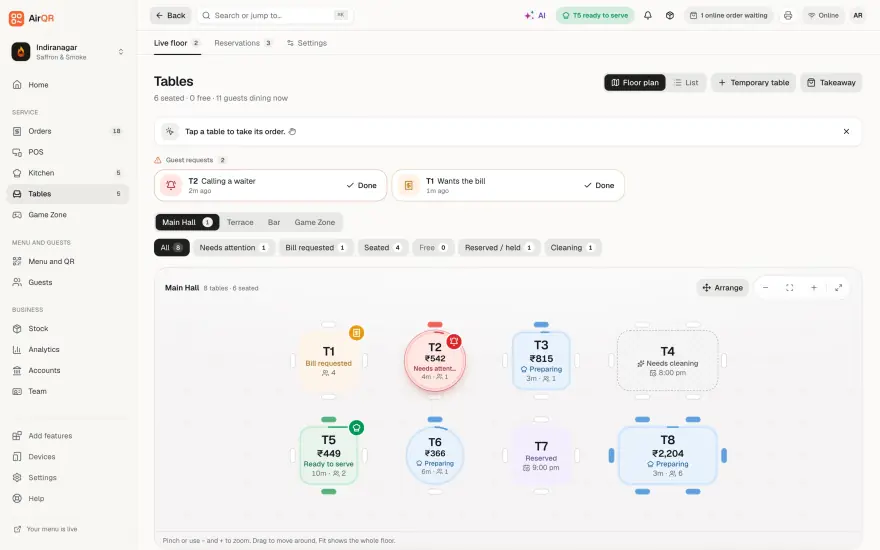
A live floor
See each table's status, how long it has been seated, its open bill and any guest request. Staff can seat or hold tables, move checks and mark tables clean. See the live floor.
Floor plan that matches the room
Draw your tables the way the room is laid out, so the host and captains find a table at a glance. See the floor plan editor.
Advance for private dining
Take an advance before a booking and get a receipt voucher. The advance is used on the final bill without paying its GST twice. See advances.
Several menus by day and time
Run a lunch menu, a dinner menu or a bar menu, and show each one only on the days and times you choose. See menu schedules.
Know your regulars
Fine dining runs on guests who return, so AirQR keeps their story.
A record for every guest
See each guest's visits, spend, favourite dishes and notes. Tag VIPs and record allergies so the next captain knows. See guest records.
Points for returning guests
Guests are recognised by phone number, so there is no card to carry. Points are earned on a paid bill and spent on the next visit. You set the earn rate.
Reviews after the meal
Offers and review prompts can bring happy guests to leave a review. See offers and reviews.
A table QR, only if you want it
Some rooms prefer no phones on the table. The table QR is optional, and captains can take every order on a tablet instead.
Reports for the owner
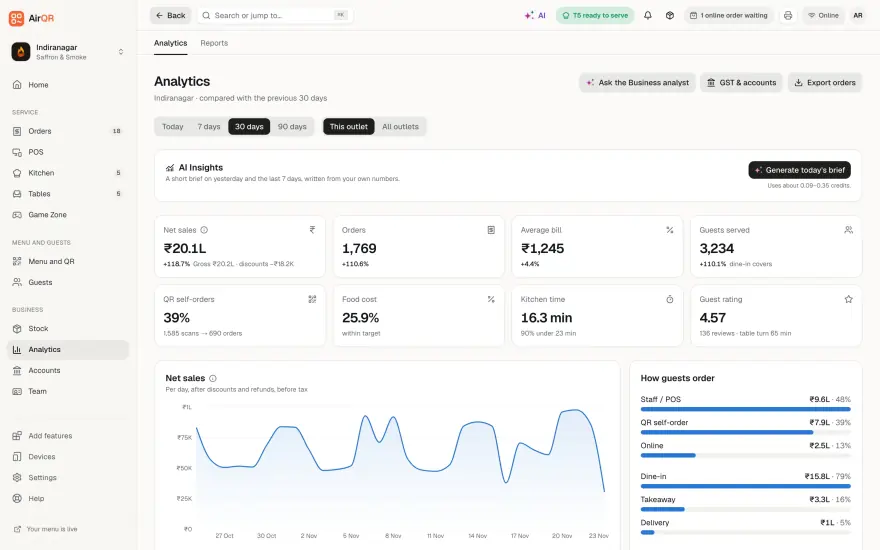
See sales by item, by captain and by hour, and compare outlets if you run more than one. See reports.
Several outlets, one menu
A group with more than one restaurant can keep one menu and set prices per outlet. See multiple outlets.
Setting up your fine dining room
Most of this is done once, before your first service.
- Add your menu with photos, allergens and kitchen notes
- Set up stations for the pass, the grill and the bar
- Draw your tables on the floor plan
- Add your captains with the Captain role and their discount limit
- Turn on bookings and the waitlist
- Set your service charge and your tax classes
- Add your UPI ID so guests see a QR for the exact amount
- Connect your kitchen and bill printers
How AirQR works for fine dining.
What a fine dining room needs from billing software
In a fine dining restaurant the bill is the last thing a guest should think about. Tables stay for two or three hours, courses arrive one after another, and a captain may look after only a few tables. The software has to stay out of the way. It should carry what the guest said, such as an allergy or an anniversary, from the booking to the kitchen ticket without anyone writing it twice.
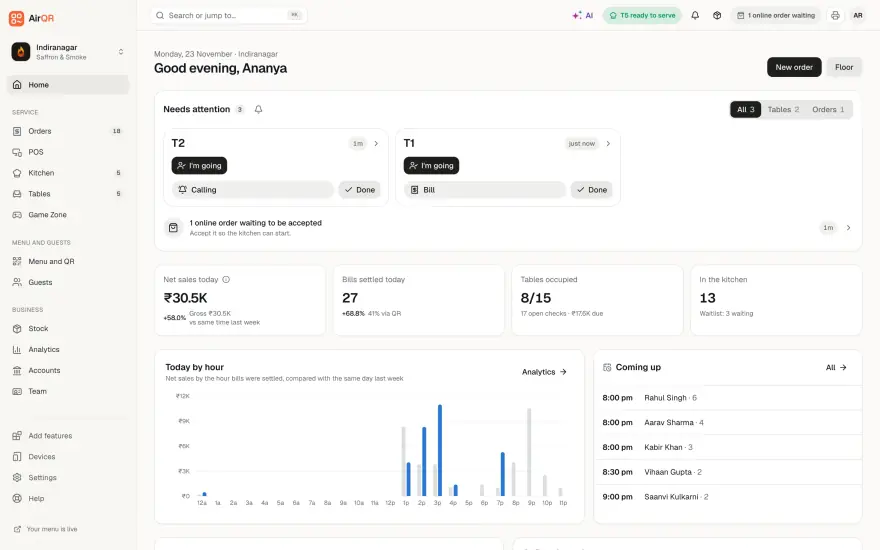
AirQR gives each captain a tablet or a phone to take the order. Each send is a round, so the starters, the mains and the dessert can each leave the pass at the right moment. The kitchen display shows every round for its own station, and the host sees the whole room on the live floor.
AirQR records payments and does not collect them. Guests pay by cash, card or UPI at the table, and the captain records how each part of the bill was paid.
GST, liquor and the final bill
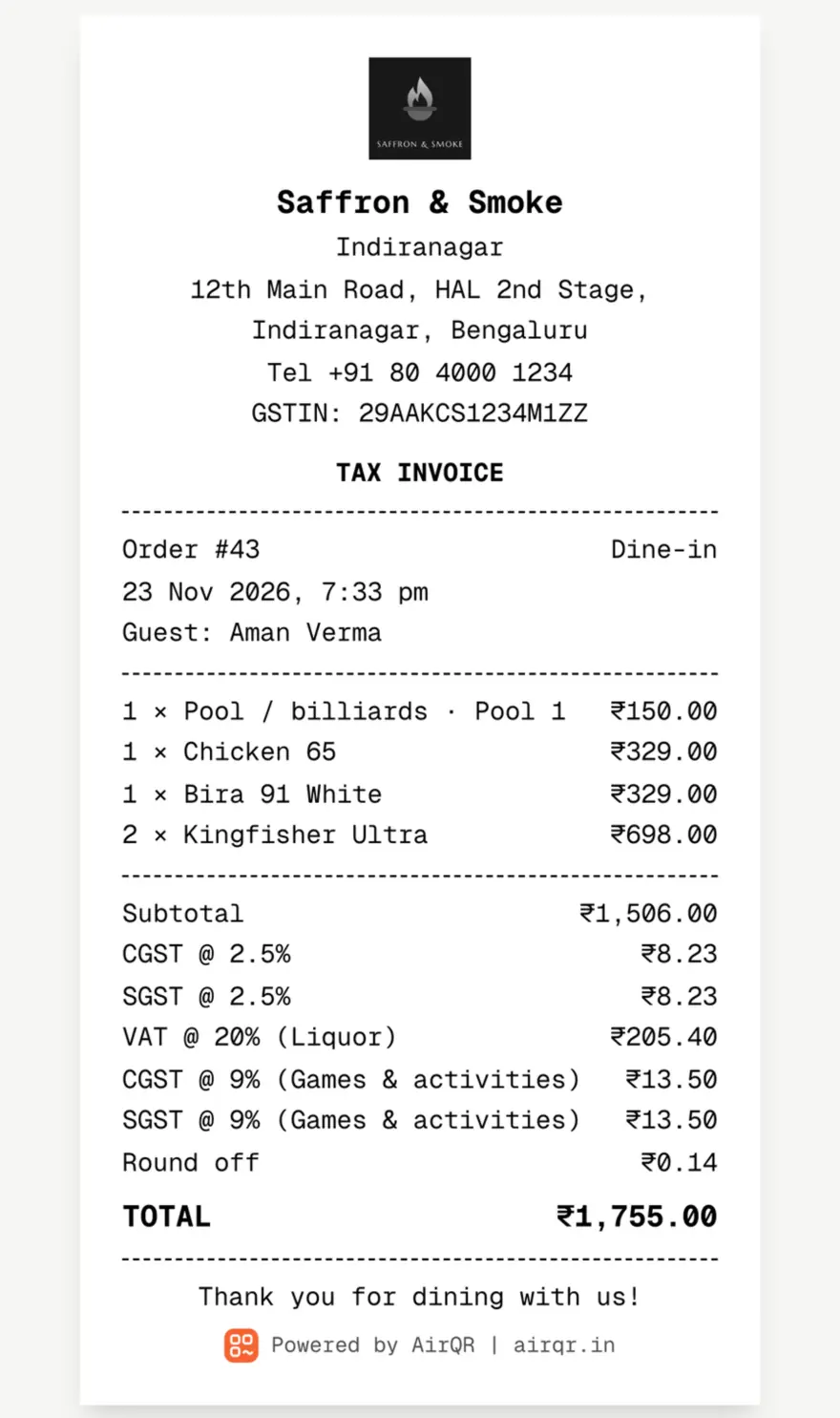
In India every line on an AirQR bill carries its own tax. You can give food and liquor different tax classes, for example food at GST 5 percent and liquor at state VAT. AirQR charges the rate you set and does not choose one for you, so confirm your rates with your accountant. The month-end files are described on the GST billing page, and the liquor setup is in tax classes and liquor VAT.
If you serve at a bar as well, a guest can open a tab by name and add rounds through the evening, then move the tab to a table. See bar tabs. You can add your UPI ID so a guest sees a QR for the exact amount, and the bill prints with every tax line.
Asked about fine dining, answered.
What is the best billing software for a fine dining restaurant in India?
Pick the one that suits a slow, course by course service. Look for rounds, allergy notes, bookings, split bills, GST and captain limits, then try it on your own menu during the free trial.
Can captains send one course at a time?
Yes. Every send is a round on the same check. Captains add the next course when the table is ready and press Send again, and the kitchen sees it as a new ticket.
How are allergies shown to the kitchen?
A kitchen note on an item or a booking travels to the ticket. A note that mentions an allergy raises a red ALLERGY tag on the kitchen screen, and each dish shows its allergens.
Can a table split the bill in different ways?
Yes. Split by person, by items or by an amount you type. Each guest's bill prints on its own with their share of tax and service charge.
Can I limit what captains can discount?
Yes. The Captain role can give discounts up to 15 percent by default. Owners and managers have no limit, and every discount and void is saved with the staff member's name.
Do guests have to order from a QR code?
No. The table QR is optional. Captains can take every order on a tablet or a phone.
Does it work when the internet drops?
The POS keeps taking orders and recording payments on the device and syncs later. Open it once on each device while online so it is ready.
How much does it cost?
The cost depends on your outlets and the modules you switch on. See pricing for current plans. You can try everything free for 28 days.





Your next service, on AirQR.
Import your menu from a photo, print your table cards, take orders today. 28 days free, no card.
Not sure which plan? See plans and prices