Offers, upsell and reviews
Offers, smart upsell and a Google review booster for restaurants
Three small tools raise sales and reputation without more work from your staff. Offers and coupons run happy hours and deals on the QR menu, online ordering and the POS. Smart upsell suggests a dish that goes well with what is in the cart. The Google review booster invites guests to review you on Google, and low ratings also go to your manager's follow-up list.
- Happy hours, coupons and deals
- Goes well with, in the cart
- Guests invited to review on Google
Why these three belong together
A restaurant earns more when each bill is a little bigger, when quiet hours fill up and when the next guest finds good reviews on Google. Offers help with the quiet hours, upsell helps with the bill and the review booster helps with the reputation.
In AirQR they all work from the same place as your menu, so there is nothing to connect. Offers are checked by AirQR when an order is placed, so guests cannot fake a discount. Upsell works by itself once it is switched on, and the review booster starts once you paste your Google review link. Offers, smart upsell and the review booster are modules from Starter up. On Starter they count toward its four modules.
Offers and coupon codes
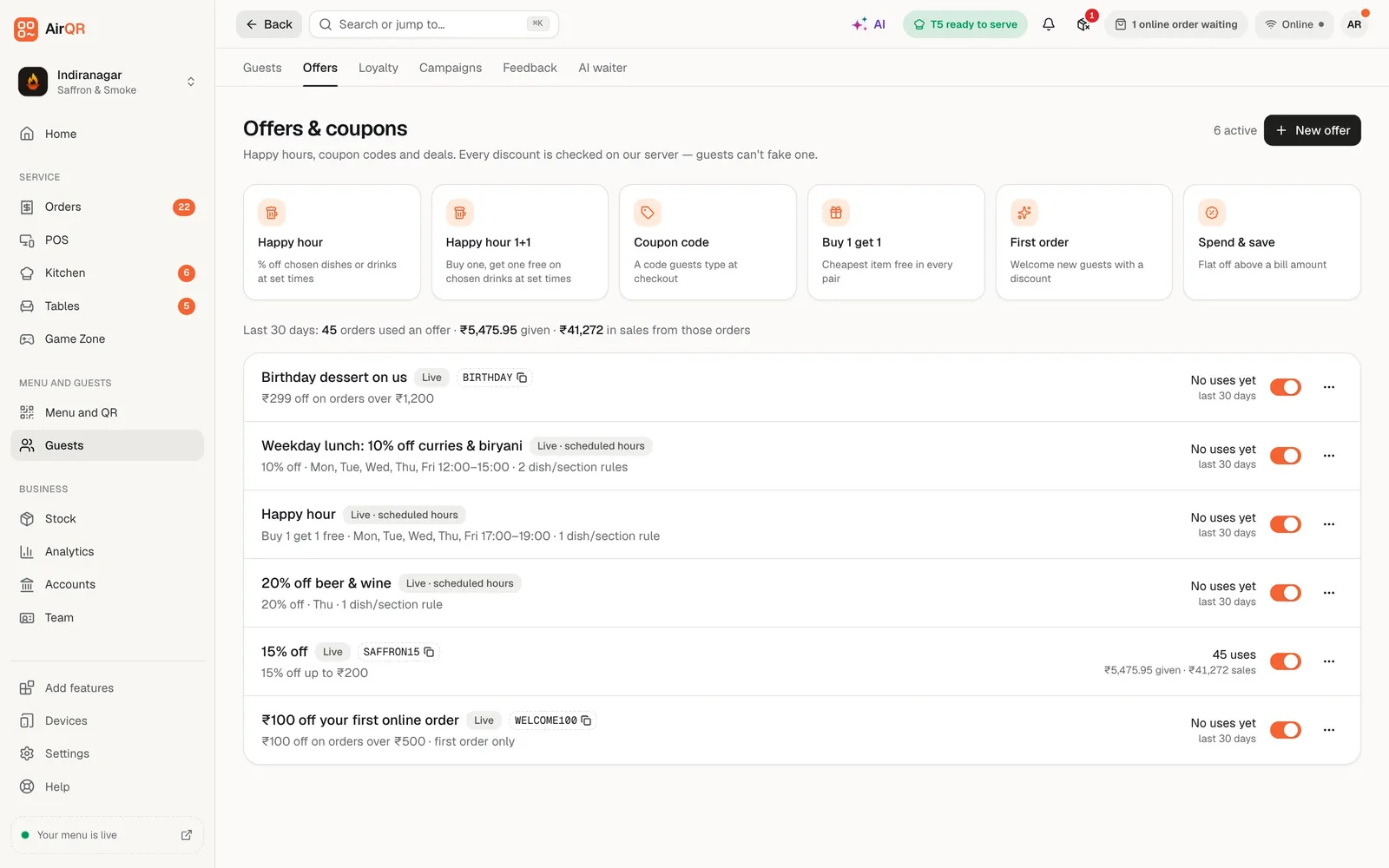
Start from one of six templates and change what you need. Happy hour takes a percentage off chosen dishes at set hours. Happy hour 1+1 gives a second drink free. A coupon code gives a percentage off the bill with a cap and one use per guest. Buy 1 get 1 makes the cheapest item in each pair free. First order gives a flat amount to a new guest, and spend and save gives a flat amount above a bill size.
Each offer can apply to the whole bill or to selected dishes and sections. You choose where it works, on the table QR, on online orders, in the store on the POS, or on any mix, and at which outlets. A schedule sets days of the week, hours and start and end dates. You can limit total uses and uses per guest, and show the offer as a banner on your menu.
- Automatic offers apply when the rules match
- Coupon codes apply when a guest or cashier enters them
- Each dish gets only its single best offer
- Duplicate an offer to reuse it
See what each offer earns
Offers are only worth running if they pay for themselves.
Uses, discount and sales
Next to every offer you see its uses, the discount given and the sales over the last 30 days.
A clear status
Each offer is marked live, scheduled, ended, fully claimed or paused, and a switch pauses or resumes it.
Reasons, not guesses
If an offer does not apply, the guest or cashier sees why, such as outside the hours, under the minimum or already used.
Nudges in the cart
When a guest is close to a minimum, the cart can say add a little more to unlock the deal.
Safe archive
An offer that was ever used is archived instead of deleted, so your reports stay correct.
Plan limits
Starter allows 3 active offers at a time. Growth and Pro have no limit.
Smart upsell, the Goes well with strip
In the cart, just before the guest places the order, a short Goes well with strip shows up to four dishes with a plus button. A lassi next to a biryani, or fries next to a burger. For a simple dish the plus adds it straight away, and if it has sizes or a required choice it opens the dish first. It appears on the QR menu and on online ordering, and not on the staff POS.
AirQR picks suggestions in a clear order. Your hand-picked pairings come first, up to three per dish, which you set in the menu builder. Next come pairings learned from your own orders in the last 60 days, when two dishes from different categories were ordered together in at least three orders. If the strip still has room, it is filled with your most ordered dishes of the last 30 days.
It never suggests a dish already in the cart, and never a dish that is sold out, hidden or not on the menu shown at that outlet. A new business starts with its own pairings and the learned ones improve as orders build up. See the smart upsell help for the steps.
Guest feedback and the Google review booster
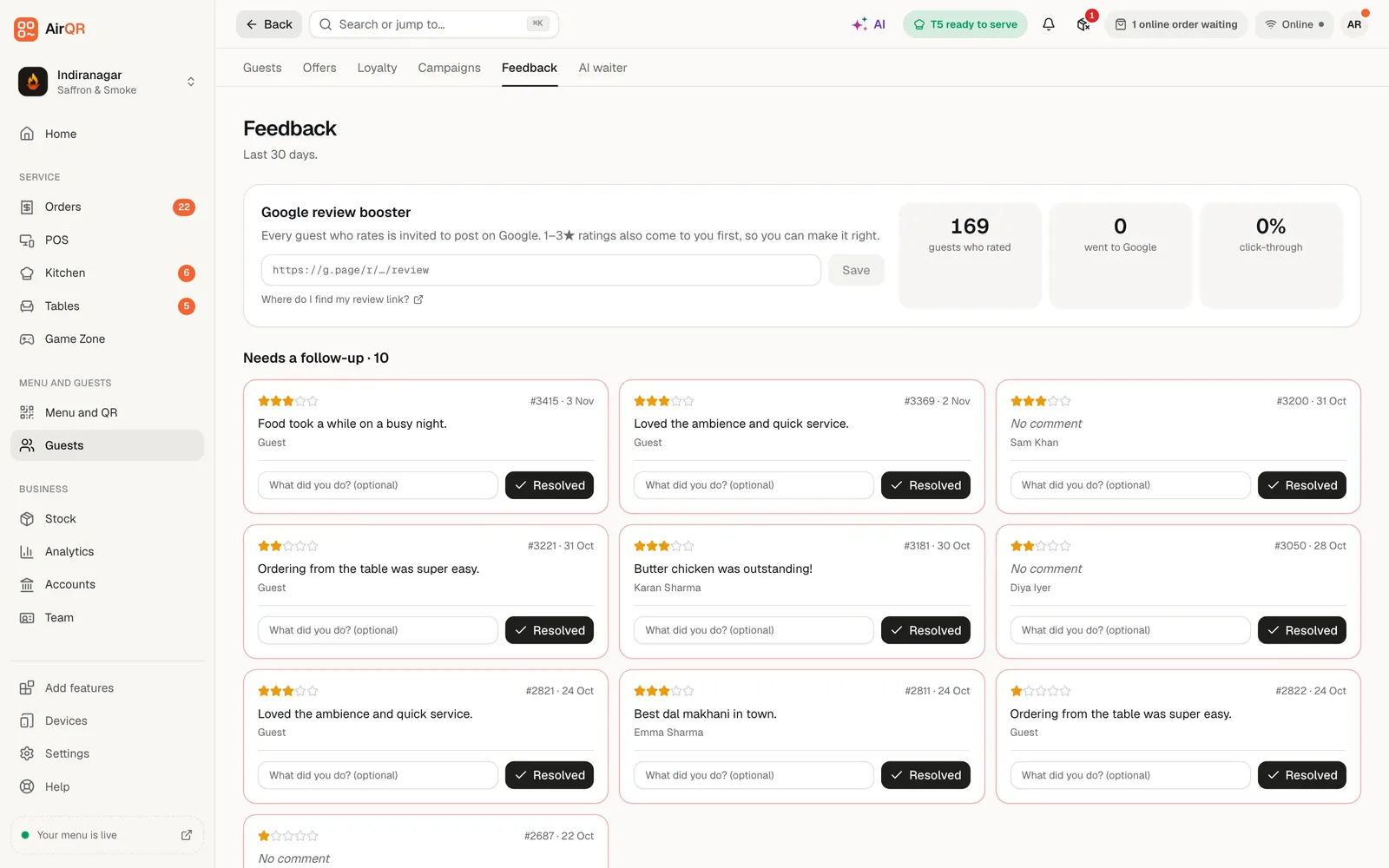
After a guest orders by QR or online and the bill is paid, their order page asks how everything was. They tap one to five stars, add a comment and can tick that the manager may call them. Every guest who rates is shown a button to post a Google review, once you paste your link. Ratings of one to three stars also go to your manager's follow-up list.
The Feedback page shows your average rating, how many guests left a rating and a bar for each star level. The booster panel counts the guests who rated, how many went to Google and the click through rate. You set it up once by pasting your Google write a review link.
- A follow up list for 1 to 3 star ratings
- Call or WhatsApp the guest from the card
- Mark it resolved with a note on what you did
- Feedback works on every plan
Put all three to work in a week
- 01
Day 1, add your pairings
Open your best selling dishes and add up to three Goes well with pairings each, such as a drink or a dessert.
- 02
Day 2, create a happy hour
Pick the Happy hour template, set the dishes and the quiet hours, and switch on the banner on your menu.
- 03
Day 3, add the review link
Paste your Google write a review link on the Feedback page and check that the booster module is on.
- 04
Day 7, read the results
See what each offer earned, what guests said and how many went on to review you.
Questions
Can I run a happy hour with AirQR?
Yes. Use the Happy hour template, choose the dishes, days and hours, and it applies by itself on the channels you pick. A 1+1 version gives a second drink free.
Do coupon codes work on the POS and online?
Yes. Guests enter a code in their cart on the QR menu or online ordering page, and cashiers enter it on the check at the POS. AirQR checks every offer when the order is placed.
How does smart upsell decide what to suggest?
Your hand-picked pairings come first, then pairings learned from your own orders, then your most ordered dishes. It never suggests a dish already in the cart or one that is sold out.
Do guests see upsell suggestions on the staff POS?
No. The Goes well with strip shows in the guest cart on the QR menu and online ordering page.
What happens when a guest leaves a low rating?
It goes straight to your manager's follow-up list, so you can make it right.
How many offers can I run at once?
Starter allows 3 active offers at a time. Growth and Pro have no limit.
Can an offer apply only to some dishes or hours?
Yes. An offer can cover selected dishes or sections, set days and hours, a start and end date, and a limit on uses per guest.
Keep reading
Try AirQR in your restaurant
Set up in minutes on the phones, tablets and printers you already have. 28-day free trial.