Restaurant website
A real website for your restaurant, built in one sitting
Your story, your best dishes, your photos, your reviews and the way to find you, each on its own page and all in a style that suits your kind of place. Big buttons open your live menu, online ordering and bookings, so guests go straight from reading about you to ordering from you. A short guided builder and AI write it from your answers, and you can edit anything.
- Six pages, a style for your kind of place
- Buttons to your live menu, order and book
- Built from your answers, edit anything
A website without a web designer
Most small restaurants have a website that is a few years old. The menu is a photo of a printed page, the prices are wrong and the hours say something that stopped being true. Guests find a Google listing, tap through and learn nothing about the place.
The AirQR website is a proper small site instead. It has a home page that sells the place, a page for your story, a page for the dishes you are known for, a gallery, a reviews page once guests have rated you, and a page that tells people how to find you. It does not copy your whole menu, because the menu already lives in AirQR and is always right. The site shows the dishes you choose and sends guests to your live menu for the rest.
The Website is an add-on on every paid plan, Pro, Custom and Licence too. It costs ₹199 a month in India and $2.99 in US dollars, for each website, and only your free trial includes it so you can build and preview it before you decide. When you add it, it includes 50 AI credits to write your site. Writing with AI uses your AI credits, and a whole site costs a small fraction of one credit.
From questions to a live site
A short builder walks you through eight steps and saves your answers as you go.
- 01
Say what kind of place you are
Pick restaurant, café, bar, quick service, bakery or a brand with several outlets. The builder shows the pages that suit you, and you can switch the optional ones on or off.
- 02
Choose your web address
AirQR suggests a name from your outlets and checks that it is free as you type. Every page gets an address of its own, such as airqr.in/w/your-name/story.
- 03
Tell your story in four short answers
How it started, since when, who is behind it and what makes you different. Every question can be skipped, and the website says nothing you did not say.
- 04
Pick your specialities and photos
Choose six to twelve dishes from your menu and add your own photos, up to twelve for the gallery. AirQR never makes up pictures.
- 05
Choose a look and write
Pick Bold, Simple or Classy, then a colour set and fonts, or use your brand colour. AI writes every page from your answers, and you can start without AI for free.
- 06
Edit and publish
Open any page, change any line by hand for free, and watch the preview on a phone or a desktop. Your live site does not change until you publish.
A style for your kind of place
Six families, each in three looks, with a layout that fits how guests use your kind of business.
Restaurants
Ember opens with your story and your best dishes, with a button to book a table when you take bookings.
Cafés
Morning is airy and bright and leads with what you serve, because guests want to know if there is something good to eat.
Bars and pubs
Taproom is dark and puts what is on this week first, then your drinks and bites, with a page for private hire.
Quick service and cloud kitchens
Rush puts Order online right under the first photo and shows your bestsellers as big cards, with a page for bulk orders.
Bakeries and sweet shops
Mithai is celebratory. It shows your gift boxes and how many days ahead to order, with a page for custom orders and one for your stores.
Brands with several outlets
Atlas gives the brand a home and every outlet its own page with its own hours, address and buttons.
A restaurant in the Classy look
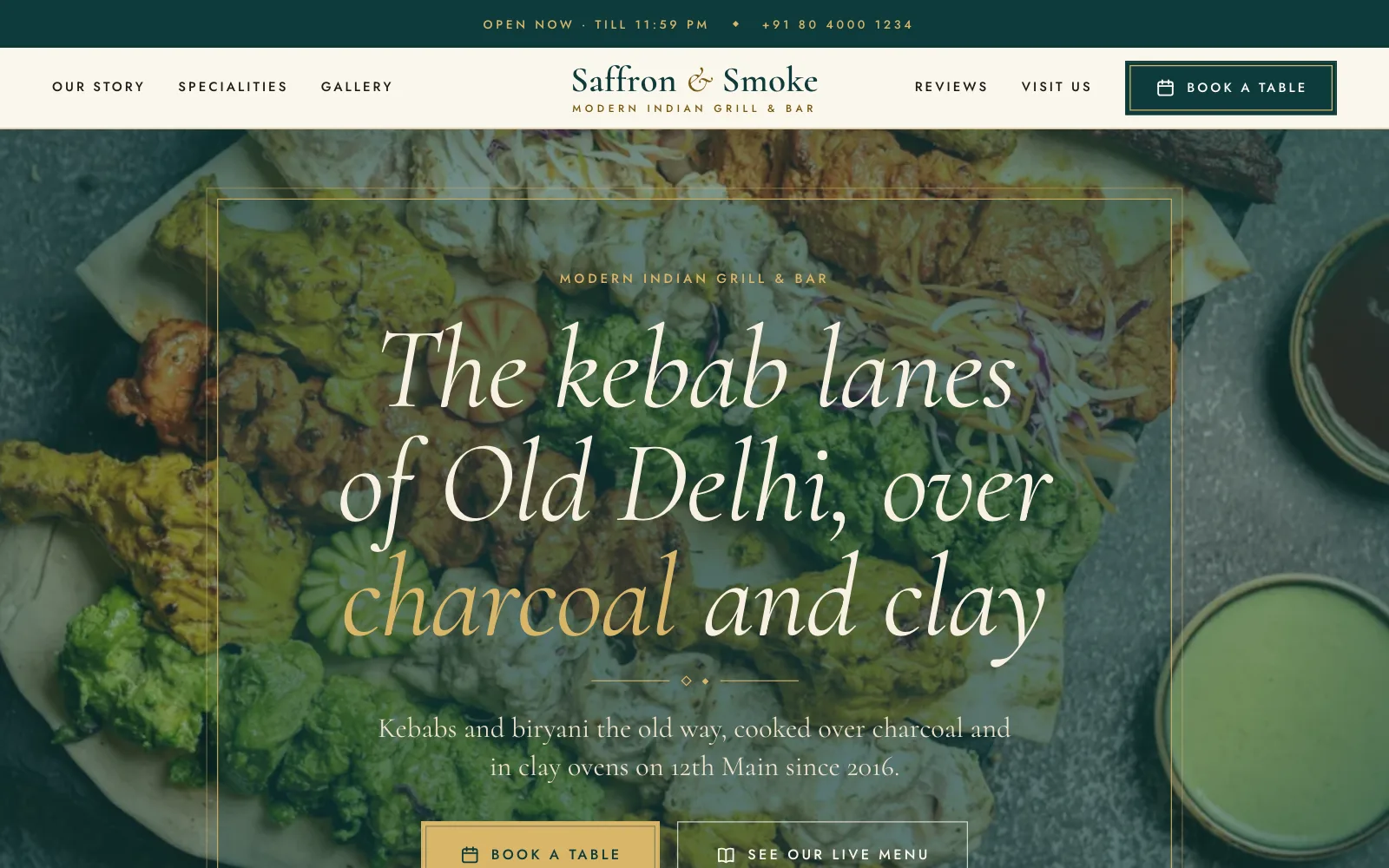
This is the first screen a guest sees. The name and the main button stay at the top of every page, and the second button opens your live menu. Classy suits a place that wants to feel like an evening out, with an editorial serif, small capitals and thin gold lines.
Bold and Simple arrange the same pages in their own way. Bold uses large condensed capitals and a tight grid, and Simple is airy and rounded. Each look has three colour sets and two font pairs, all checked so the text is easy to read.
- Open now and the phone number at the top
- A main button on every page
- Your live menu one tap away
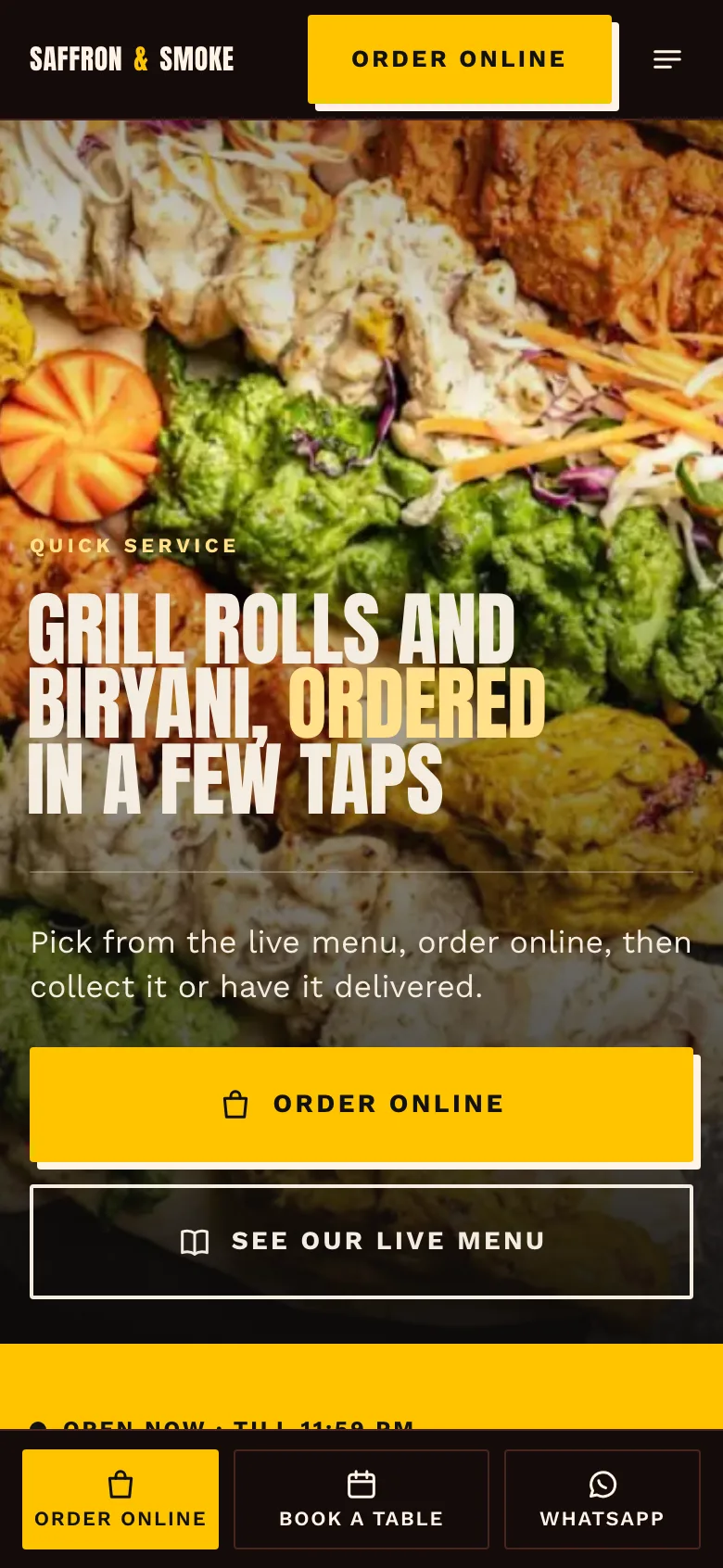
A quick service kitchen in the Bold look
On a phone the site keeps the way to order in reach. The header carries the main button, the first screen has Order online as the biggest thing on it, and a bar at the bottom holds up to three buttons, such as order, book and WhatsApp.
Rush is the family for quick service. It puts ordering right under the first photo and shows your bestsellers as large cards, with a page for bulk orders and one for the areas you deliver to.
- A bottom bar for order, book and call or WhatsApp
- Only the actions you offer are shown
- Pages load quickly on a slow connection
Buttons that lead into AirQR
Only the actions you really offer are shown.
See our live menu
Every guest can open your full menu with today's prices and what is sold out, so the site never carries a stale copy.
Order online
Opens your ordering page for that outlet, so the sale stays yours with no commission. It shows only when you are taking orders.
Book a table
Opens your booking page, and disappears when you pause bookings.
Call and WhatsApp
A call button, and a WhatsApp button with a ready message in India and the UAE when you add your number.
Always within reach
The main button sits at the top of every page, and on a phone a bar at the bottom holds order, book and call.
Offers
When you have offers that are shown on your menu, an Offers page lists them live. It goes away by itself when there are none.
Found on Google, fast on a phone, easy to share
A website is only useful if people can find it and it opens quickly.
Built for search
Every page has its own title, description and address, and tells search engines your name, address, hours, menu and booking page in the format they read. A sitemap lists every page in every language.
Fast and readable
Pages are built to load quickly on a slow phone connection, with large tap targets and text that is easy to read. It sets no cookies, so guests do not see a consent banner.
Your own link and QR code
Choose an address, change it later and the old one keeps working on every page. Download a QR code for the table, the window or the bill.
More than one language
Add Hindi, Arabic or any of your menu languages and every page is translated. Arabic reads right to left with the layout mirrored.
Legal notices
Outlets in the EU can add the legal notice a business site needs, and outlets in India can show an FSSAI licence number in the footer.
Simple numbers
See visits, menu opens, orders started and bookings for the last 30 days, without setting up any analytics tool.
You stay in control of the words
AI only helps with the writing. It turns your answers into headlines and short sections, and nothing else. Prices, hours, addresses, phone numbers, ratings, awards, years and the names of people come from you or from AirQR, never from AI, and a sentence that holds a number or a claim you did not give it is removed before it reaches the page.
Words you type yourself stay exactly as you typed them. If a line says something like certified or organic, the editor reminds you to make only claims that are true, because some of them need certification. Every change is saved as a version, you can ask for a change in plain words and see exactly what would change before you accept it, and you can always restore an older version.
Before you publish
- Add at least three dishes with prices to your menu
- Check the address, phone number and opening hours on each outlet
- Add your own photos, a hero photo first
- Add holiday dates under the opening hours
- Ask guests for feedback so the reviews page can appear
- Fill in the legal notice if you have an outlet in the EU
- Download the QR code and put it on the table cards or the door
Questions
How much does the website cost?
The Website is an add-on on every paid plan, Pro, Custom and Licence too. It costs ₹199 a month in India and $2.99 in US dollars, for each website. Only your free trial includes it, and a site goes offline if you do not add it when the trial ends, with nothing deleted. Adding it includes 50 AI credits to write your site. AI writing uses your AI credits, and editing by hand, publishing and the numbers are free.
Does the website show my whole menu?
No. It shows the six to twelve dishes you choose, with photos and live prices, and a button to your live menu for everything else. The live menu is always up to date, so the site never shows a price that is wrong.
Does AI write my prices and opening hours?
No. Prices, dishes, hours, addresses and phone numbers are read live from your menu and outlets. AI writes only words such as your story and headlines, and it never invents awards, years or ratings.
Can guests order from the website?
Yes. The site has buttons that open your AirQR ordering and booking pages, shown only when you offer them. Orders come to you directly, with no commission.
Can I use my own photos?
Yes, and only your own. You can add up to twelve gallery photos and four page photos, or use the photos already on your menu. AirQR never makes pictures with AI, so a place without a photo gets a clean panel in your colours.
Will my website show up in Google?
Every page carries the structured details search engines read, and a Show in Google switch controls whether it is listed. During the free trial the website asks search engines not to list it. It turns on when your plan starts.
What if I have more than one outlet?
One website covers the whole business, with a page for each outlet that has its own hours, address and buttons. The Atlas style is made for this.
What happens if I stop paying for the add-on?
The website goes offline and guests see a not found page. Your words, versions and numbers are kept, and the website comes back when you add it again.
Keep reading
Try AirQR in your restaurant
Set up in minutes on the phones, tablets and printers you already have. 28-day free trial.