Guide for restaurant owners
How do QR code menus work?
Updated · 9 min read · By the AirQR team
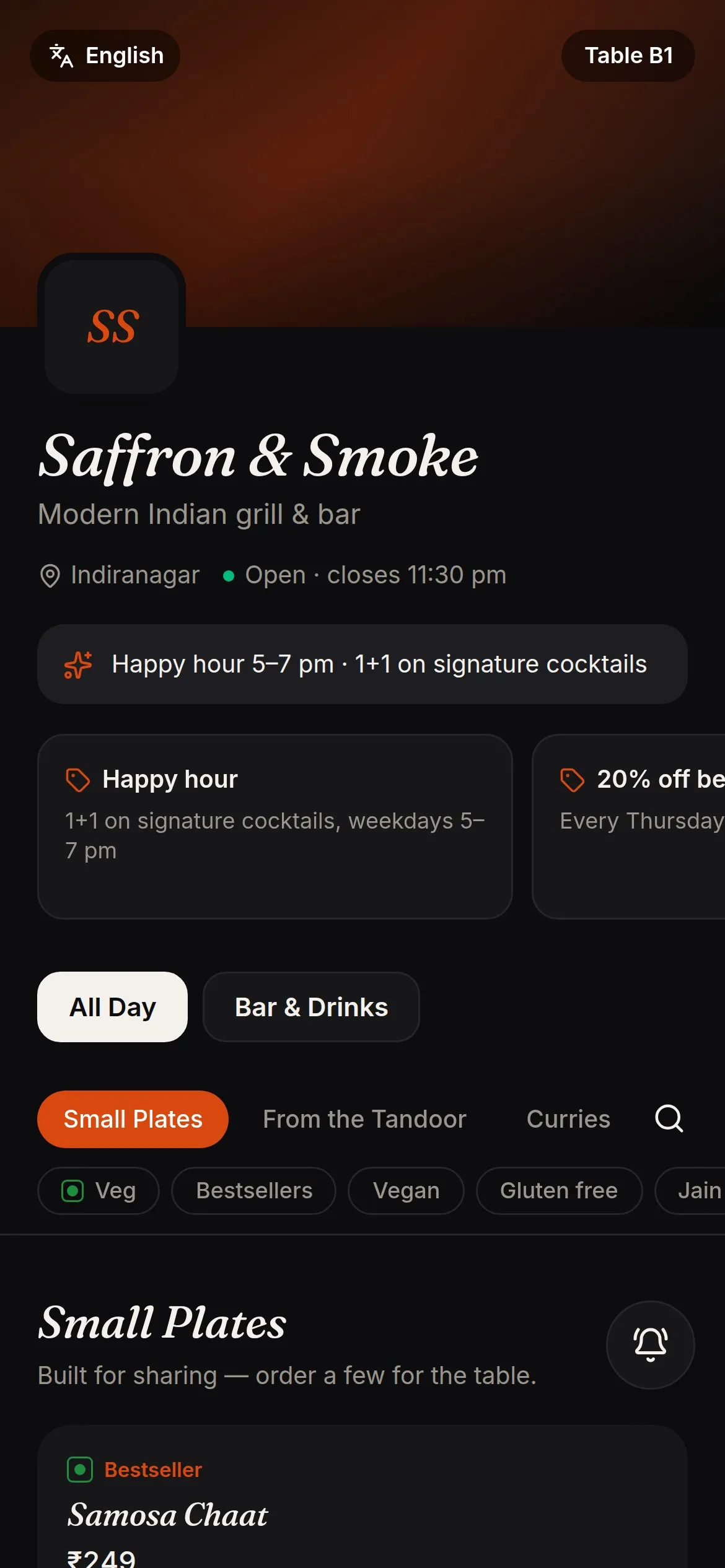
A QR code menu works by storing a web address in a square code that any phone camera can read. The guest scans the code, the phone opens that address in the browser and the menu appears, with no app to install. If the address leads to a live menu rather than a fixed PDF, prices and sold-out dishes stay current, and the same code can also let guests order and pay by UPI.
- From scan to payment, step by step
- Static and dynamic codes compared
- Fixes for scan and signal problems
What a QR code actually holds
A QR code is a small picture that stores a short piece of text. For a restaurant that text is nearly always a web address. When a guest points a phone camera at the code, the camera reads the pattern, shows a link on screen, and a tap opens it in the browser. Modern Android phones and iPhones do this in the camera app, so guests need no special scanner.
Everything a guest then sees comes from the web address, not from the code. The code is only a doorway. This is why two QR menus that look identical on a table can behave very differently. One may open a PDF of last year's menu. Another may open a live menu with today's prices, photos and a button to order.
The benefits owners usually look for are simple. Guests can read the menu without waiting for a printed copy. Prices can be changed without reprinting. Photos and veg marks answer questions before staff are asked. Sold-out dishes can be hidden. Whether you get all of this depends on how the menu behind the code is built.
Static and dynamic QR codes compared
The word dynamic is used loosely, so here is what it means for a menu. A static code stores the final address inside the picture. A dynamic code stores an address you control, which then points to your current menu. You can change the destination without changing the picture.
- What the guest opens
- Static code to a PDFA file, usually a PDF of the printed menu
- Dynamic code to a live menuA web page built for phones
- Changing a price
- Static code to a PDFEdit and re-upload the PDF, and hope the link stays the same
- Dynamic code to a live menuEdit the dish and the change shows at once
- Sold-out dishes
- Static code to a PDFCannot be marked
- Dynamic code to a live menuCan be marked so guests do not order them
- If you move or delete the file
- Static code to a PDFThe printed code stops working
- Dynamic code to a live menuThe printed code keeps working
- Reading on a small screen
- Static code to a PDFPinch and zoom, often hard to read
- Dynamic code to a live menuText sized for phones, with photos and search
- Counting scans
- Static code to a PDFNot possible
- Dynamic code to a live menuPossible, per table or per flyer
- Taking orders
- Static code to a PDFNot possible
- Dynamic code to a live menuPossible, if the menu supports it
- Languages
- Static code to a PDFOne file per language
- Dynamic code to a live menuA language picker on the same menu
A static code is fine for a fixed menu that never changes. Most restaurants change prices or specials often enough that a dynamic code pays off.
Menu-only or menu with ordering?
A menu-only QR code lets guests read and nothing more. Staff still take orders at the table. It is the lowest-risk way to start and it already saves printing and arguments about prices.
A QR ordering menu lets the guest add dishes to a cart and send the order to the kitchen. At a table, each table has its own code, so the order is tied to that table without the guest typing anything. The kitchen gets a ticket, the guest can follow its status, and later orders from the same table join the same bill as new rounds. A good system also has a switch to pause ordering when the kitchen is overloaded, while guests carry on reading the menu.
Takeaway and online ordering can use their own codes. A counter code can give each guest a token number, and a separate code on a flyer or delivery bag can open your online ordering page. You can see the ordering side in more detail on the QR ordering page.
What happens after a guest scans, step by step
- 01
The camera reads the code
The phone decodes the address in the picture and offers a link. No app, login or download is needed.
- 02
The menu page loads
The browser fetches your menu from the internet. This is why a guest needs mobile data or Wi-Fi, even though they installed nothing.
- 03
The guest browses
They search, filter for veg, switch language if you offer one, and open a dish to see its photo, description, price and allergen tags.
- 04
Dishes go in the cart
Sizes, add-ons and cooking notes are chosen here. A well-built menu rechecks every price when the order is placed, so a guest cannot change a price on their own phone.
- 05
The order reaches the kitchen
The order appears as a ticket on a kitchen screen or prints as a KOT. Some restaurants keep a staff approval step first.
- 06
The guest follows and pays
The page shows the order moving from sent to preparing to ready. After the meal the guest pays at the counter or by UPI, as the next section explains.
Paying by UPI from a QR menu
UPI is how most of India pays digitally, and a QR menu fits it well. NPCI data for September 2026, as reported by Outlook Money, shows UPI handled about 24.07 billion transactions that month. The RBI Annual Report 2024-25, as reported by IANS, put UPI at 83.7% of digital payment volume in FY25. These are national figures for all payments, not for restaurants.
There are two common designs. In the first, the menu shows a UPI QR for the exact amount due and a button to open the guest's UPI app. In the second, the restaurant shows its own shop QR and the guest types the amount. In both, the money goes from the guest straight to the restaurant's bank account.
Ask any vendor whether they collect the money or only record it. AirQR records the payment and does not collect it, so there is no gateway fee and no cut of your sales. That also means a UPI payment counts only when you see it arrive in your own UPI or bank app. Never accept a screenshot as proof. Some UPI apps limit amount-filled QR codes from unverified merchants to around ₹2,000, so a bigger bill may need a split payment or the shop's own QR.
What a QR menu knows about your guests
A menu you only read needs no sign-up. Ordering usually asks for little. In AirQR the phone number at checkout is optional and is used for loyalty points, receipts and offers when the guest chooses to share it. Guests can only order at a table by scanning that table's own code, which also limits mischief from someone who has only seen the link.
In AirQR, the order-ready TV screen for takeaway and delivery shows token numbers and first names only, with no amounts, phone numbers or items. Whatever product you pick, ask what it stores, who can see it and whether guests can say no to offers. If you run offers by WhatsApp, the guest should have ticked a box first.
One practical safety tip applies to every restaurant. Someone can stick a different code over yours. Use cards that are hard to peel, glance at them during closing checks, and print your restaurant name and table name next to the code so a guest can tell it is yours.
Problems with QR menus and how to fix them
- The phone will not scan
- Likely causeCode too small, low contrast or glossy glare
- FixPrint bigger, use dark dots on a light background, use matte paper, and try turning off a logo in the middle
- Menu opens a PDF that is hard to read
- Likely causeThe code points to a fixed file made for A4 paper
- FixMove to a phone-friendly live menu and keep the PDF only as a backup
- Menu is slow or never loads
- Likely causeWeak mobile signal inside the restaurant, or very heavy photos
- FixPut the Wi-Fi name and password on the table card, and keep photos light
- Guest scans and lands on a home page, not your menu
- Likely causeThe code was paused or deleted
- FixReactivate it, or print a new card
- Orders arrive at the wrong table
- Likely causeCards were swapped between tables
- FixPrint the table name under each code and check cards after cleaning
- Older guests will not scan
- Likely causeNo smartphone or no data
- FixKeep a few printed menus at the counter and let staff help
- Guest sees yesterday's price
- Likely causeA static code pointing to an old file, or an old page still open on the phone
- FixUse a live menu and ask the guest to refresh
QR code menu examples for three kinds of restaurant
These are illustrative, not customer stories. A family thali restaurant puts one card on each table. Guests can switch the menu between English and Hindi, photos show the thali contents, and the manager marks the day's special as sold out once the last portion is served.
A bar uses one menu for food and one for drinks. Each drink lists 30 ml and 60 ml prices. Drinks go to a bar screen and food goes to the kitchen, even though the guest ordered both from one cart.
A café has a counter code that gives a token number for takeaway, a table code for dine-in, and a campaign code on a flyer outside to count how many passers-by scan. Each code shows its own scan count, so the owner can see which one brings people in.
How AirQR handles QR code menus
Every AirQR code is dynamic. It points to your live menu, so price changes, new dishes and sold-out labels appear on the cards you already printed. You can switch ordering on or off with the same codes. See the QR code menu page for what guests see, and the step-by-step guide to making one if you are starting from a paper menu.
The table codes, takeaway counter code, online ordering code and campaign codes are all managed in one place, with scan counts and the option to pause a code without deleting it. The QR codes help article covers styling and printing.
- No app for guests
- Pause or reactivate any code
- Scan counts per table and campaign
- Table cards printed 4, 6 or 8 per A4 sheet
Questions
Why does my QR code open a PDF that I cannot read properly?
The code points to a file made for paper, not for a phone screen. A live menu page sized for phones reads far better and can be changed without reprinting.
Can a QR code menu work without internet?
No. The guest's phone needs mobile data or Wi-Fi to load the page. Put your Wi-Fi details on the table card and keep a few printed menus ready.
What is the difference between a QR menu and QR ordering?
A QR menu lets guests read. QR ordering also lets them place the order, which then goes to the kitchen and the table's bill.
Is it safe to scan a restaurant QR code?
Scanning only opens a link, but anyone can stick a fake code over a real one. Use cards that are hard to peel, print your restaurant name beside the code and check tables when you close.
Can I see how many people scan my QR code?
With AirQR, yes. Each code counts its own scans, so you can compare tables or compare a flyer with a poster.
Do QR menus replace printed menus completely?
Many restaurants keep a few printed menus for guests who prefer paper or have no smartphone. The QR menu then handles everyone else and stays up to date.
Can I try this before paying?
AirQR has a 28-day free trial. Set up one table, scan it with a few different phones and see how it feels before you print for the whole floor.
Sources
- UPI transactions in September 2026, NPCI data reported by Outlook Money · checked 10 October 2026
- UPI at 83.7% of digital payment volume in FY25, RBI Annual Report 2024-25 as reported by IANS · checked 10 October 2026
Keep reading
Try AirQR in your restaurant
Set up in minutes on the phones, tablets and printers you already have. 28-day free trial.