Takeaway token system
A token system for restaurant takeaway, from QR to TV screen
AirQR gives every takeaway order a short daily token, such as Token 15. Guests scan your counter QR, order and pay, and watch their token move from Preparing to Ready on a TV near the counter. Your staff run every pickup from one board, call orders by token and hand over, without shouting names across a crowded counter. These are your own orders, and AirQR takes 0% commission on them.
- A new token every day
- Order-ready TV screen
- 0% commission from AirQR
How do food tokens work?
A food token is a short number that stands in for a guest's name. Every takeaway, pickup and delivery order in AirQR gets a token for the day. Tokens restart at 1 with your first order each day, so numbers stay small and easy to call.
The same token appears everywhere the order goes. Guests see it as Your token on their phone. The kitchen sees it on the ticket, marked TAKEAWAY or PARCEL. Staff see it on the board and on printed tickets and bills, and the TV screen shows it when the food is ready. Orders without a token, such as dine-in, use the order number instead.
This page is about the token system itself. If you want guests to place orders on a tablet at your counter, read about the self-order kiosk.
Your counter QR, your orders, 0% commission from AirQR
Your counter QR, your takeaway standee and your own online ordering link are your channels. Orders from them come straight to you, and AirQR takes 0% commission on them. You pay a flat subscription, shown on the pricing page, so the margin on every parcel stays with you.
At a busy counter that adds up. A parcel ordered from the standee QR is billed at the prices you set, the money arrives by UPI in your own bank account with no gateway fee from AirQR, and the guest's name and phone number go into your own guest book. Next time, that regular can earn loyalty points or get an offer from you directly.
Delivery apps do a different job. They help new customers find you, and their orders carry the app's commission. Many restaurants use both, the apps to be found and their own counter QR and link for the guests who already know them.
From scan to collection in five steps
- 01
Guest scans the counter QR
Put a Scan to order takeaway standee at the counter or front window. Guests give a name and phone number, so you can reach them. See QR ordering for the menu side.
- 02
The order reaches you
It arrives on the board with a sound and a QR, POS or Online badge. If you take payment first, it waits there until you confirm the money.
- 03
The kitchen cooks it
The ticket goes to the kitchen display or the printer with the token in big type. Press Mark ready if you do not use a kitchen display.
- 04
The token moves to Ready
The guest's page changes to Ready to collect, the TV chimes and the token moves across. You can also send a WhatsApp message saying Token 15 is ready.
- 05
Hand over
Match the token on the guest's phone, give the parcel and press Handed over. If money is still due, you record how it was paid.
A token display system for your restaurant counter
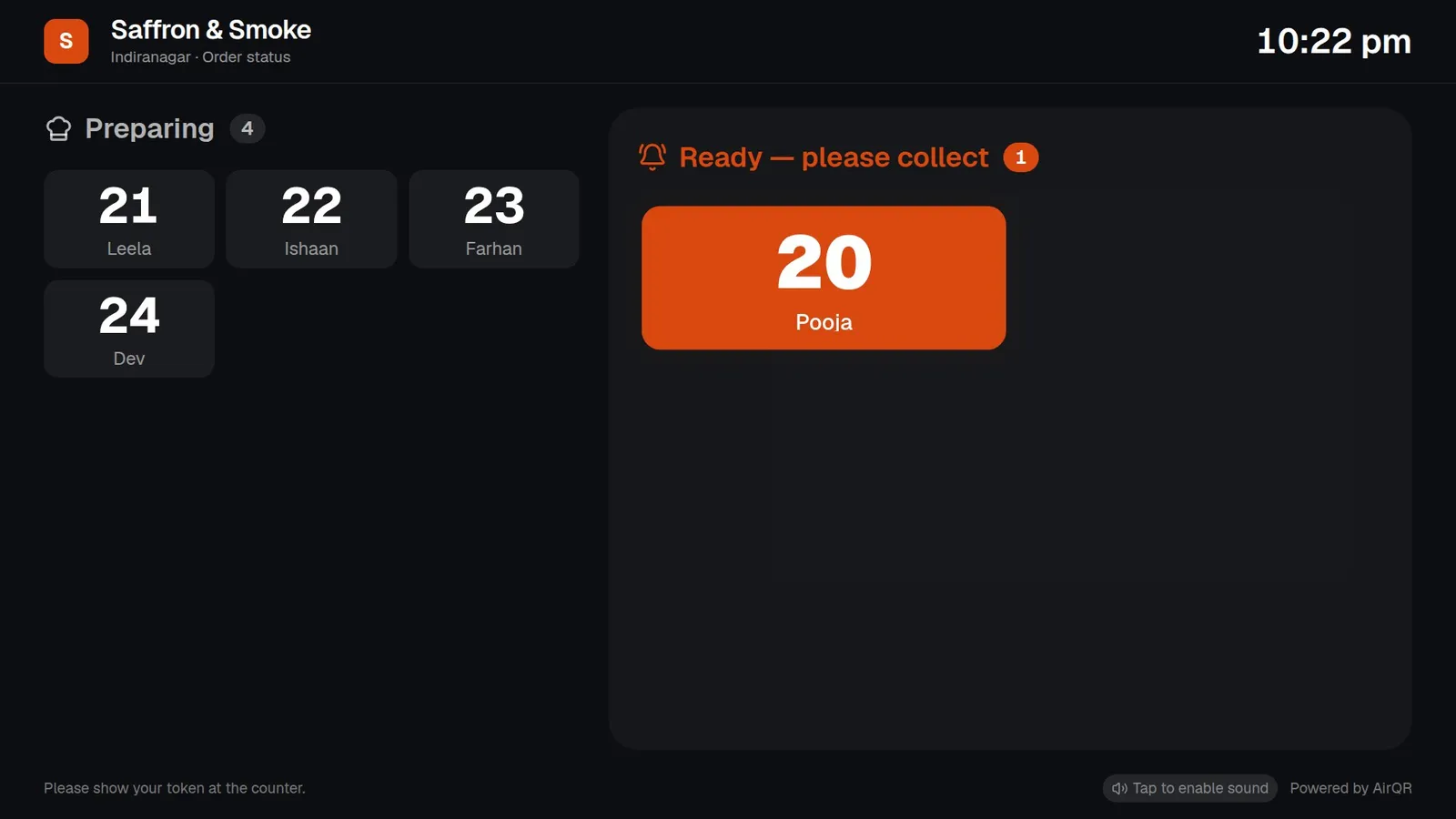
The order-ready screen is a web page you open in the browser of a smart TV, a TV stick, or a laptop or tablet connected to the TV. Preparing tokens show on the left, oldest first. Ready tokens show on the right in larger type, with the newest highlighted. A chime plays whenever an order moves to Ready.
It shows only token numbers and first names. There are no amounts, phone numbers or items on the screen. It lists takeaway, pickup and delivery orders only, never dine-in, and collected orders drop off after about 10 minutes. The page refreshes itself, so nobody needs to touch it.
- No sign-in needed on the TV, so treat the link like a key
- Tap the screen once after opening it to turn the sound on
- Add ?theme=light to the link for a light background
- Press New link in settings to stop an old link working
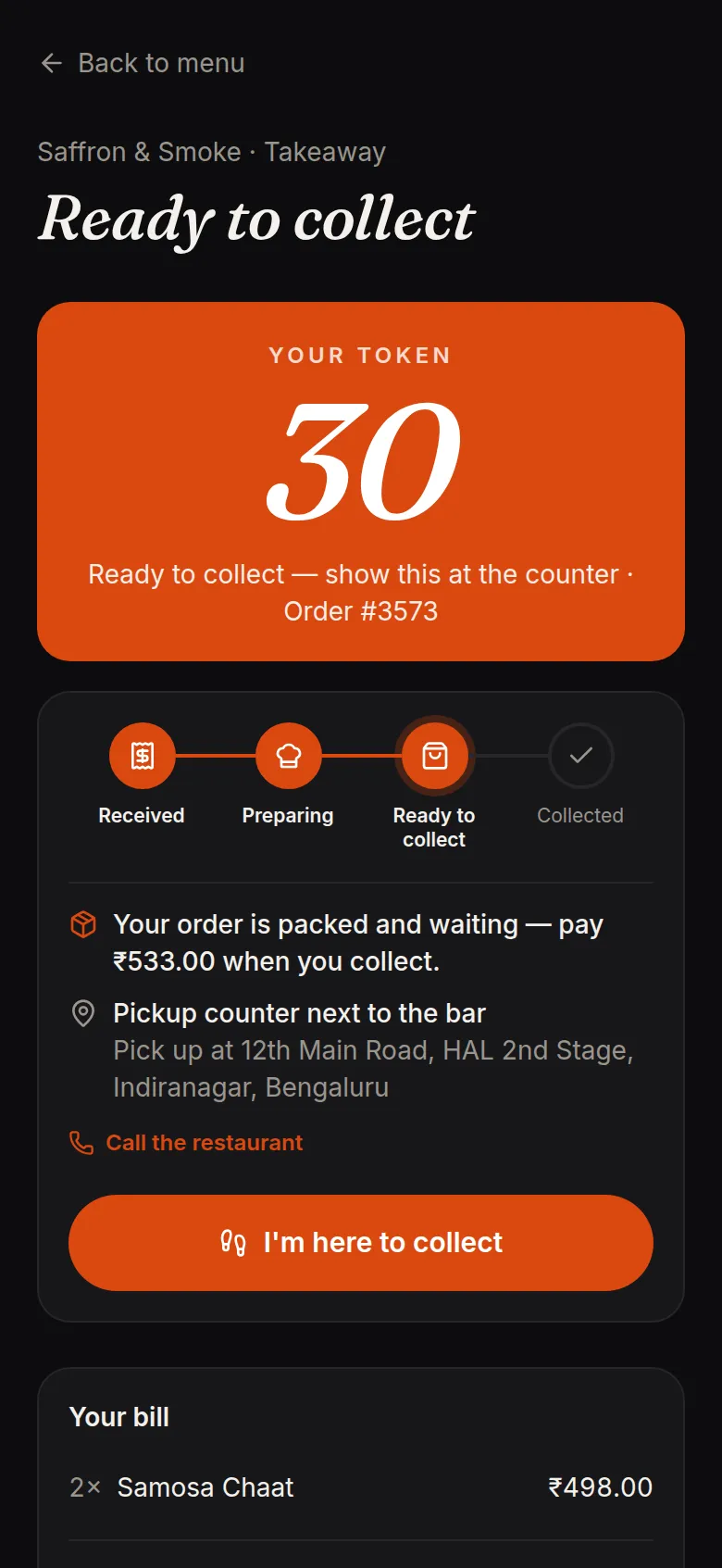
What the guest sees on their phone
Guests do not need to hover at the counter. Their order page shows a progress bar from Received to Preparing to Ready to collect to Collected, your pickup location, and a button to call you. When they arrive they tap I'm here to collect, and your board shows Guest is here with a two-note chime.
Guests can cancel on their own phone only while the order is still waiting for payment or approval. After that, they need to call you.
Takeaway order management on one board
The Takeaway and delivery board is where staff run every pickup. See the help article for the full flow.
Four columns
New, Preparing, Ready to collect and Done today. Each card shows the token, where it came from, the guest, the items and how they will pay.
Every channel in one place
QR takeaway, online orders from your own link, counter orders from the POS and kiosk orders, each with a badge and a filter.
Pay first or pay on collection
With Pay first on, an order waits for you to confirm payment before the kitchen starts. Unpaid orders cancel themselves after a time you set.
Cancel and no-show handling
Cancel with a reason, or mark an unpaid ready order as a no-show. It comes off the TV screen and the guest gets a no-show on their profile.
Delivery with a rider
Send out an order with a rider name and phone, and the guest sees who is bringing it.
Takeaway settings, parcel charges and pay first
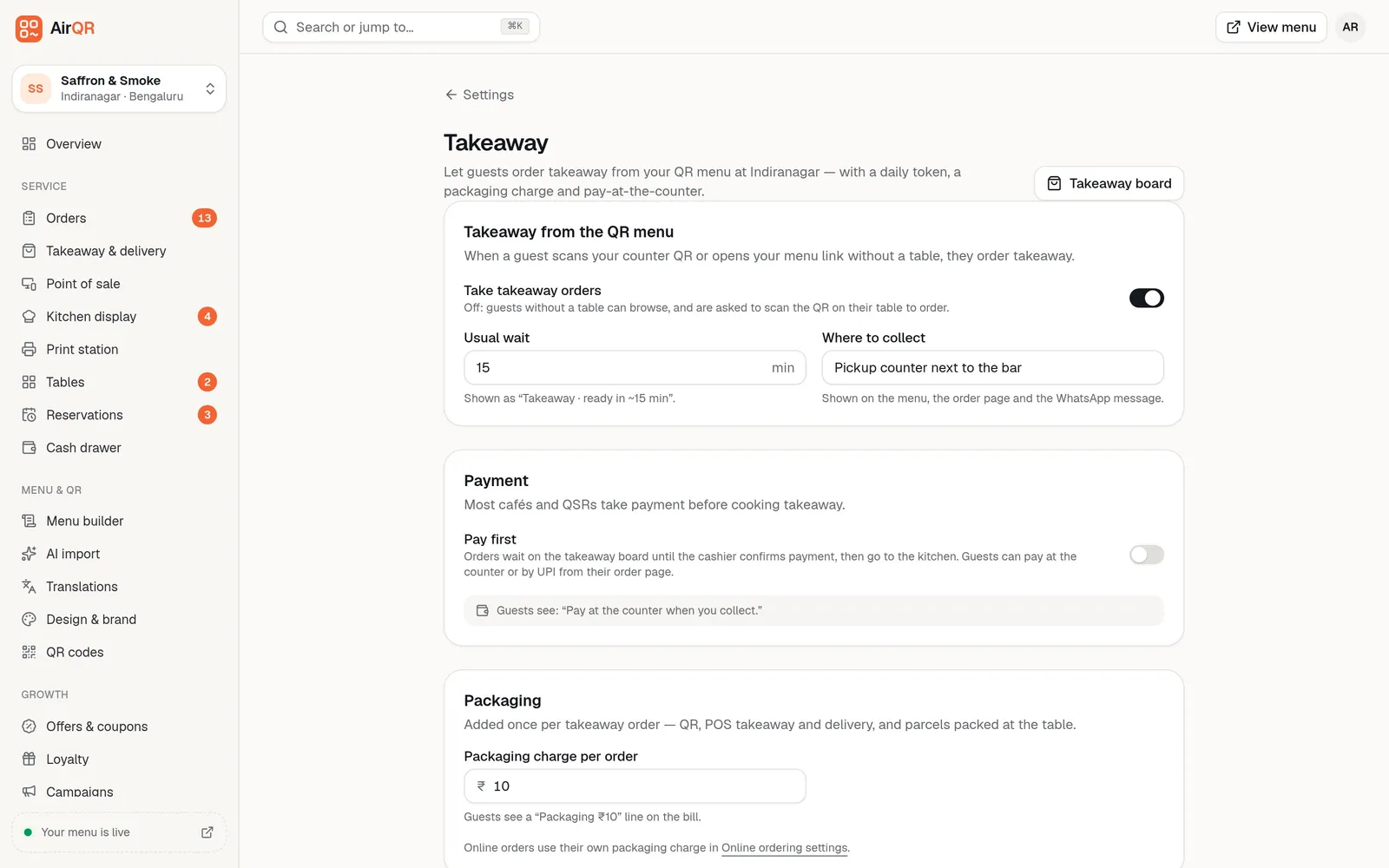
Set a usual wait, such as ready in about 15 minutes, and a collection spot such as Pickup counter next to the bar. Both show on the menu, the order page and the WhatsApp message. Add a packaging charge, which is added once per takeaway order.
Parcel pricing is separate. A biryani in a big box can cost ₹30 more while a samosa costs nothing extra. You set a fixed amount or a percentage as a reusable rate, then apply it to a dish, a category, a menu or an outlet, and the most specific one wins. Read parcel pricing for the details.
- Packaging charge per order and parcel price per dish can be used together
- Guests can ask to pack a round at the table, which adds the charge once
- Staff can pack a single item as a parcel on the POS
What you need to set this up
- The Takeaway and counter pickup module switched on in Settings
- A counter QR created on the QR codes page, printed as a standee
- A TV or tablet near the counter, with the order-ready link opened and the sound enabled
- A phone number for every takeaway guest, or the order rung up as Takeaway on the POS
- A kitchen display or printer, so the token reaches the cooks. See KOT and bill printing
- A decision on pay first or pay on collection
Limits worth knowing
The TV screen moves a token to Ready only when the kitchen marks it ready on the kitchen display or staff press Mark ready on the board. If nobody presses it, the token stays under Preparing, so make marking ready part of the kitchen's routine.
WhatsApp messages to guests open for you to press send, so a person still taps once per message. And while QR ordering is paused at an outlet, takeaway stops too. Read the takeaway tokens help article for every setting.
Questions
How does a token system for a restaurant work?
Each takeaway order gets a short number for the day. The guest, kitchen, board, printed ticket and TV screen all show the same token, so staff call and hand over orders by number and not by name.
Do token numbers restart every day?
Yes. Tokens restart at 1 with the outlet's first order each day.
Does AirQR take a commission on takeaway orders?
No. Takeaway orders from your counter QR, and online orders from your own link, carry 0% commission from AirQR. The guest's UPI payment goes straight into your bank account.
What do I need for an order-ready screen?
Any TV, TV stick, laptop or tablet with a web browser near the counter. Open your order-ready link on it, make it full screen and tap once to enable sound. No sign-in is needed on the screen.
Does the TV screen show guests' phone numbers or bill amounts?
No. It shows only token numbers and first names.
Can I take payment before cooking a takeaway order?
Yes. Switch on Pay first and the order waits on the board until you confirm payment by cash, UPI or card. Unpaid orders are cancelled automatically after the time you choose.
Can I charge more for parcels?
Yes. You can add one packaging charge per order and also set a parcel price on dishes, as a fixed amount or a percentage. Dine-in dishes keep their normal price.
What if a guest never collects their order?
For an unpaid ready order, press Not collected and pick a reason. It comes off the TV screen and the guest gets a no-show on their profile. Paid orders cannot be marked no-show, so keep them aside and call the guest.
Keep reading
Try AirQR in your restaurant
Set up in minutes on the phones, tablets and printers you already have. 28-day free trial.