Step-by-step guide
How to make a QR code menu for your restaurant
Updated · 9 min read · By the AirQR team
To make a QR code menu, put your menu into a digital form, load it into a tool that shows it as a page on a phone, and create one QR code for each table that opens it. Then test the codes on a few phones, print them at a readable size and place them on the tables. You can do it free with a PDF and a QR code generator, or with restaurant software that lets you change prices without reprinting.
- Seven steps from paper menu to live
- A free route and a software route
- Print size, placement and testing
Three ways to make a QR code menu
Before the steps, choose a route. You can make a QR code menu in three broad ways, and each suits a different kind of restaurant.
The cheapest route is a free QR code generator. You save your menu as a PDF, put it somewhere with a permanent link, such as a shared cloud folder, and make a code for that link. This is how to make a QR menu free, and it works for a small stall whose menu rarely changes. Its limits are that the guest sees a PDF made for paper, you cannot mark a dish sold out, and you should check whether the free codes from your generator expire.
The middle route is a paid QR generator that lets you change where the code points. It fixes the reprint problem but still shows a file. The third route is restaurant software, where the menu is a phone page built from your dishes and prices, and the codes are made for you. AirQR works this way. The steps below apply to any tool, with a note in each on how it works in AirQR.
Which route suits your restaurant?
- Best for
- Free generator and PDFA tiny menu that rarely changes
- Paid generator with editable linkA fixed menu that needs the odd correction
- Restaurant software such as AirQRMenus that change, or restaurants that want ordering
- What guests see
- Free generator and PDFA PDF, often small on a phone
- Paid generator with editable linkA PDF or web page you link to
- Restaurant software such as AirQRA phone-friendly page with photos and tags
- Changing a price
- Free generator and PDFRe-upload the file
- Paid generator with editable linkRe-upload the file
- Restaurant software such as AirQREdit the dish once
- Mark a dish sold out
- Free generator and PDFNo
- Paid generator with editable linkNo
- Restaurant software such as AirQRYes, in one tap
- Ordering and payment
- Free generator and PDFNo
- Paid generator with editable linkNo
- Restaurant software such as AirQROptional
- Cost pattern
- Free generator and PDFFree or very low
- Paid generator with editable linkA subscription for the code service
- Restaurant software such as AirQRA software plan, with a 28-day free trial for AirQR
AirQR is not free forever. It has a 28-day free trial and then paid plans, and the current plans are on the pricing page.
Step 1, get your menu ready with this digital menu card template
Whatever tool you use, the work starts with clean information. Use this as a digital menu card template and fill it in once, in a spreadsheet.
- Category
- ExampleStarters
- Why it mattersGroups dishes so guests can scroll
- Dish name
- ExamplePaneer Tikka
- Why it mattersUse the name guests say aloud
- Description
- ExampleCharred paneer, mint chutney
- Why it mattersOne line is enough
- Price
- Example320
- Why it mattersFinal price, one number
- Sizes
- ExampleHalf 180, Full 320
- Why it mattersEach size with its own price
- Veg or non-veg
- ExampleVeg
- Why it mattersGuests look for the green mark first
- Allergens and diet tags
- ExampleContains nuts, Jain
- Why it mattersAnswers staff questions early
- Station
- ExampleTandoor
- Why it mattersDecides which kitchen screen or printer gets it
How to make a QR code menu, steps 2 to 7
The order is the same in any tool. Each step says what to do, then how it works in AirQR.
- 01
Step 2, bring the menu in
Load your dishes, sizes and prices into the tool, by typing them or importing the spreadsheet from step 1. In AirQR you can also upload a PDF or Word file, or photograph the pages of your printed menu, and check the draft line by line before anything goes live. A spreadsheet you match yourself uses no AI credits, while photos, PDFs and Word files do. See import your menu.
- 02
Step 3, tidy it
Check every price, add photos where they help, set sizes and add-ons, and put categories in the order guests should read them. In AirQR the import marks any price it could not read in red, and the menu builder can send a whole drinks category to the bar station at once. See menu builder basics.
- 03
Step 4, design it
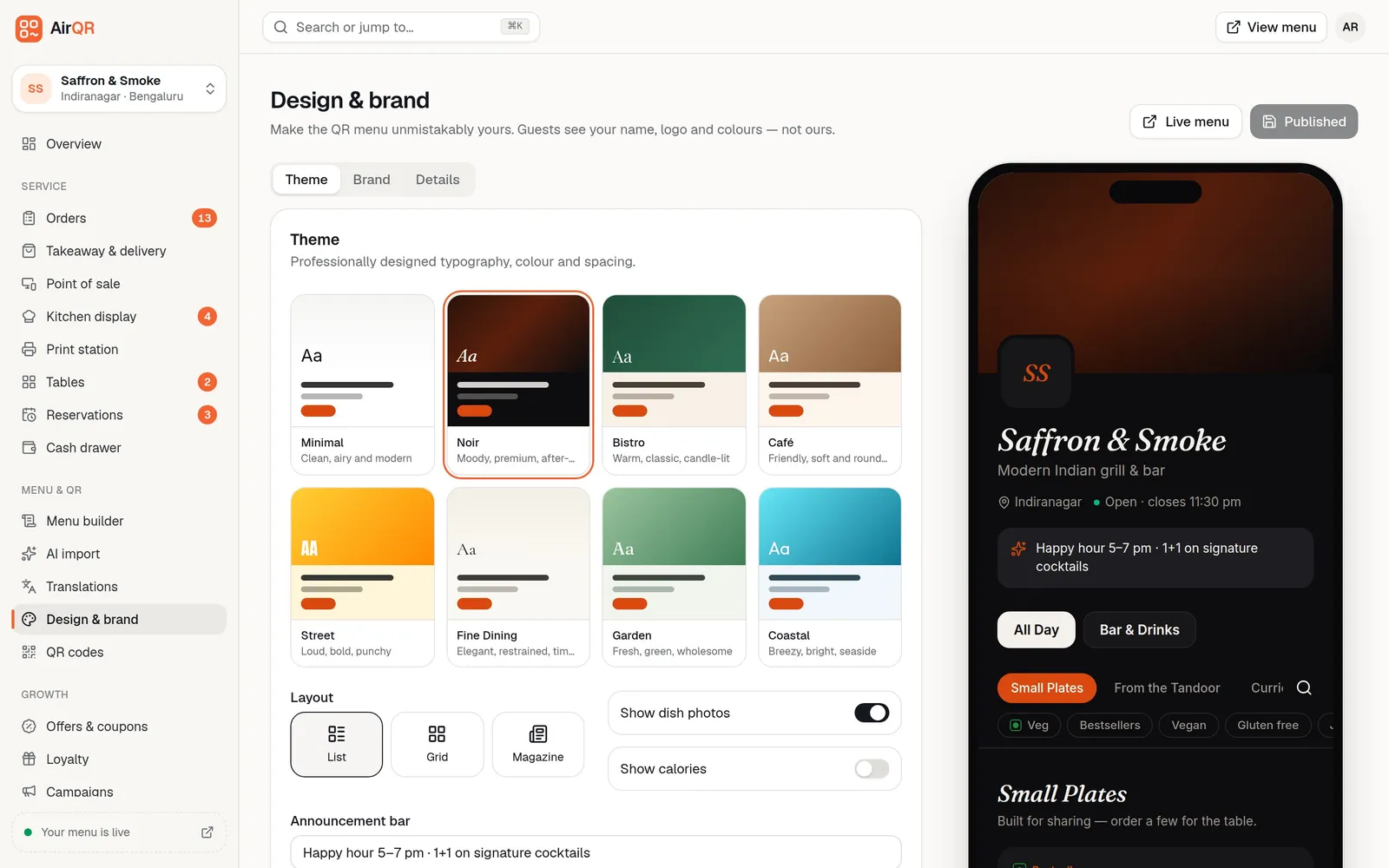
Pick colours and a layout that suit your restaurant, and check the menu on a real phone. In AirQR you choose a theme, add your logo and brand colour, and check the live preview on a phone, tablet and desktop before you publish. See design and branding.
- 04
Step 5, add languages if you need them
If many guests read another language better than English, add it and ask someone who reads it to check the translation. In AirQR you add Hindi or another language and review the translation before saving. Guests pick their language on the menu, and English stays the default. See menu translations.
- 05
Step 6, create and style your QR codes
Make one code for each table so every order is tied to a table, plus any codes for the counter, the door or flyers. In AirQR table codes are made when you add a table to the floor plan, and you can add takeaway, online ordering or campaign codes and style them with your colours and logo. See QR codes.
- 06
Step 7, test, print and go live
Scan the printed cards, place a test order if ordering is on, then put the cards on the tables. In AirQR, check that the test order reaches the kitchen with the right table name. The go-live checklist lists everything to check.
Digital menu design ideas that work on a phone
Most guests will read your menu one-handed, in dim light, while talking. Design for that. These ideas hold in any tool.
In AirQR you pick one of eight themes, choose a list, grid or magazine layout, and then tune twelve font pairs, colours, corners and card styles. A built-in picture editor crops your logo, app icon and cover photo, and a focal point keeps the important part visible on every screen. Guests can add your menu to their phone's home screen with your own icon. A small Powered by AirQR line stays at the foot of the menu on every plan.
- Keep body text large and use high contrast between text and background
- Use photos only when they are good. A text menu beats a dull photo
- Put the green and red marks where guests expect them, beside the dish name
- Keep descriptions to one line and put bestsellers near the top
- List sizes clearly, for example half and full, or 30 ml and 60 ml
- Use one brand colour for buttons and prices, not three
- Use a short announcement line for happy hour or the day's special
Printing QR codes. Size, placement and material
A beautiful code that will not scan is worse than no code. Print dark dots on a light background, avoid glossy surfaces that reflect lights, and keep the quiet margin around the code clear. If you place a logo in the middle, test it, and turn it off if any phone struggles.
On size, bigger is safer. AirQR prints table cards 4, 6 or 8 to an A4 sheet, and even with 8 per page each code is about 31 mm wide, enough for phones to scan. Print on A4 at 100% scale, not shrunk to fit. For a professional print shop, download the sharp vector (SVG) file or the PNG.
Think about where the card sits. Put it at the guest's eye line on a table tent, a stand or a table-top card, not flat under a glass where light bounces. Choose thick paper or matte lamination that can be wiped, since tables get cleaned many times a day. Print the table name under each code so cards can be put back in the right place. Keep spare cards for replacements. Add a takeaway code at the counter and your online ordering code on the door, the bag and your Instagram page.
Test your QR code menu before guests scan
Do this once on a quiet day. It takes less time than fixing a bad Friday.
- Scan a printed card with at least one iPhone and one Android phone
- Scan from a normal seat, in the restaurant's real lighting, not from a desk
- Check the menu loads on mobile data as well as on your Wi-Fi
- Check every price, size, veg mark and sold-out label for one full category
- Place a test order from a table card and check the right table name appears on the kitchen ticket
- Settle one test bill by cash and one by UPI
- Ask someone who has never seen the menu to order a meal without help
- Delete or cancel the test orders before opening
Keep your QR code menu up to date
A QR menu is only useful if it is true. With a live menu you change a price in one place, and every printed card shows it. Mark a dish sold out when the last portion goes, and switch it back on in the morning. If your tool has menu schedules, use them to show Breakfast in the morning and the bar menu after 6 pm. Review the translations when you add new dishes. Replace cards that are bent, stained or faded.
With a static PDF code, set a monthly reminder to check that the link still opens and that the file is the latest version. Read how QR code menus work for the difference between static and dynamic codes, and the QR code menu page for what AirQR guests see.
Questions
How can I make a QR code menu for free?
Save your menu as a PDF, store it at a permanent link, and make a code for that link with a free generator. It works for a menu that rarely changes. AirQR is not free, but it has a 28-day free trial.
What size should the QR code on a table card be?
Bigger is safer. In AirQR even eight cards per A4 sheet give codes about 31 mm wide, which phones read easily. Print at 100% scale with dark dots on a light background.
Can I turn my existing PDF menu into a QR code menu?
Yes. AirQR can read a PDF and turn it into editable dishes and prices for you to check. That uses AI credits, and a spreadsheet you match yourself does not.
Do I need a website to make a QR code menu?
No. A restaurant software tool hosts the menu page for you. For the free route you only need a place to store the PDF with a permanent link.
Can I add my logo and colours to the QR code?
Yes. You can colour the dots and add your logo in the centre. Keep strong contrast and test it, and turn the logo off if a phone struggles.
How much does it cost to make a QR code menu with AirQR?
Start with the 28-day free trial, then choose a plan. The pricing page has the current plans.
How do I keep table cards clean and replace damaged ones?
Use thick paper or matte lamination you can wipe, and keep spare cards printed. In AirQR a reprint of the same code works, because each code keeps the same link.
Keep reading
Try AirQR in your restaurant
Set up in minutes on the phones, tablets and printers you already have. 28-day free trial.