Guide to online ordering
Zero commission online ordering, explained for Indian restaurants
Updated · 8 min read · By the AirQR team
Zero commission online ordering means guests order pickup or delivery from your restaurant's own link or QR code, and the ordering system takes no cut of each order. With AirQR that is 0% commission from AirQR on your own online orders, and guests pay you directly. Swiggy and Zomato still bring discovery, so this guide explains how to use both and move regulars to order direct.
- Aggregator or your own link, fairly
- How to get regulars to order direct
- Pickup, order ahead and own delivery
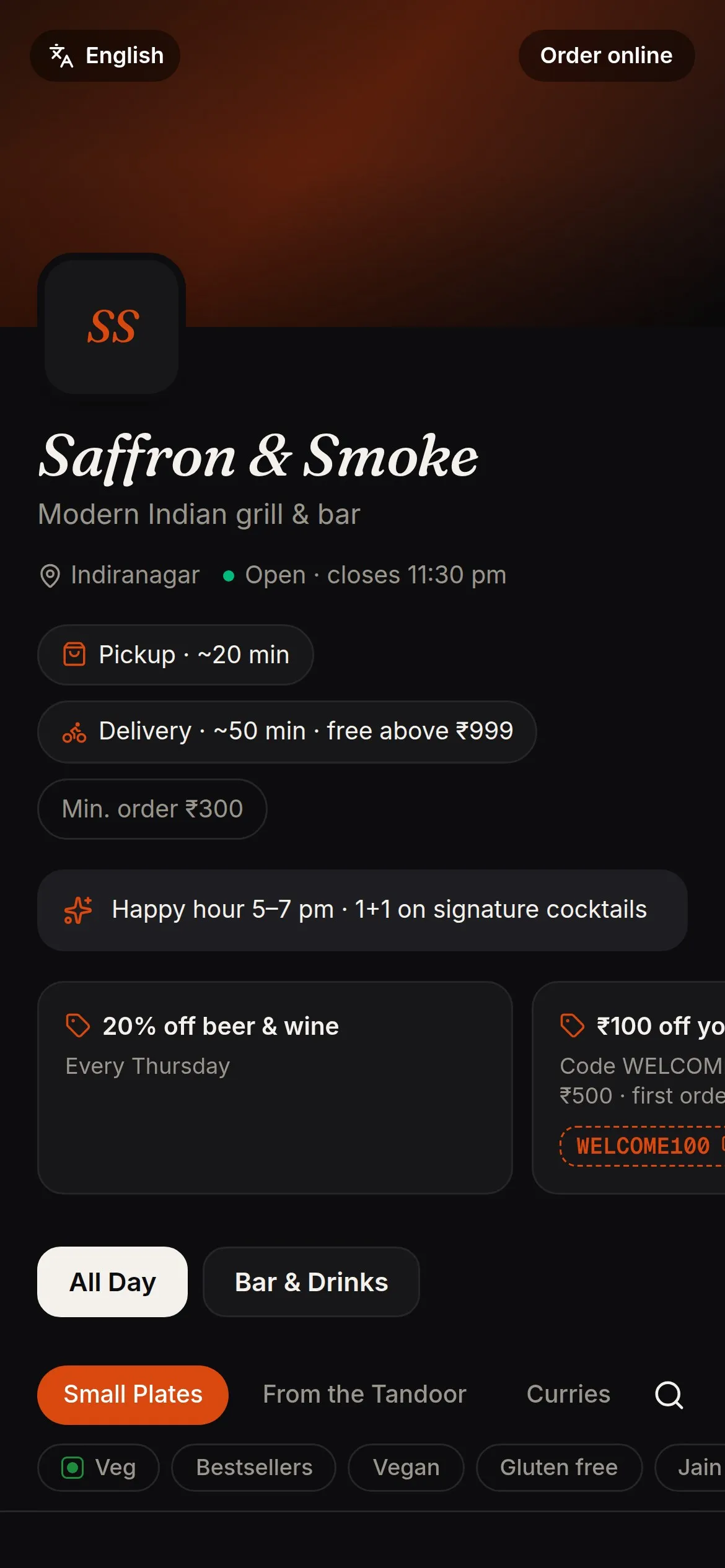
Zero commission online ordering, and what it really means
Zero commission means the ordering system does not take a percentage of each order. With AirQR, orders from your own online ordering link carry 0% commission from AirQR. Guests pay you directly, by UPI to your own account when they order, or in cash or UPI at pickup or delivery. AirQR records these payments and does not collect them, so there is no gateway fee from AirQR either.
It does not mean ordering costs nothing. You still pay for the software plan, packaging, riders and the time your team spends. It also does not mean aggregators are a bad deal. If an app brings you a guest you would never have met, the commission may be worth it. The aim is to stop paying that commission on guests who would have ordered from you anyway.
That is the idea behind a Swiggy and Zomato alternative in India. You do not leave the apps. You build a second route that regulars use, and you keep the apps for discovery. To see the cost parts of running software, read our guide to restaurant POS cost in India.
What is an online food ordering system?
It is a menu on the internet where a guest picks dishes, chooses pickup or delivery, pays or promises to pay, and sends the order to your kitchen. Your staff see it on a screen or a printed ticket, accept it, cook it and hand it over or send it out. The guest can follow the order on their phone.
There are two kinds. A marketplace such as Swiggy or Zomato lists many restaurants in one app and sends you orders from people who found you there. Your own ordering system, such as an ordering page on your own link, takes orders from guests who already know you. Most restaurants end up using both, and the useful question is how to use each one well.
Your own system is often what people mean by a restaurant website with online ordering. It does not need a full website. A single link or QR code that opens your menu, shows prices and takes orders is enough to start.
Aggregator or your own ordering link, side by side
Both have a place. This table is a fair summary, and you decide the mix that suits your restaurant.
- Who finds you
- Aggregator appNew guests who browse the app and have never heard of you
- Your own ordering linkGuests who already know you, or find your link on Google Maps, Instagram or WhatsApp
- What it costs you
- Aggregator appThe aggregator's commission on each order, as agreed in your contract with the platform
- Your own ordering link0% commission from AirQR on your own link. You pay for your software plan
- Menu prices
- Aggregator appSet in your listing, so you decide whether to match your restaurant prices
- Your own ordering linkThe same prices as at your restaurant, with no mark-up needed
- Delivery
- Aggregator appDepends on your arrangement with the platform
- Your own ordering linkYour own riders, in the areas you choose
- GST
- Aggregator appThe aggregator pays the 5% GST on these orders under Section 9(5)
- Your own ordering linkYou charge GST yourself, as on any direct sale
- Guest relationship
- Aggregator appDepends on the platform, so ask what guest details you receive
- Your own ordering linkYou collect the guest's name and phone, so you can thank them and invite them back
- Setup effort
- Aggregator appOnboarding with the platform, then menu and photo upkeep
- Your own ordering linkYour menu is already in your system, so you switch ordering on and share the link
Commission rates differ by platform and contract. Read your own agreement for the exact figure.
How to reduce Swiggy and Zomato commission on regulars
You cannot tell the apps to charge you less, but you can move repeat guests to your own link. Here is a simple plan.
- 01
Work out what you pay today
Take last month's platform orders and multiply the order value by your commission percentage. That is what you gave up. It shows how much it is worth moving even a few regulars.
- 02
Put a QR code in every bag
Print a QR code that opens your online ordering page and stick it on delivery bags, boxes and bills. A line such as Order direct next time works well. See QR codes.
- 03
Share the link where regulars already are
Add your ordering link to your Google Maps listing and Instagram bio, and share it in WhatsApp groups and with guests who message you. The Share on WhatsApp button on the order board helps.
- 04
Give a reason to switch
Offer something small only for direct orders, such as free delivery above an amount or a welcome coupon. Keep it modest and honest.
- 05
Keep the apps for new guests
Leave your aggregator listing on so new people can find you. Over time more of your repeat orders move to your own link.
How AirQR online ordering works
AirQR gives each outlet its own ordering page for pickup and delivery. You copy the link, switch ordering on and set how long the kitchen needs. Guests order from the link or a QR code with no app, and your staff handle the orders on the Takeaway and delivery board.
You control the details. Set a minimum order, a packaging charge and a delivery fee, with free delivery above an amount if you like. Choose whether guests can pay by UPI at checkout or pay on pickup or delivery. See online ordering for what is included and the setup guide for the steps.
- 0% commission from AirQR on your own online orders
- Pickup, order ahead and delivery from one link
- Pay by UPI at checkout, or pay on pickup or delivery
- Unpaid UPI orders are cancelled on their own after a time you set
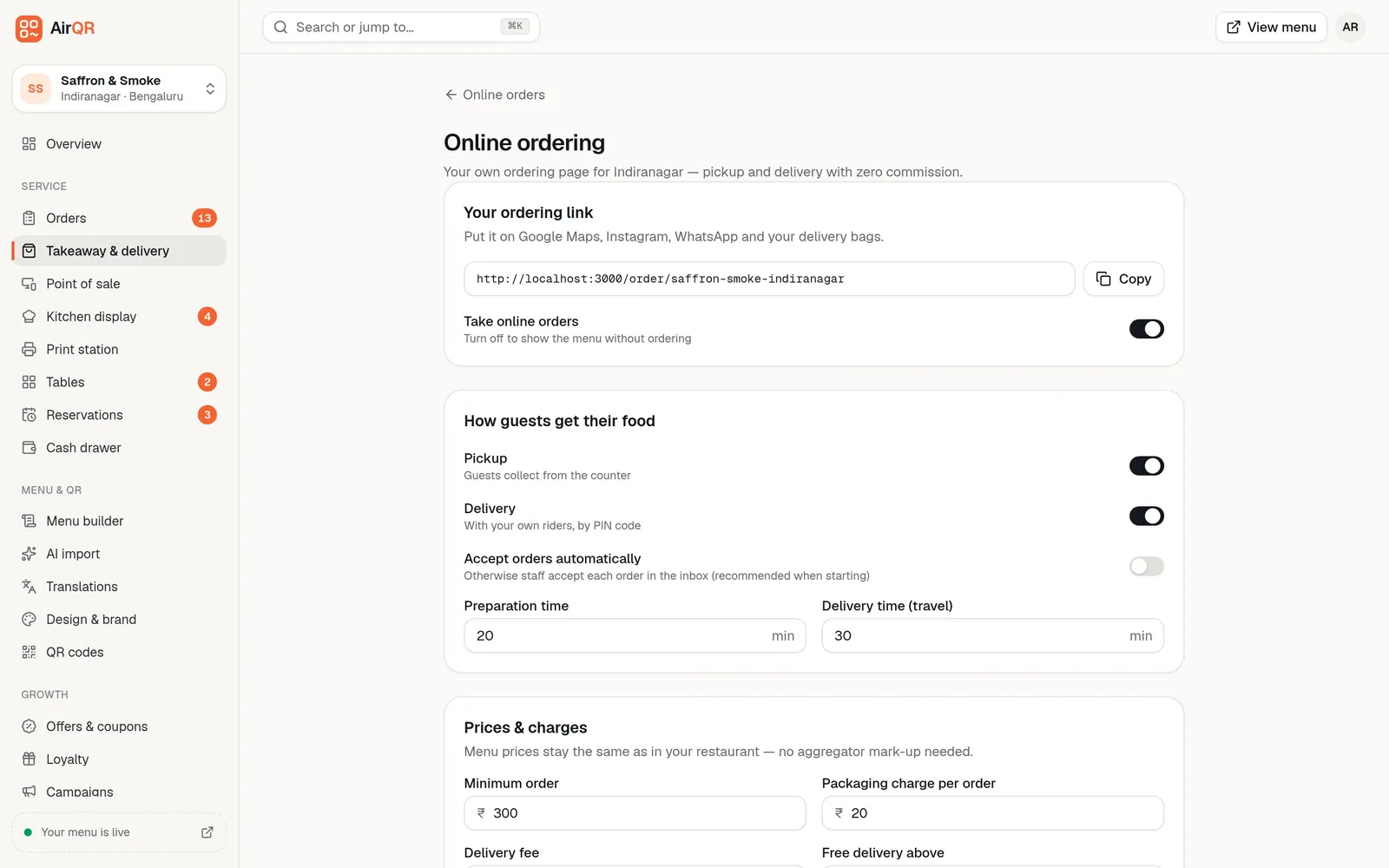
Pickup, order ahead and delivery options
Delivery is only one way to serve online orders. Many restaurants start with pickup because it needs no riders.
Takeaway now
The guest orders from the counter QR or with the cashier and collects it with a token number a few minutes later.
Order ahead for pickup
The guest orders from your link at home or work and collects at the counter, as soon as it is ready or at a time they choose. See takeaway tokens.
Delivery with your own riders
You set the PIN codes you deliver to, with a fee, minimum order and travel time for each area. Guests outside those areas are asked to choose pickup.
Scheduled orders and time slots
Let guests pick a time and cap the number of orders per slot, so the kitchen is not swamped at 8 pm.
Tracking for the guest
The guest sees where the order stands, and for delivery they see the rider's name once it is sent out.
Aggregator delivery for new guests
If you want reach beyond your regulars, keep an aggregator listing alongside your own link.
What about integrating Swiggy and Zomato into your system?
Some billing platforms bring aggregator orders onto the same screen as your own orders. Petpooja lists direct Zomato and Swiggy integration with reconciliation against payout sheets, and UrbanPiper sells Hub for the same purpose. That saves staff from watching several tablets and helps when you check payouts. It makes aggregator orders easier to run, but those orders are still placed through the aggregator and still carry the aggregator's commission.
AirQR focuses on the other channel, your own. Pickup and delivery orders from your own link and QR carry 0% commission from AirQR, the margin on each one stays with you, and you keep the guest's name and phone number. AirQR does not bring Swiggy and Zomato orders into its bills, so you keep handling those through the aggregator. Many restaurants do both, using the apps to be found and their own link for regulars. Our AirQR and Petpooja comparison and the buyer's guide explain how to weigh this.
Remember the tax side too. On aggregator orders the platform pays the GST, and on your own link you charge it yourself. See GST for restaurants in India.
A checklist before you switch on online ordering
- Your menu has current prices, photos and sold-out labels
- You know your preparation time and the area you can deliver to
- Your UPI ID is set up, so guests can pay you directly
- Someone is assigned to accept orders and call the guest if needed
- Your ordering QR is printed for bags, bills and the counter
- You have chosen pickup, delivery or both, and set a minimum order
- You have told your regulars where to find your link
Questions
What is an online food ordering system?
It is a menu on the internet where guests choose dishes, pick pickup or delivery and pay, and the order reaches your kitchen. It can be an aggregator app, your own ordering link, or both.
What is zero commission online ordering?
It means the ordering system takes no percentage of each order. With AirQR, orders from your own online ordering link carry 0% commission from AirQR, and guests pay you directly. You still pay for the software plan.
Is there a Swiggy and Zomato alternative in India?
You can add your own ordering link beside the apps, so regulars order direct and the apps stay for discovery. It is a second route, not a full replacement for the reach of an aggregator.
How can I reduce Swiggy and Zomato commission?
You cannot change the platform's rate, but you can move repeat guests to your own link with a QR code in every bag, your link on Google Maps and Instagram, and a small offer for direct orders.
Do I need a website for online ordering?
No. A single ordering link or QR code that opens your menu and takes orders is enough. AirQR gives each outlet its own ordering page with no app for guests.
Can guests pay by card on my online ordering page?
Not yet. Guests can pay by UPI at checkout or choose pay on pickup or delivery. Card and wallet payments through a gateway are not available yet.
Does AirQR bring in Swiggy and Zomato orders?
No. AirQR focuses on your own ordering channel, so aggregator orders are not in its bills and you keep handling them through the aggregator. On those orders the platform pays the GST.
Sources
- Petpooja online order management (aggregator integration) · checked 10 October 2026
- UrbanPiper home page (Hub, Meraki) · checked 10 October 2026
- UrbanPiper Hub page · checked 10 October 2026
- ClearTax on GST for restaurant services through e-commerce operators · checked 10 October 2026
- CBIC Central Tax (Rate) notifications index (Notification 17/2021) · checked 10 October 2026
Keep reading
Try AirQR in your restaurant
Set up in minutes on the phones, tablets and printers you already have. 28-day free trial.