KOT and bill printing
Restaurant billing software with printer support for KOT and bills
AirQR prints a kitchen order ticket (KOT) the moment an order reaches the kitchen and a GST bill when you settle the check, on the usual 58 mm and 80 mm thermal printers. Bar items go to the bar printer and food goes to the kitchen printer. It works over Wi-Fi, USB or Bluetooth, and a printer that goes offline never loses an order.
- KOTs split by kitchen station
- 58 mm and 80 mm thermal printers
- Wi-Fi, USB and Bluetooth
What restaurant billing software with a printer should do
Most owners want the same few things from a billing machine. When a captain sends an order, a ticket should come out in the kitchen without anyone walking over. When the guest is ready to pay, the bill should print with your GSTIN and the right tax lines. If the printer jams or the Wi-Fi drops, nothing should disappear.
AirQR does this on the thermal printers Indian restaurants already use, such as Epson, TVS, Posiflex, Everycom, Rugtek, Xprinter, Retsol and Hoin, and on small 58 mm Bluetooth handhelds. You add each printer once and choose what it prints. After that, tickets and bills come out by themselves.
Printing sits on top of the same restaurant POS your captains and cashiers already use, so a KOT can come from the POS, a guest's QR order or an accepted online order, and all of them land on the same printers.
A KOT the cook can read at a glance
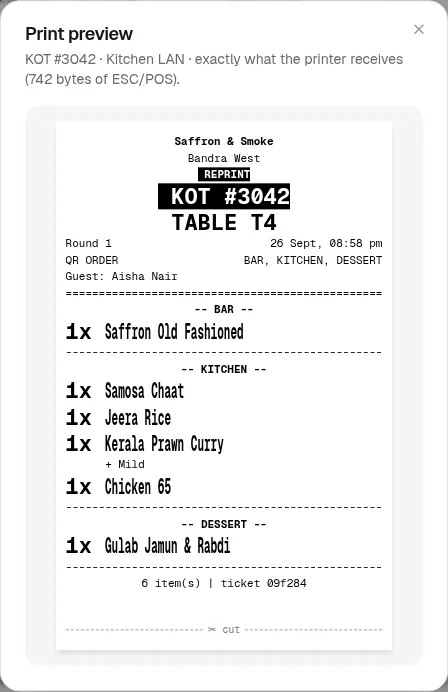
Each ticket shows your restaurant name, a big KOT number, the table, the round and the time. It also says where the order came from, whether the POS, a QR order or an online order, along with the guest's name. Items are printed large, with sizes, add-ons and notes underneath.
A second round on the same table prints as its own ticket, marked Round 2, so the kitchen never wonders what is new. Takeaway tickets carry a big token number, and parcels print a clear PARCEL mark.
- Table, TAKEAWAY or DELIVERY at the top
- Round number, so repeat orders are obvious
- Items grouped under bar, kitchen, tandoor or dessert
- REPRINT banner on any copy, so a dish is never cooked twice
What prints without anyone pressing a button
Once a printer has auto-print on, these come out by themselves. Anything else prints when someone taps Print.
KOT on every round
A KOT prints when staff press Send to kitchen, when a guest's QR order arrives or is accepted, and when an online order is accepted.
Split by station
Each printer lists the stations it prints for. Drinks go to the bar printer, tandoor items to the tandoor printer, and a printer with nothing to print for that order stays quiet. See stations.
VOID and CHANGE slips
When a dish is removed or added after the kitchen has the ticket, a short slip says exactly what changed. Removed items read VOID, DO NOT MAKE.
Bill on settle
A tax invoice prints when the check is closed with payment. Online orders print their bill when they are accepted.
Cash drawer opens
A drawer plugged into the bill printer opens when a cash bill prints on settle. Card and UPI bills leave it shut.
Cash reports
Cash drawer reports can be sent to the printer from the cash drawer page.
Bill printing at the counter
A bill printer can print the tax invoice by itself the moment a check is settled, or only when the cashier taps Print bill. A bill printed before payment carries a UPI QR for the exact amount due, so the guest can scan it at the table. Takeaway bills carry the token number in large type, and a bill printed a second time is marked DUPLICATE.
Each printer has its own paper width, 58 mm or 80 mm, and can print more than one copy of every KOT or bill. Your FSSAI number or a line such as opening hours goes in the receipt header, and a thank you or Instagram handle in the footer. What the bill says about GST is covered on the GST billing page.
Wi-Fi, USB or Bluetooth printer
Pick the connection that matches the printer and the device it is next to. You can mix them in one outlet.
- Wi-Fi or LAN cable
- Best forKitchen and bar printers
- NeedsA small free helper program on a computer that stays on at the outlet
- USB cable
- Best forA billing printer on the counter computer
- NeedsChrome or Edge on that computer, or Chrome on an Android tablet with a USB-OTG cable
- Bluetooth
- Best forA 58 mm handheld a waiter carries
- NeedsChrome on an Android phone, Windows or Mac
- Printer installed on a computer
- Best forA USB printer on a Windows PC, or an ordinary A4 printer
- NeedsThe same helper program on that computer
- Print window
- Best forAny printer, and Hindi or other scripts on paper
- NeedsAny browser. It is the least automatic option
iPhone, iPad, Safari and Firefox cannot connect to USB or Bluetooth printers. On an iPad, use a Wi-Fi printer through the helper or the print window.
One screen for every printer in the outlet
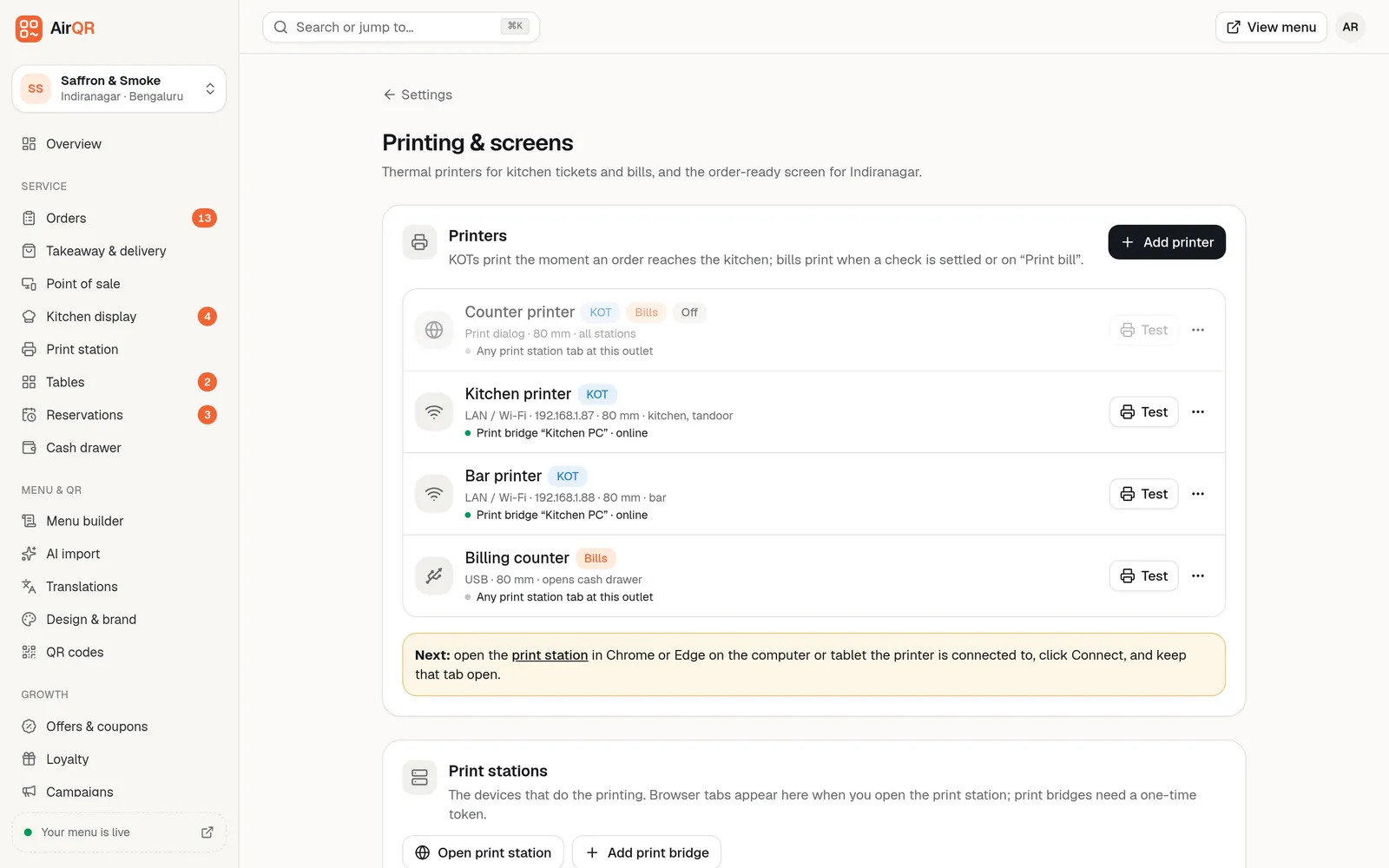
Settings shows each printer as a card with its name, what it prints, its connection, paper width and whether the computer driving it is online. The Test button prints a test page, and a preview shows exactly what the printer would receive before service starts.
A typical hotel setup has a kitchen printer and a bar printer on Wi-Fi, and a billing printer with a cash drawer at the counter. The page Devices lists every printer next to the screens and tablets your team uses.
How to connect your first printer
- 01
Open Add printer
Go to Settings, then Printing and screens, and press Add printer. The wizard asks how the printer is connected and helps you find it.
- 02
Say what it prints
Name it, choose Kitchen tickets, Bills or both, pick the kitchen stations for KOTs, and set 58 mm or 80 mm paper.
- 03
Print a test page
Press Save and print test page. For a USB or Bluetooth printer, keep the Print station page open in Chrome or Edge on that device while you serve. Step by step help is in setting up a USB or Bluetooth printer and setting up a Wi-Fi printer.
When a printer misbehaves, nothing is lost
Every print goes into a queue in AirQR first, so a printer problem becomes a delay and not a lost order.
- Prints wait in the queue if the printer is off or out of paper, and come out when it is back
- A failed print is tried again up to 3 times before it is marked Failed
- A print older than 30 minutes is not printed by itself, so a printer switched on in the morning does not spit out last night's orders
- Recent prints lists the latest jobs, with a Print button for failed or missed ones and Again for another copy
- The kitchen display keeps working even if every printer is down
- A print station tab on the same device still prints when the POS is working offline
Limits worth knowing before you buy
Thermal printers print basic text, so the rupee sign appears as Rs. and Hindi, Tamil or other scripts print the item's English name. Keep an English name on every dish. If you want regional scripts on paper, use the print window connection.
A USB billing printer on Windows usually works best as a printer installed on the computer, because Windows hands it to the maker's driver. Kitchen printers are more dependable on Wi-Fi than on a tablet that may go to sleep. If you would rather not use paper in the kitchen at all, a kitchen display can replace the printer, or work alongside it.
For fixes to common problems, such as blank paper, garbage characters or text cut off, read printer troubleshooting.
Questions
Which printers work with restaurant billing software like AirQR?
Standard 58 mm and 80 mm thermal receipt printers that understand ESC/POS, the common command language most receipt printers use. That covers the usual brands in Indian restaurants, such as Epson, TVS, Posiflex, Everycom, Rugtek, Xprinter, Retsol and Hoin, and 58 mm Bluetooth handhelds. An ordinary A4 or Letter printer also works for bills when it is installed on a computer running the helper program.
Can I print KOTs from a Bluetooth printer?
Yes. Most Bluetooth receipt printers, including 58 mm handhelds, connect through Chrome on an Android phone, Windows or Mac, using the Print station page. Some older Bluetooth printers do not show up in the browser, and those can be paired to a Windows computer and used from there instead.
Can the bar and the kitchen each get their own KOT?
Yes. Every item belongs to a station and every KOT printer lists the stations it prints for. A round with drinks and food prints a drinks ticket on the bar printer and a food ticket on the kitchen printer.
Does printing work with an iPad or iPhone?
Not for USB or Bluetooth printers, because iPhone, iPad and Safari cannot connect to them. Use a Wi-Fi printer through the helper program on a computer, or the print window connection.
What happens to my orders if the printer is off?
They wait in a queue and print when the printer is back. A failed print is retried up to 3 times, and you can reprint any job from Recent prints. The kitchen can keep cooking from the kitchen display.
Why does the rupee sign print as Rs. on my bill?
Most thermal printers cannot print the rupee symbol, so AirQR prints Rs. instead. It is deliberate, and it keeps bills readable on every printer.
Can I open my cash drawer from the bill printer?
Yes, if the drawer is plugged into the bill printer and Open the cash drawer is on. It opens when a bill with a cash payment prints on settle. See cash drawer for counting and reports.
Keep reading
Try AirQR in your restaurant
Set up in minutes on the phones, tablets and printers you already have. 28-day free trial.