Guide for restaurant owners
What is restaurant POS software, and what does it do?
Updated · 9 min read · By the AirQR team
Restaurant POS software is the system your staff use to take orders, send them to the kitchen as KOTs, print the GST bill and record how each bill was paid. Owners in India often call it billing software, though a full POS does more than print bills. A good one also keeps day-end totals, tax figures and stock in one place, so you see the day's numbers without adding up slips.
- Every part explained in plain words
- Cloud vs installed, compared fairly
- Questions to ask any vendor
What is restaurant POS software?
POS stands for point of sale, the place and moment where a guest orders and pays. In a restaurant that used to mean a billing machine at the counter with a cash drawer beside it. Today it means software that runs on a computer, tablet or phone and connects the counter, the captain, the kitchen and the bar.
Owners use many names for the same idea. You may hear billing software, billing machine, hotel software or restaurant management system. They overlap, but they are not identical. Billing software is the narrowest and only prints bills. A POS adds order taking, kitchen tickets and payments. A restaurant management system is the widest and adds stock, staff, reports and sometimes online ordering around the POS.
The easiest test is to ask what happens after the captain taps an order. If the order reaches the kitchen on its own and the bill is ready when the guest asks, you have a POS. If someone has to carry a slip or retype items, you have billing software.
How does a POS system work in a restaurant?
Follow one table through a normal evening and you will see every part of the system at work.
- 01
The order is taken
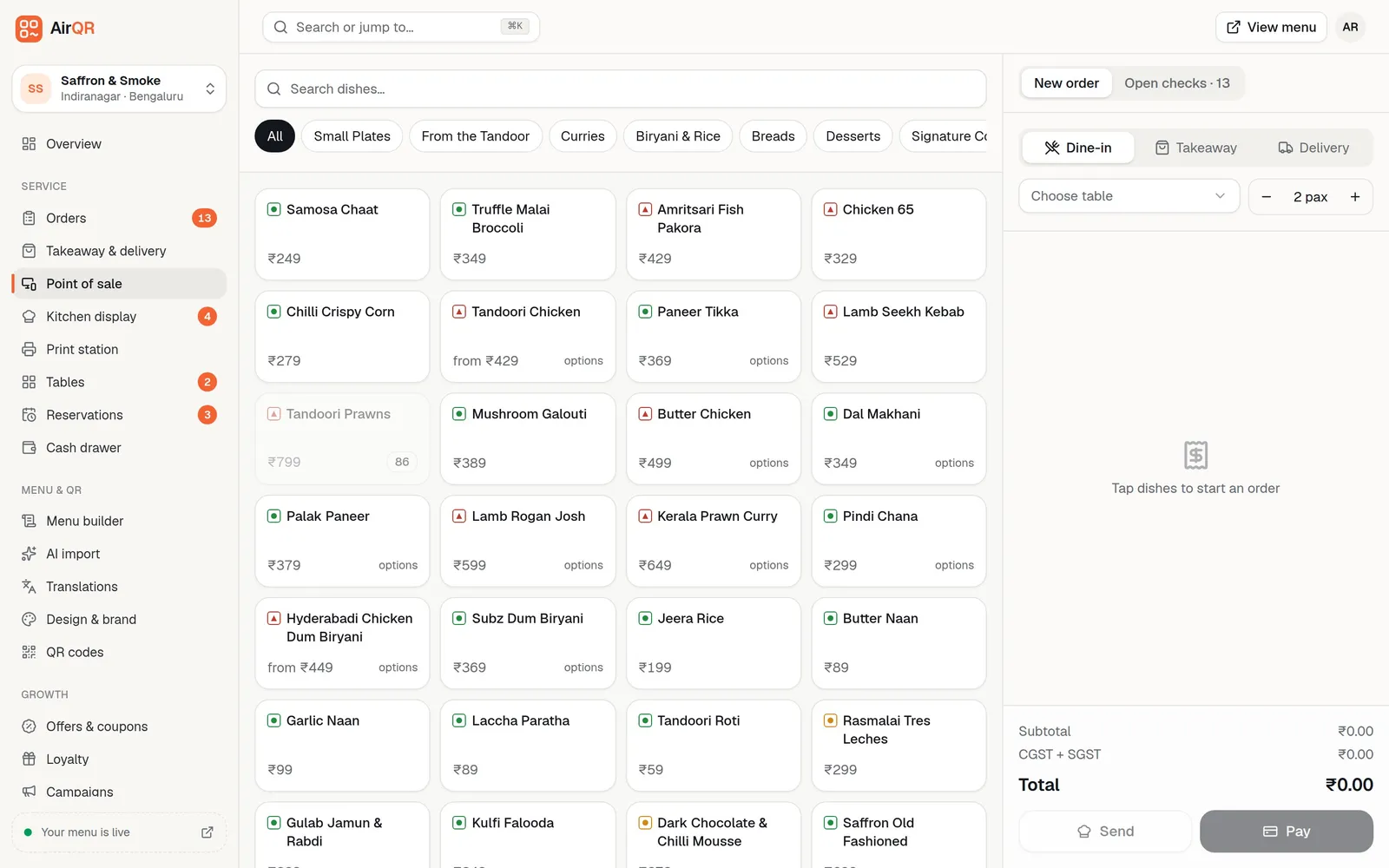
A captain or cashier opens the table on the POS and adds dishes by tapping them or typing a short code. Sizes, add-ons and notes such as no onion are added here. Some restaurants let guests order from a QR code on the table, and those orders join the same bill.
- 02
The kitchen gets a ticket
When the order is sent, a kitchen order ticket (KOT) prints in the kitchen or appears on a kitchen screen. Dishes go to the right place, so drinks reach the bar and tandoor items reach the tandoor.
- 03
More rounds are added
Guests ask for more rotis or another round of drinks. Each addition goes to the kitchen as a new round on the same bill, so nothing is billed twice.
- 04
The bill is printed
When the guest asks for the bill, the POS adds up items, discounts, any optional service charge and GST, and prints it. Many restaurants print a UPI QR for the exact amount on the bill.
- 05
Payment is recorded
The guest pays by cash, card or UPI. The cashier records it, and for cash the system shows the change to return. A split bill is recorded in parts.
- 06
The day is closed
At night the owner or manager checks sales by payment type, voided items, tax totals and the cash in the drawer. The same records feed the next day's reports.
The parts of a restaurant POS
Different products bundle these differently, so check each one when you compare.
Billing
Builds the bill, applies discounts, any optional service charge and GST, handles split bills and prints a proper tax invoice with your GSTIN. See GST billing.
KOT printing
Sends the order to the right kitchen printer the moment it is placed, one slip per station, with reprints clearly marked. See KOT printing.
Kitchen display (KDS)
A screen in the kitchen that shows live tickets with timers instead of paper. Many kitchens use it alongside a printer. The kitchen display system guide explains it fully.
Payments
Records cash, card and UPI against each bill. Some systems also collect money through a payment gateway, and others only record what you receive. Ask which one you are buying.
Reports
Daily sales, item-wise sales, payment totals, tax summaries and cash-up reports. Good reports let you see yesterday's numbers in a minute, not at month end.
Inventory
Tracks ingredients and takes stock off as dishes sell, so you see what is low before it runs out. Not every POS includes this, and some need an add-on.
Tables and menu
A floor plan with live table status, and a menu you can change in minutes. Sold-out dishes should disappear from every screen at once.
Online and QR ordering
Takes orders from a QR menu on the table or your own ordering page and feeds them into the same kitchen and bill.
Cloud POS and installed POS compared
Both types work. The right one depends on your internet, your outlets and who looks after the computers.
- Where does the data live?
- Cloud POSOn the vendor's servers, reached through a browser or app
- Installed POSOn a computer in your restaurant
- What if the internet drops?
- Cloud POSDepends on the product. Good ones keep billing offline and sync later, so ask for a demo with the router switched off
- Installed POSKeeps working, because it does not need the internet for billing
- Updates
- Cloud POSThe vendor updates it for everyone, usually without you doing anything
- Installed POSYou or a technician install updates on each machine
- Several outlets
- Cloud POSOne login can see every outlet and compare them
- Installed POSEach outlet is separate unless the vendor adds a sync service
- Checking sales from home
- Cloud POSOpen a phone or laptop anywhere
- Installed POSOften needs a remote tool or a separate report export
- If the computer breaks
- Cloud POSSign in on another device and carry on
- Installed POSRestore from a backup, if you made one
- Typical weak point
- Cloud POSNeeds a reliable connection and clear offline rules
- Installed POSSingle computer, manual backups and slower updates
Whichever you choose, ask where backups are kept and how you export your data if you ever leave.
What hardware does a restaurant POS need?
Less than most owners expect. A cloud POS runs on a laptop, tablet or phone you may already own. Add only what your service needs.
A thermal printer is the usual first purchase. Bill and kitchen printers come in two common paper widths, 58 mm and 80 mm, and connect by USB, Bluetooth, Wi-Fi or a network cable. Check that the POS supports your printer model before you buy, and ask who sets up network printers.
A cash drawer plugs into the bill printer and can open when a cash bill prints. A barcode scanner helps bars and retail counters where every bottle has a barcode. A kitchen screen replaces or supports the KOT printer. A steady router and a small power backup matter more than any single device, because a counter that loses power during Saturday dinner loses money.
What POS systems do restaurants use in India?
There is no single answer, because restaurants differ. In broad terms you will meet four kinds of product. The first is the all-in-one cloud restaurant system that covers billing, kitchen, QR ordering and reports. The second is older desktop billing software installed on one computer. The third is a POS sold as part of an online ordering or delivery platform. The fourth is a large enterprise system built for chains with many outlets.
For a side-by-side look at one well-known option, read the AirQR and Petpooja comparison. For a method of shortlisting, see best restaurant POS software in India. To understand what you will pay and what bills usually grow around the base price, read restaurant POS cost in India.
How to choose a restaurant POS
Start from your own service, not from a feature list.
- Write down how an order moves in your restaurant today, from captain to kitchen to bill, and make the demo follow it exactly
- Decide whether you need dine-in only, or also takeaway, delivery and QR ordering
- List your stations, such as kitchen, tandoor and bar, and check that each can get its own tickets
- Test a bad day. Switch off the internet and print a bill
- Check the GST bill, including your GSTIN, the tax split and how service charge is handled
- Ask how many devices a plan covers and whether kitchen screens or printers cost extra
- Make sure your staff can learn it in one shift. Try it with your slowest captain
- Confirm you can export your menu and sales if you ever leave
Questions to ask a vendor before you buy
- What exactly is in the price, and what is an add-on (kitchen display, inventory, extra outlets, extra users)?
- Is there a free trial, and does it include every feature or a cut-down version?
- Do you collect payments for me, or only record them? What do you charge for that?
- Do you take any commission or percentage of my online orders?
- What works offline, and how do orders sync when the internet returns?
- Which printers and scanners are supported, and who helps me set them up?
- How long does it take to move my menu in, and can you import from a spreadsheet or photo?
- Who do I call when billing stops on a busy night, and during which hours?
- How do I get my data out if I leave?
Where AirQR fits
AirQR is restaurant software for India that covers the parts above. Staff bill from a laptop, tablet or phone, add dishes by tapping or typing a short code, and send rounds to the kitchen. Kitchen tickets print per station or appear on a kitchen display, and a kitchen display is optional because the POS can run the whole check without one. The bill prints with a UPI QR for the amount due, and a bill can be split by person, by items or by amount, with each guest getting their own printed bill. See the restaurant POS page for the full picture.
The POS is included in every AirQR plan and can be set up for a restaurant, bar, café or counter, quick service stall or a venue with shared tables, so a bar is not asked for a guest count and a counter is not asked for a table. It works offline on any counter device that has opened the POS once while online, and it syncs when the connection returns. AirQR records payments but does not collect them, so UPI money goes straight to your bank account and there is no gateway fee. It takes 0% commission on your own online orders.
You can try everything on the 28-day free trial before you decide. See pricing for current plans, and the POS basics help article for how staff use it day to day.
- Billing with GST and split bills
- KOT per station and a live kitchen screen
- Day-end cash-up reports
- QR menu and QR ordering on the same bill
Questions
What is a POS in a restaurant?
It is the system at the counter and on the floor where orders are taken, sent to the kitchen, billed and paid. The name comes from point of sale.
Is restaurant POS software the same as billing software?
Not quite. Billing software prints bills. A POS also takes orders, sends kitchen tickets and records payments, and often adds reports and stock.
Does a restaurant POS need the internet?
A cloud POS uses the internet to sync your data. Some can keep billing when it drops and sync later, so ask the vendor to show you that on a real device.
Can a small hotel or café with one counter use a POS?
Yes. A single counter with a thermal printer is enough to start, and you can add a kitchen screen or QR ordering later.
Does restaurant POS software handle GST?
A good one prints a tax invoice with your GSTIN and the tax split, and gives you GST totals for your filing. Check how service charge is shown before you buy. The GST guide covers the rules.
How much does restaurant POS software cost?
It varies by product, by number of outlets and by add-ons. The POS cost guide lists what to compare.
Keep reading
Try AirQR in your restaurant
Set up in minutes on the phones, tablets and printers you already have. 28-day free trial.