For office, college, hospital and factory canteens
Canteen billing software for a lunch queue that keeps moving
AirQR is canteen billing software for office, college, hospital and factory canteens in India. Staff bill at the counter with short codes, every order gets a token, and a TV shows which tokens are ready. A self-order kiosk can take the overflow, menus switch between breakfast, lunch and snacks by time, and each shift ends with a cash report. AirQR has no employee wallet, meal card or payroll deduction.
- Tokens and an order-ready TV
- Breakfast, lunch and snack menus by time
- Self-order kiosk for the lunch queue
What canteen billing software has to do
A canteen is a counter business with a very sharp peak. Little happens for hours and then hundreds of people want lunch in the same short window. Cafeteria billing software has to keep the line moving, show the kitchen what to cook and make sure the right plate reaches the right person.
AirQR is set up for this pattern. You choose a Quick service profile in the POS settings, which shows Eat here and Takeaway, hides the table picker and gives every bill a daily token that restarts at 1 each morning. Cashiers add dishes with short codes, and the bill, the payment and the token happen with one Charge button.
It also matters what AirQR is not. It is a billing and ordering system, so it does not hold employee balances, issue meal cards or deduct from salary. The section near the end of this page lists those gaps, so a corporate canteen can decide with open eyes.
A canteen day from breakfast to the shutter
Here is how one working day can run in an office or college canteen.
- 01
Before opening
The manager checks that the Breakfast menu is the one being served and marks the idli batter as sold out because it ran short. The cashier opens the drawer with the float and the TV near the counter is opened to the order-ready page.
- 02
8 to 10 am, breakfast
People queue for tea, idli and poha. The cashier types a short code and presses Charge. A tea station and a kitchen station each see their part of the order on their own screens.
- 03
Noon to 2 pm, the lunch peak
A lunch menu takes over by its schedule. Some guests order on a self-order kiosk tablet, pay by UPI or at the counter, and get a token in big type. Others scan the QR at their seat. The cashier bills the rest with short codes.
- 04
Calling the tokens
When a plate is ready, the token moves to Ready on the TV with a chime. Staff match the token and press Handed over. No one shouts a name across a crowded hall.
- 05
The afternoon snack window
A Snacks menu takes over. Samosas, tea and biscuits sell as a quick basket, and packaged items are scanned with a barcode scanner.
- 06
Closing
The cashier closes the drawer and the Z report lists sales, payments by cash, card and UPI, and the cash count. The manager looks at analytics and exports the day's orders if the contractor or company asks.
Canteen billing software at the counter
Everything below is part of the standard POS. The POS is included in every plan.
One Charge button
With quick billing on, one tap adds the items, takes payment and issues the token. The send button appears only when a kitchen screen or printer needs telling.
Short codes and a scanner
Type a code and a quantity, such as 3*TEA, and press Enter. Packaged snacks can be added by scanning their barcode. See short codes.
Walk-in by default
Start every order as a walk-in, so nobody is asked for a name or phone at a busy counter. Staff can add details for a regular.
Cash, card and UPI
The POS shows a UPI QR for the exact amount and records cash with change, and card payments from your own machine. AirQR records payments and does not collect them.
Several counters at once
More than one counter device can bill at the same outlet, and each keeps working through a Wi-Fi drop. Tokens are given when the device syncs.
Hindi on shared screens
Every staff screen is available in English and Hindi, and a shared till or kitchen screen can be set to Hindi for that device alone.
Menus for breakfast, lunch and snacks
Run several menus and give each its own days and hours. These timings are only an illustration.
- Breakfast
- DaysEvery day
- Hours7.30 to 10.30 am
- Lunch
- DaysMonday to Saturday
- Hours12 noon to 3 pm
- Snacks
- DaysMonday to Saturday
- Hours3.30 to 6 pm
- Late night tea
- DaysEvery day
- Hours10 pm to 1 am
Guests can browse a menu outside its hours but cannot order from it, and the QR opens the menu being served now. Staff can still ring up any item on the POS.
Tokens and the order-ready screen
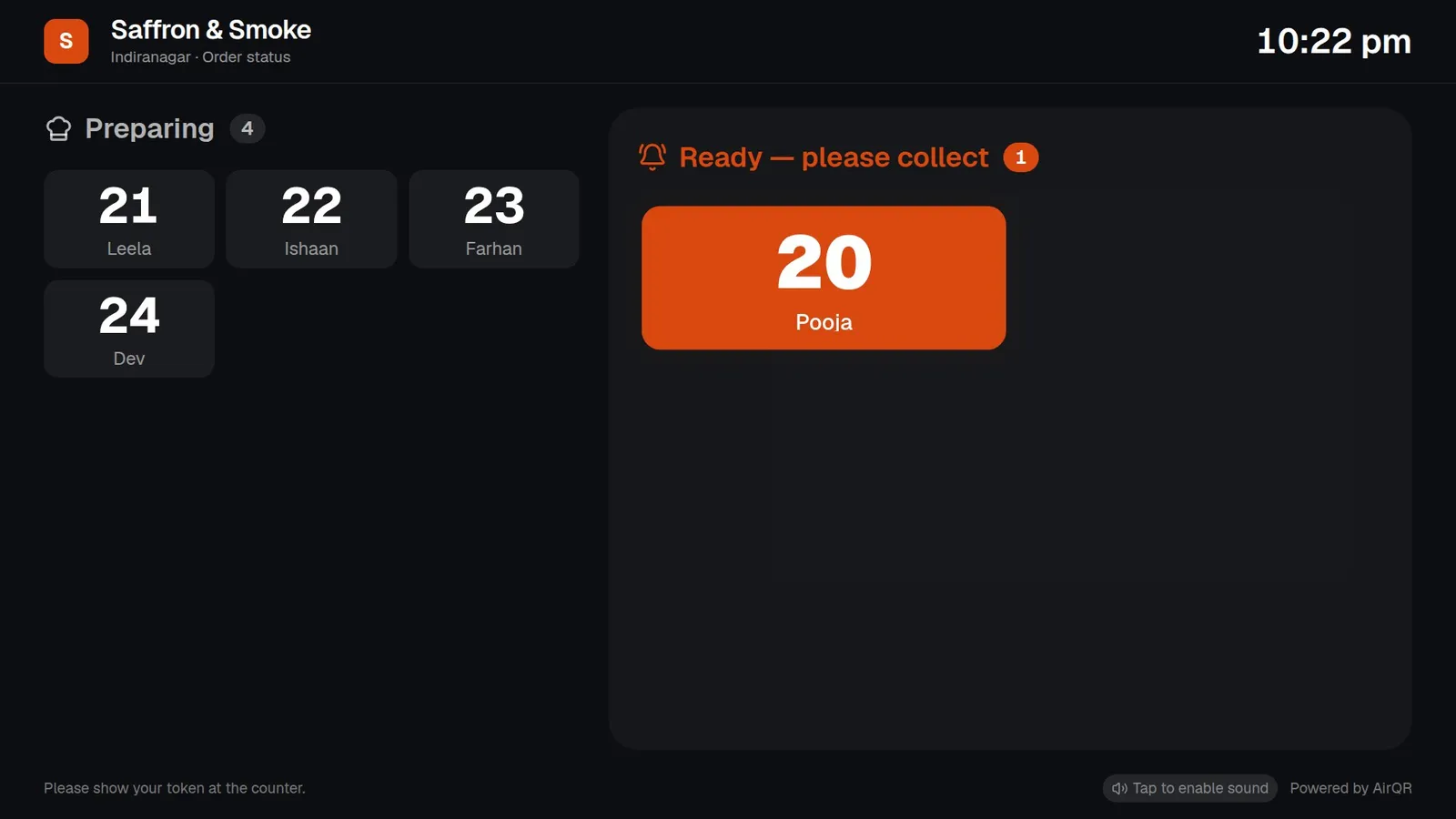
The order-ready screen is a web page for a TV or a spare tablet near the counter. It shows Preparing and Ready by token and first name, and nothing else, so no amounts or phone numbers are on show. Open it, tap once to turn the chime on and leave it. It lists takeaway and pickup orders and never shows dine-in. See the takeaway token system.
Each station can have its own screen. A pickup counter screen lists orders by token with the progress of every station, so staff can see which station is still working before they call the token.
- Newest ready token pulses and chimes
- Collected tokens drop off after about ten minutes
- A light theme is available for bright halls
Stations, the self-order kiosk and QR ordering
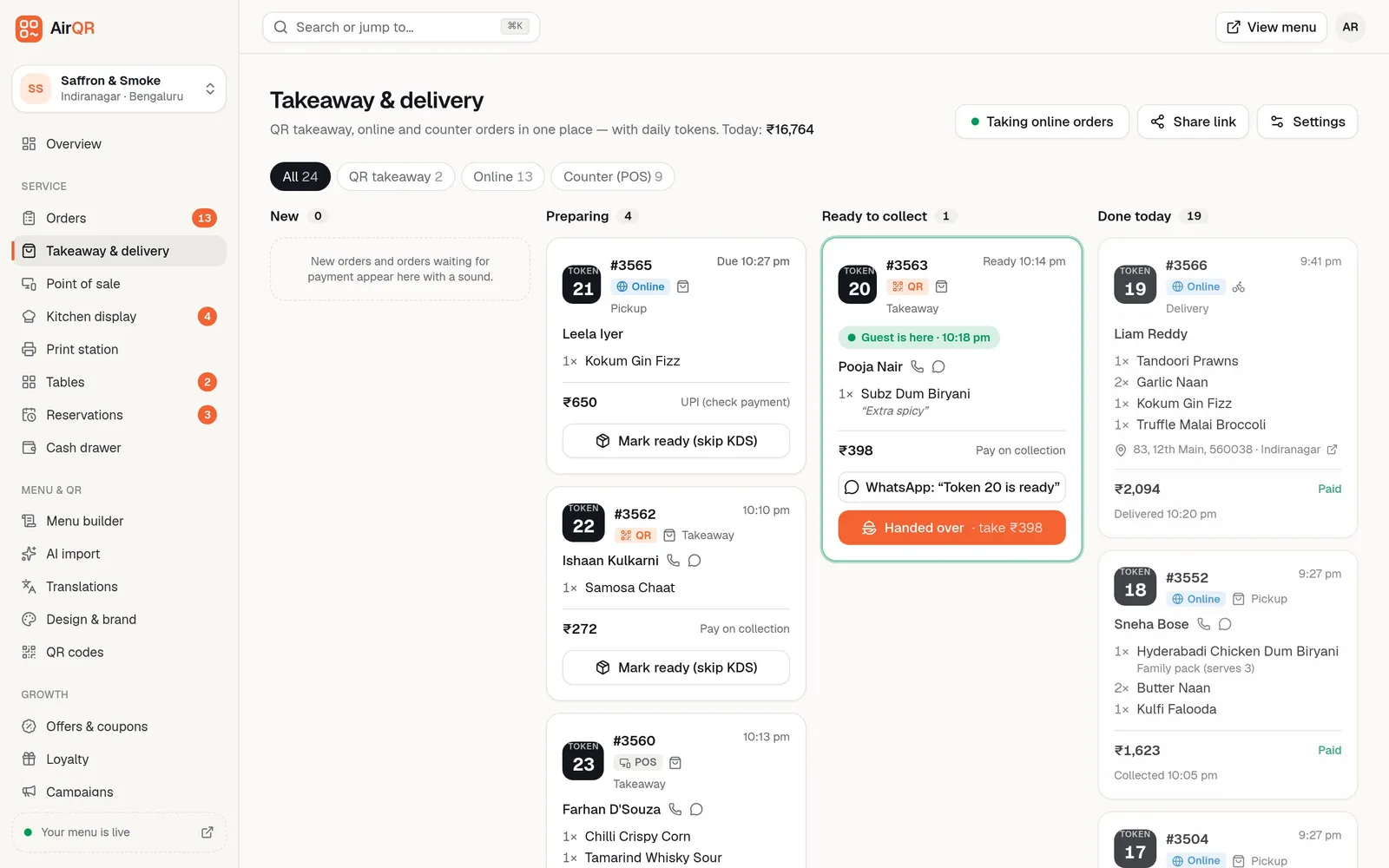
Add a station for each place that makes food, such as the thali counter, the snack counter and the tea point. Every dish is sent to one station, and each station can have its own screen and printer. The kitchen display shows timers that turn amber and then red when a ticket is late.
A self-order kiosk is a paired tablet where a guest picks Eat here or Take away, pays and gets a token. You can switch it on and off by a schedule, with several ranges in a day. Table QR ordering suits a seated canteen, and a counter QR suits takeaway. Kiosk availability depends on your plan, so check pricing. Read about the self-order kiosk.
- Kiosk guests choose English or Hindi
- Pay at the counter, by UPI or on collection
- Orders show on the board marked Kiosk
Reports for the canteen manager
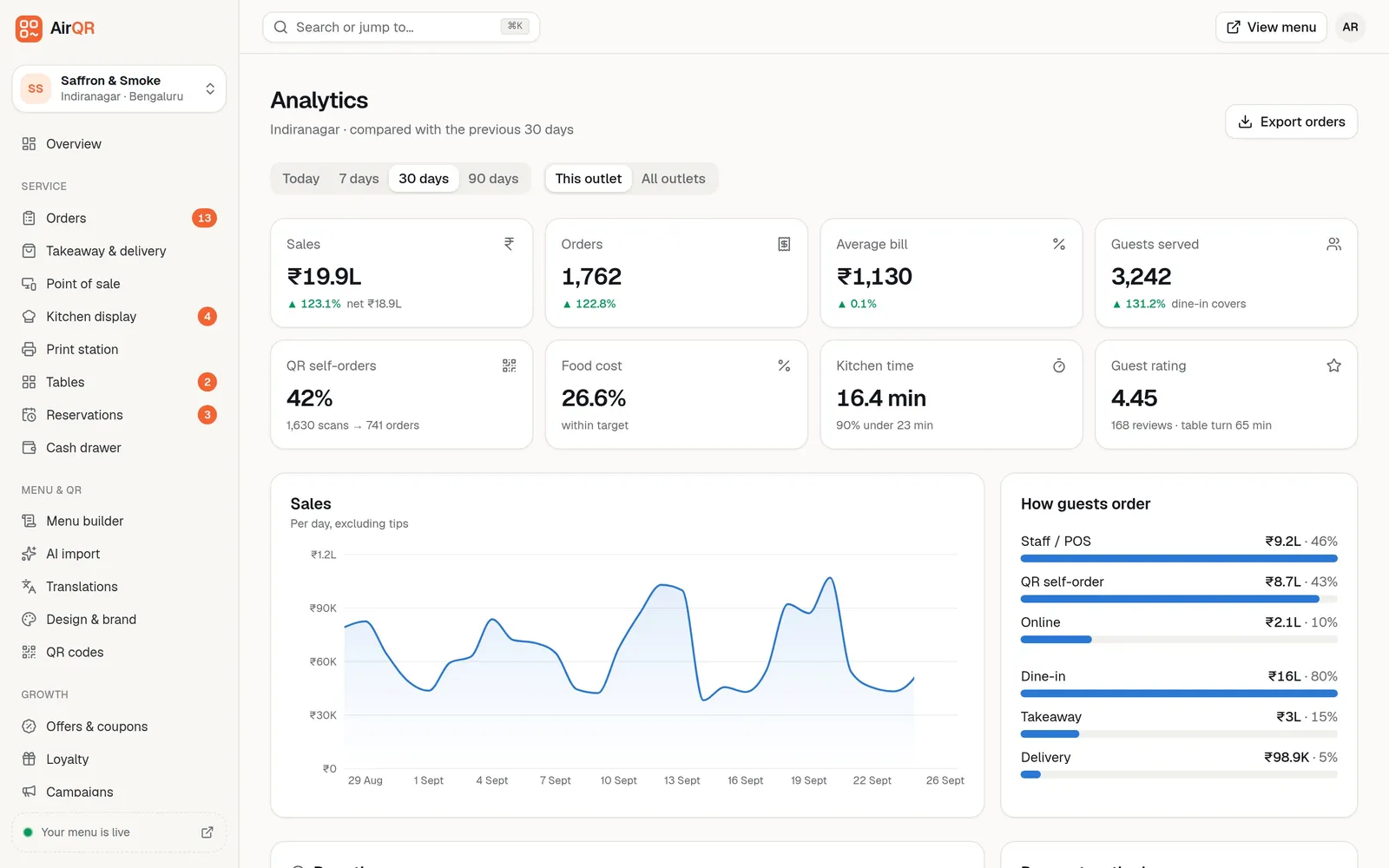
Every drawer session ends in a Z report with sales, discounts, tax, payments by method, voids and the cash count, which you can print on A4 or a thermal printer. Analytics shows sales, orders and the average bill, and a busy times map on plans that include it.
You can download the orders as a CSV, and GST files for your accountant. See reports and analytics and GST billing. AirQR charges the tax you set up, and a contractor canteen may be taxed differently from a restaurant, so confirm your rates with your CA.
Good to know before you set up a canteen
Read this before you start, so there are no surprises.
- Employee wallets, meal cards and prepaid balances are not part of AirQR
- Salary or payroll deduction for meals is not available
- Per employee subsidies and meal allowances are not available
- Coupons per employee are not available, although shared coupon codes exist
- Cash, card and UPI are recorded, and Other can record a payment with a reference
Questions
What is the best canteen billing software?
The best one is the one your cashiers can use at the lunch peak. Look for tokens, short codes, UPI and a screen that shows ready orders, then test it on your own menu during the free trial.
How much does canteen billing software cost?
It depends on your outlets and the modules you switch on. See pricing for the current plans. You can try everything free for 28 days.
Does AirQR support employee meal cards or payroll deduction?
No. AirQR does not hold employee balances, issue meal cards, deduct from salary or manage subsidies. It records cash, card and UPI payments at the counter.
Can college canteen billing software handle a break-time rush?
More than one counter device can bill at the same outlet, and a self-order kiosk and QR ordering spread the queue. Short codes and one Charge button keep each bill quick.
Can the canteen show different menus for breakfast and lunch?
Yes. Give each menu its own days and hours. Guests can browse a menu outside its time but cannot order from it, and staff can still bill it on the POS.
Can we use it in Hindi?
Yes. Every staff screen is available in Hindi, and a shared screen can be set to Hindi for that device. Printed tickets and bills stay in English.
Can one login run several canteens?
Yes, if you add each canteen as an outlet. They share the menu and keep their own tables, cash drawer and reports. The number of outlets depends on your plan.
Keep reading
Try AirQR in your restaurant
Set up in minutes on the phones, tablets and printers you already have. 28-day free trial.