For food trucks and street food carts
Food truck POS system that bills from a phone or tablet
AirQR is a food truck POS system for India. You bill on a phone or tablet, show a UPI QR for the exact amount, print the bill on a Bluetooth printer and call guests by token. Billing keeps working when the mobile signal drops and syncs when it returns. Guests can also scan a QR on the truck to order, or order ahead online for pickup.
- Bills on a phone or tablet
- Keeps billing offline and syncs later
- UPI QR, tokens and a Bluetooth printer
What a food truck needs from a POS
A food truck is a kitchen with a window. There is no dining room, no captain and often no room for a counter machine. The queue stands in the open, the signal comes and goes, and one person may take the order, cook and handle the money. Mobile billing for a food truck has to be quick to tap and light to carry.
AirQR runs in the browser, so the POS works on a laptop, a tablet or a phone you already own. You can install it like an app on a counter device. For a truck, switch tables off in the POS settings so staff never see a table picker, and every order gets a token for the day.
AirQR records payments and does not collect them. UPI goes straight from the guest to your bank account, and you confirm the credit in your own UPI app or on your soundbox before you record it.
A food truck evening from setup to close
This is one night at a truck that parks outside an office park.
- 01
At the base kitchen
While there is good Wi-Fi, the owner opens the POS on each phone or tablet that will bill. That saves the menu and settings on the device, which is what lets it work offline later. The Bluetooth printer is connected and a test page is printed.
- 02
On arrival
Staff open the drawer with the cash float. The Where to collect line is set to something guests can find, such as the blue truck by the main gate.
- 03
The first rush
The cashier types a short code like VP for vada pav, or 3*VP for three, presses Enter and taps Charge. Payment, bill and token happen together. The guest sees a UPI QR for the exact amount and the cashier checks the credit.
- 04
The signal drops
The connection pill turns to Offline. Billing carries on. Orders, cash, card and UPI are recorded on the device, and the kitchen ticket and bill print from the Bluetooth printer. Coupons and loyalty points wait until the signal returns.
- 05
Pickup orders arrive
Guests who scanned the QR on the truck, or who ordered ahead on your link, appear on the Takeaway and delivery board with a token and a sound. The cook marks them ready and the guest is called.
- 06
Closing
The cashier closes the drawer and prints the Z report. Back on Wi-Fi, everything done offline syncs and the screen says Back online.
Food truck POS system features for a small window
Everything below is part of the standard POS. It is not a separate truck product.
No tables, token on every bill
Choose the Quick service or Cafe and counter profile. Orders are Eat here or Takeaway, and each gets a daily token that restarts at 1 each morning.
Short codes for speed
Give each dish a short code and press Enter to add it. A quantity such as 2*VP adds two. A busy window with a queue behind it needs nothing slower. See short codes.
Walk-in by default
Start every order as a walk-in so the line is not slowed by asking for a name or phone. Staff can still add details for a regular.
A UPI QR for the exact amount
Add your UPI ID once. The POS and the printed bill then show a QR with the amount filled in, so guests do not type it. Some UPI apps limit amount-filled QR codes from unverified merchants, so keep your shop's own QR handy.
Sold out in one tap
When the buns run out, switch the item off. It greys out on the till and on the guest menu.
Know your devices
Name each phone and tablet, see who is signed in, and sign a lost one out from Settings. See devices.
What works offline and what needs a signal
Offline billing is only as good as the setup. Here is the plain list.
- Taking orders with sizes, add-ons and notes
- Without internetWorks on the device
- Cash, card and UPI payments, and split payments
- Without internetWorks and is recorded on the device
- Kitchen ticket and bill on a Bluetooth printer
- Without internetWorks if the Print station page is open on the same device
- UPI QR on the payment screen
- Without internetDrawn on the device, but the guest's phone needs data
- Order numbers and takeaway tokens
- Without internetGiven when the device syncs, with a reference like C1-0007 until then
- Order-ready screen and QR orders from guests
- Without internetNeed the internet
- Coupon codes and loyalty points
- Without internetNeed the internet
- Changing or voiding items already sent
- Without internetNeeds the internet
- Refunds
- Without internetNeed the internet
Open the POS once while online on every device, or it has no offline copy. Do not sign out with changes still waiting, because signing out deletes them from that device. Read how offline billing works.
A QR menu and tokens on the truck
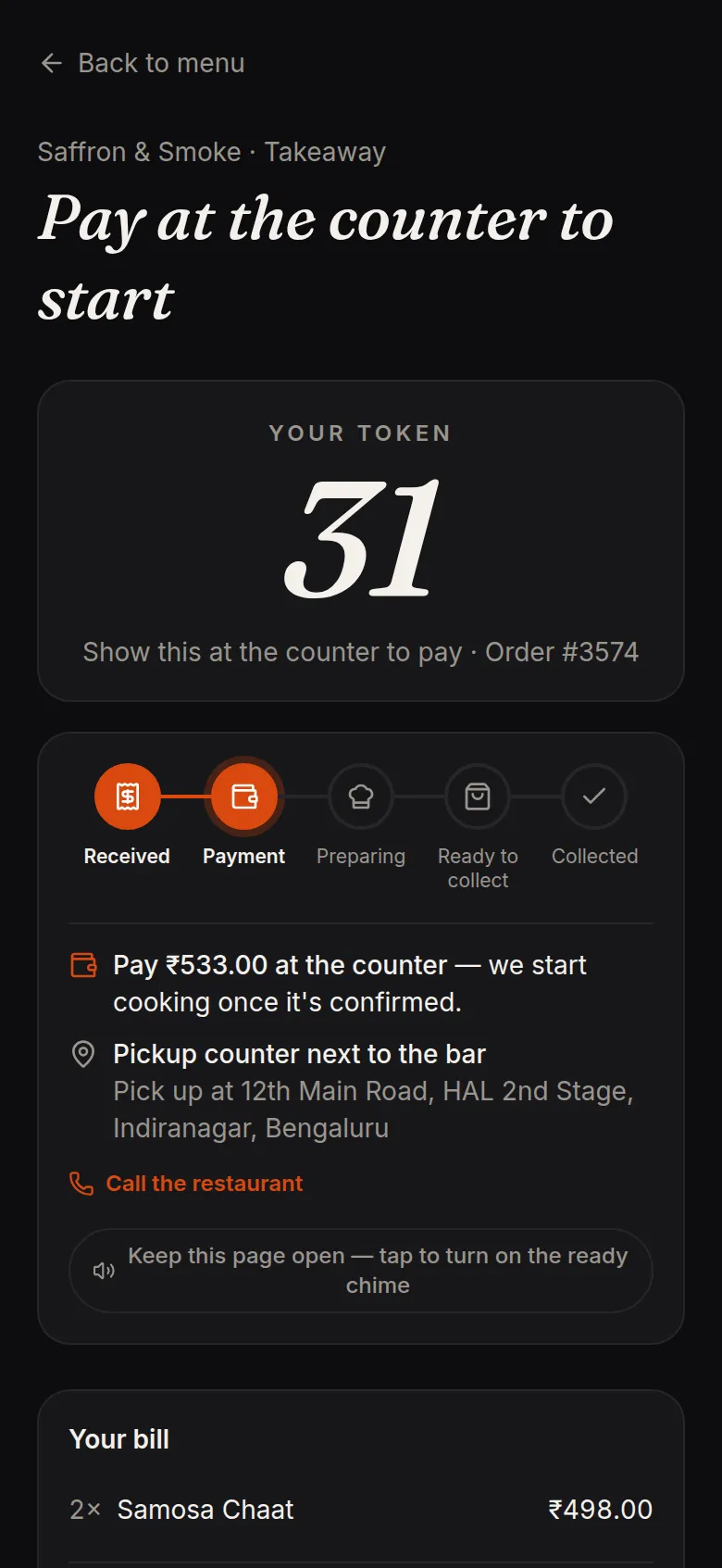
Print a Takeaway counter QR and stick it on the window or a standee. A guest scans it, reads the menu with photos and prices, orders, gives a name and phone and gets a token. With pay first on, the order waits until the cashier confirms the UPI credit, so the cook does not start food that is not paid for. An unpaid order cancels itself after the time you set.
The guest can follow the order on their phone and tap I'm here to collect. Staff can send a WhatsApp message when the token is ready. A tablet or spare phone showing the order-ready page lets guests see Preparing and Ready by token, without names being shouted. That page needs the internet. See the takeaway token system.
- A QR on the truck window gives every order a token
- Pay first keeps unpaid orders out of the kitchen
- The guest's phone shows each step until Ready to collect
Bluetooth printers and the print station
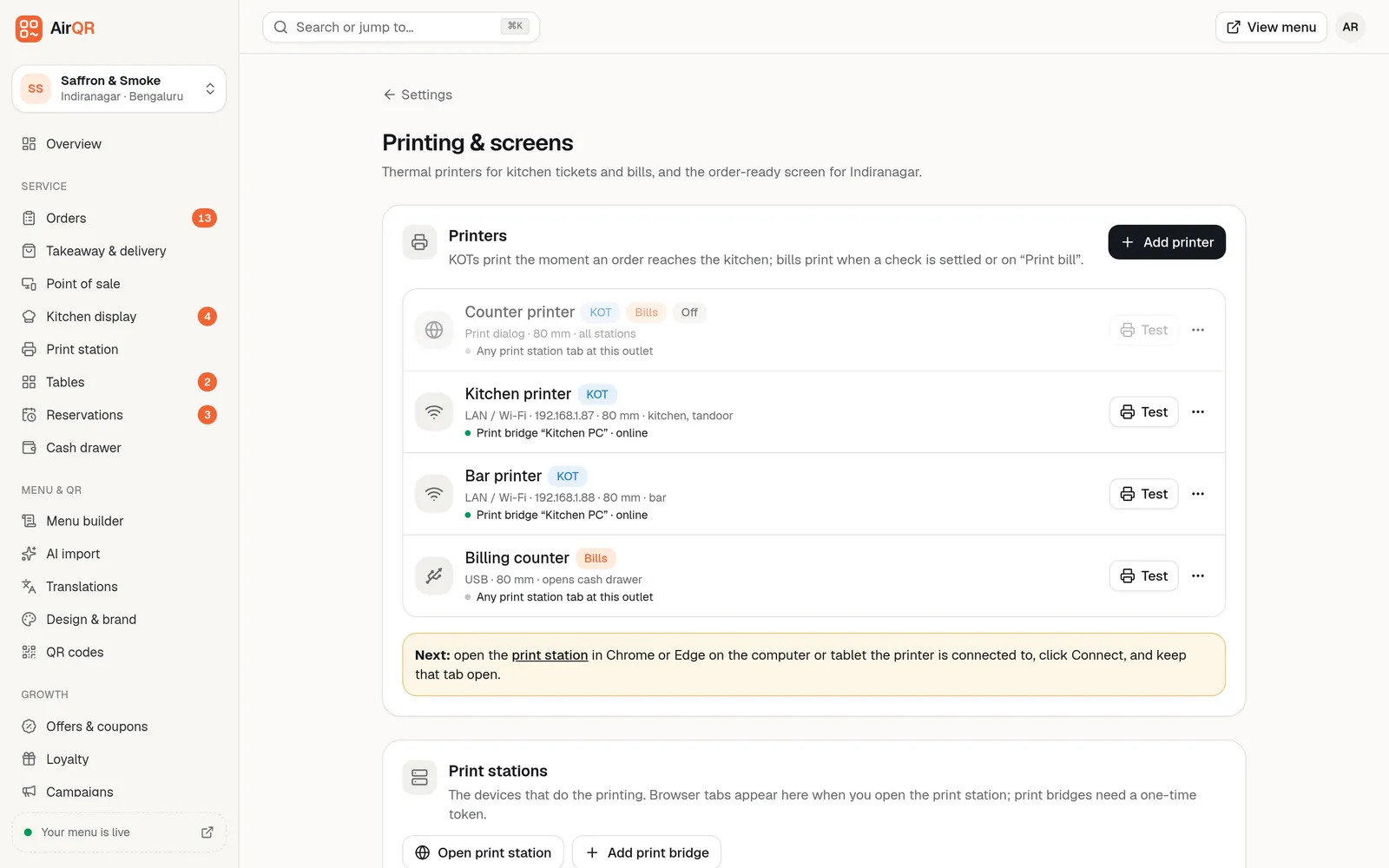
AirQR prints kitchen tickets and bills on standard 58 mm and 80 mm thermal printers. A small 58 mm Bluetooth printer suits a truck. You add it with the Add printer wizard and a test page, and a Print station page stays open in the browser on that device to do the printing. Keep the screen awake and the device on a charger.
Bluetooth printing works from Chrome on an Android phone or tablet, and from Chrome on Windows and Mac. An iPhone or iPad cannot connect to a Bluetooth printer, so use an Android device for the printer, or print through the browser print window. Details are in kitchen ticket printing.
Pickup orders before the truck arrives
Your online ordering page lets a regular order ahead and choose a pickup time. Put the link in your Instagram bio and on WhatsApp, or print its QR for a flyer. There is no commission from AirQR on your own online orders. You can cap orders per time slot, and the Busy button pauses online orders for 15 minutes to 2 hours when the window is overwhelmed.
If your menu changes between spots, edit it once and the QR menu and the POS follow. The online ordering page explains pickup, scheduled orders and payment choices, and your plan decides whether delivery is available, so check pricing.
Packing list before you roll out
Do this at base, on good Wi-Fi.
- Open the POS on every billing device while online
- Connect the Bluetooth printer and print a test page
- Give every dish a short code and add your UPI ID
- Print the counter QR and a UPI QR as a backup
- Charge every phone and carry a power bank
- Name each device in Settings so a lost one can be signed out
Questions
What is the best POS for a food truck in India?
Choose one that bills on a phone or tablet, keeps working when the signal drops, shows UPI and prints on a small Bluetooth printer. Test it on your own menu during a free trial.
Does food truck billing software work without internet?
AirQR keeps taking orders, printing and recording payments on the device, then syncs when the signal returns. Tokens are given at sync and guest QR orders need a connection.
Can I use my phone as a food truck POS?
Yes. The POS works on a laptop, tablet or phone in the browser, and can be installed like an app. Open it once online on each device first.
Which printer works for mobile billing on a food truck?
A small 58 mm Bluetooth thermal printer works from Chrome on Android. An iPhone or iPad cannot connect to a Bluetooth printer, so use an Android device for printing.
How much does a food truck POS system cost in India?
The cost depends on the modules you switch on. See pricing for current plans, and try everything free for 28 days.
Can guests scan a QR on the truck and order?
Yes. Print a Takeaway counter QR, and guests order, get a token and track it on their phone. You can ask for payment first.
Do I need tables to use AirQR on a truck?
No. Switch tables off in the POS settings and orders become Eat here or Takeaway, each with a daily token.
Keep reading
Try AirQR in your restaurant
Set up in minutes on the phones, tablets and printers you already have. 28-day free trial.