For restaurant chains and multi-outlet brands
Restaurant chain POS software with one menu for every outlet
AirQR is restaurant chain POS software for a brand with several outlets. You build the menu once and every outlet shares it, then change the price of a dish without sizes or mark any dish sold out at one outlet only. Each branch keeps its own bills and tax ID, staff see only their branch, and owners read sales for every outlet together.
- One menu shared by every outlet
- Prices and sold out set per outlet
- Staff limited to their own branch
What a chain needs from its POS
A chain has two problems at once. The brand wants one menu, one look and one set of numbers. Each branch wants to bill its own guests, run its own kitchen and close its own cash. A POS that treats every branch as a separate shop makes the brand retype everything. A POS that treats the chain as one shop hides what each branch is doing.
AirQR splits the work the way a chain does. The menu, the logo and the design belong to the brand, so you build them once. Orders, tables, QR codes, bills, tax ID and opening hours belong to the outlet. You move between outlets from the box at the top of the sidebar, and every page then shows that outlet.
This page is the chain view. For the full list of what multi-outlet management does, see multi-outlet management. All outlets of one business must be in the same region.
Opening a new branch
This is how a chain adds an outlet and has it selling the same day.
- 01
Add the outlet
The owner or a manager adds an outlet with a name, a city and a number of tables. AirQR creates a QR code for each table and a main menu QR.
- 02
The menu is already there
Every existing menu is shared with the new outlet, along with your brand and design. Nothing is copied and nothing is retyped.
- 03
Local details
The branch manager fills in the address, the tax ID, the UPI ID in India and the opening hours. A bill printed at that branch carries that branch's details.
- 04
Adjust what differs
Set a different price for a dish at the mall branch, or turn a dish off where there is no tandoor. Everything else keeps following the shared menu.
- 05
Add the team
Create staff and choose the outlets each person works at. A captain at one branch cannot open another branch's data.
- 06
Print and go
Print the new branch's QR codes, set up its printers and take the first order.
One menu, local control
Build the menu once and let each outlet change only what really differs.
A shared menu
Menus are linked to outlets, and a new outlet starts with the existing menus. You can also limit a menu, such as a bar menu, to the outlets that have a bar.
A different price per outlet
Open a dish and set a price for one outlet. Leave the box empty and the normal price applies. This works for dishes without sizes.
Sold out at one outlet or everywhere
Mark paneer sold out at the branch that ran out and keep selling it at the others. Availability can be set per outlet for any dish.
One brand and design
Your logo, colours and theme are shared, so change them once and every outlet's guest menu follows.
A bill series for each outlet
Each outlet has its own two-letter outlet code in front of its bill numbers (SP/26-27/1021), chosen for you and never given to two outlets, so outlets never share a bill number even on one GSTIN. The series starts again at 1 each financial year. A printed bill is locked. If it is changed before payment, the old number is cancelled in the series and the next bill takes a new one, so every number is accounted for. See multiple outlets.
Day end for each outlet
Every outlet closes its own cash drawer and gets its own Z report, so a shortage is traced to the right branch.
Sales for every outlet in one view
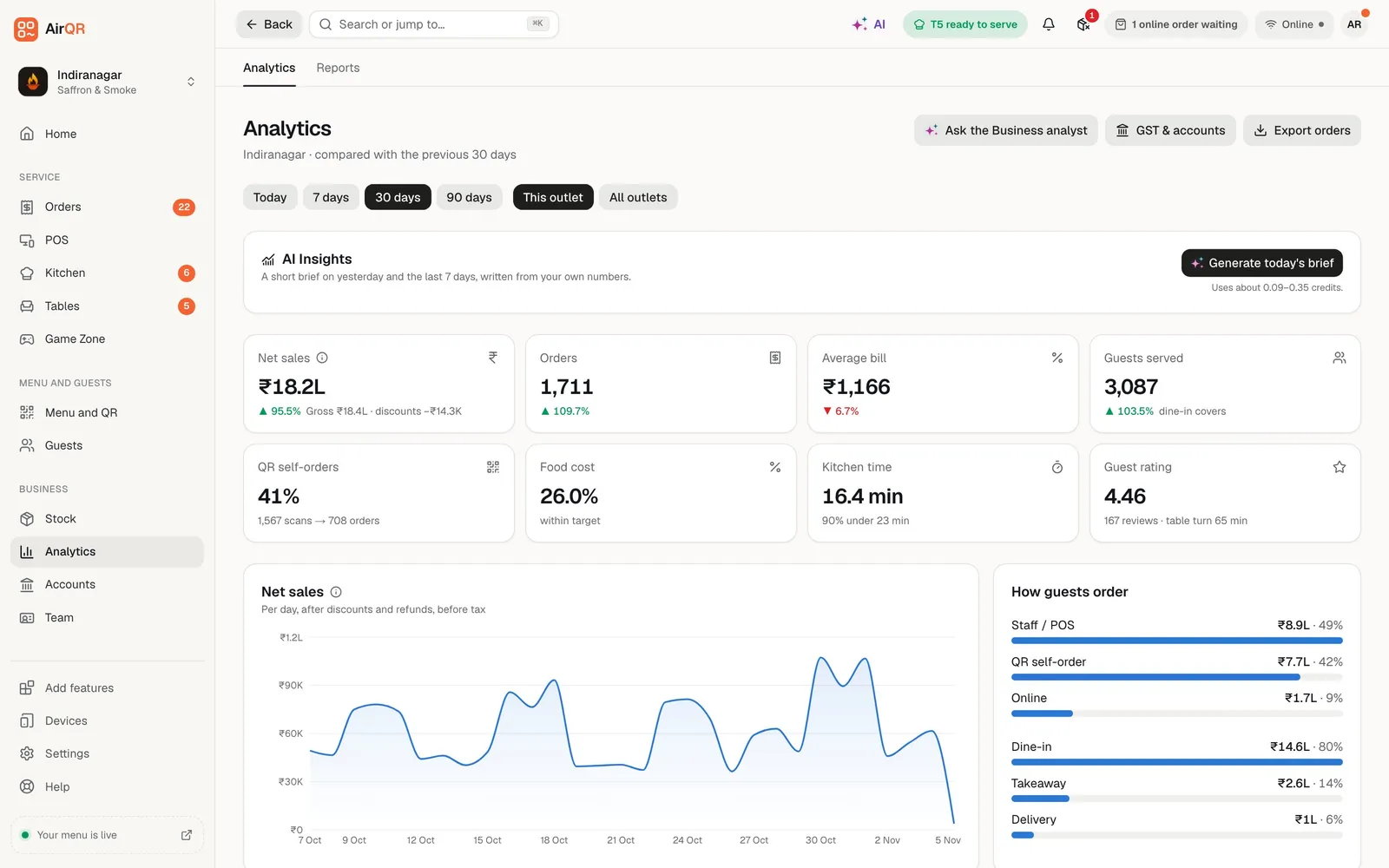
In Analytics, switch from This outlet to All outlets and the page shows sales and orders for each outlet side by side with the brand total. The Outlets page adds a card for every outlet with its orders and revenue for the last 30 days. Owners see this by default, and so do staff the owner has given business-wide reports.
In Reports, owners and staff with business-wide reports can run sales, item and payment reports for all outlets together, and an Outlet comparison report lists your outlets side by side. Outlets that use different currencies cannot be added up, so those reports are read one outlet at a time. See reports and analytics.
- Sales and orders for each outlet
- Reports for all outlets together
- An Outlet comparison report
Staff who see only their own branch
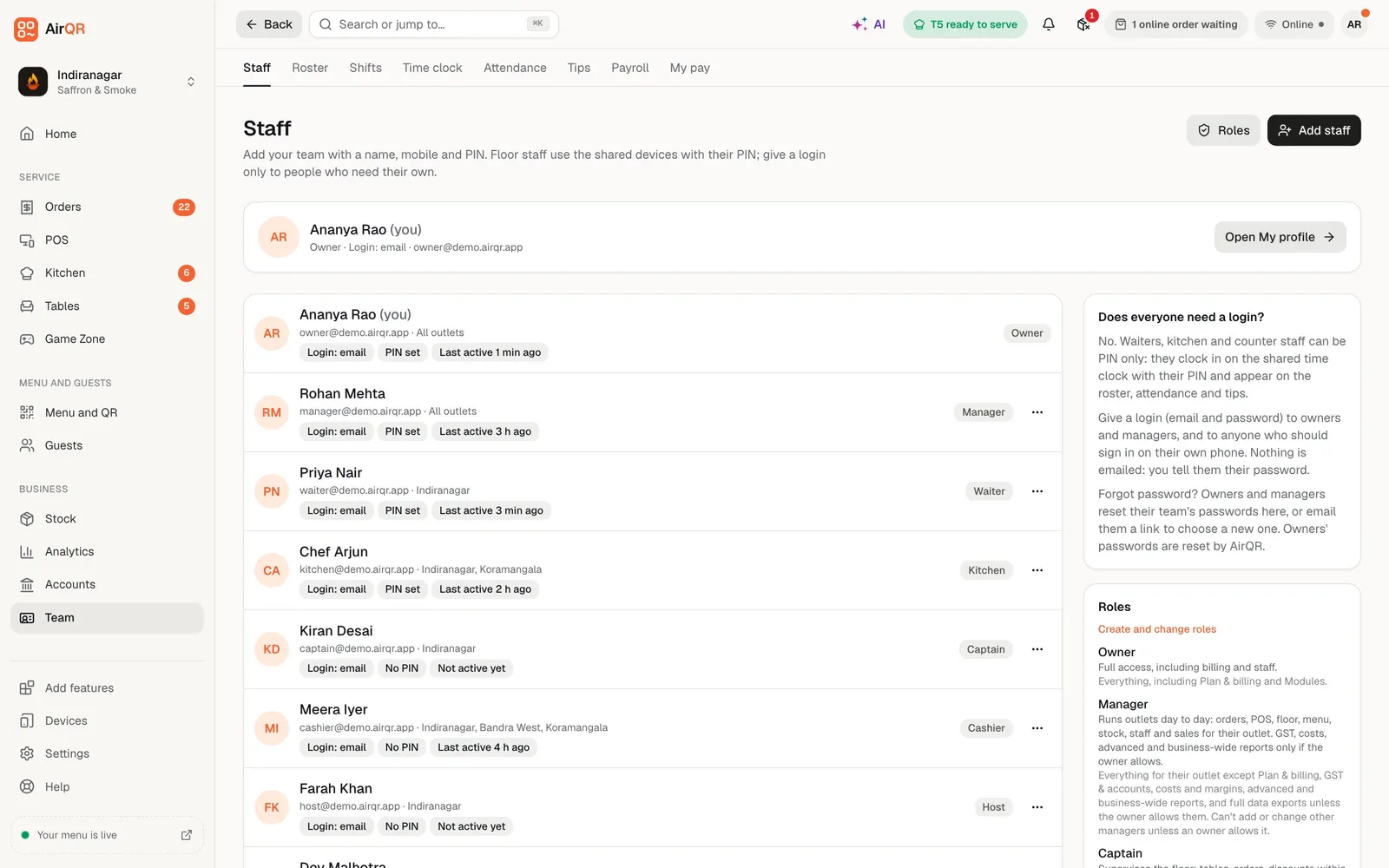
Every team member has a role, and the role decides what they see and do. AirQR has standard roles from owner and manager to captain, cashier and kitchen, and you can make custom roles of your own. With two or more outlets, you also choose where each person works. Pick all outlets, including ones you add later, or tick the branches they work at.
Staff limited to some outlets cannot give themselves or anyone else access to more. Giving staff access to chosen outlets works on every plan. See staff roles and staff logins.
- All outlets or chosen outlets for each person
- Standard roles and custom roles
- Staff cannot widen their own access
Plans for a chain
How many outlets each plan includes, and what comes after.
- Starter, Growth and Pro
- Outlets1 included, more on request
- Good forA single branch, or a growing brand with a few outlets
- Custom
- OutletsAs agreed
- Good forLarger groups, with more than 5 outlets
Each extra outlet is added on request for a monthly price, shown on the pricing page. You can have up to 3 outlets on Starter and up to 5 on Growth and Pro. The free trial includes up to 3 outlets.
Is AirQR right for your chain?
Check your set-up against this list before you start the free trial.
- Good fit, one owner or company with branches under one brand and menu
- Good fit, different prices or dishes at some branches
- Good fit, managers and captains who should only see their own branch
- A second brand is set up by AirQR as its own account, and you switch to it from the sidebar
- A group with many outlets or franchisees should contact us first so we can agree the right plan
- All outlets of one business must be in one region
Questions
Can every outlet share one menu?
Yes. Menus are linked to outlets, and a new outlet starts with every existing menu already shared. You can also limit a menu to chosen outlets.
Can a dish have a different price at each outlet?
Yes, for dishes without sizes. Open the dish and set a price for one outlet, or leave it empty to use the normal price. A dish can also be sold out or off at one outlet only.
Can I see all my outlets in one report?
Yes. Analytics has an All outlets view, and Reports can run for all outlets together, including an Outlet comparison report. Outlets in different currencies cannot be added up.
Can I limit staff to one branch?
Yes. Choose all outlets or tick the branches a person works at. They then see only those outlets. This works on every plan.
How many outlets does each plan include?
Every plan includes 1 outlet. More outlets are added on request, up to 3 on Starter and up to 5 on Growth and Pro, and Custom plans cover groups with more than 5 outlets. See pricing.
Can outlets be in different countries?
No. All outlets of one business are in the same region. An Indian business cannot add an outlet in the United States, but a business in the EU can have outlets in different EU countries.
Does each outlet have its own tax ID?
Yes. Address, tax ID, taxes and opening hours are set for each outlet, so every bill carries that outlet's details. Check with your accountant which registration each outlet should use.
Keep reading
Try AirQR in your restaurant
Set up in minutes on the phones, tablets and printers you already have. 28-day free trial.