AirQR Routes · Location
See where each bill was made, not where your driver is
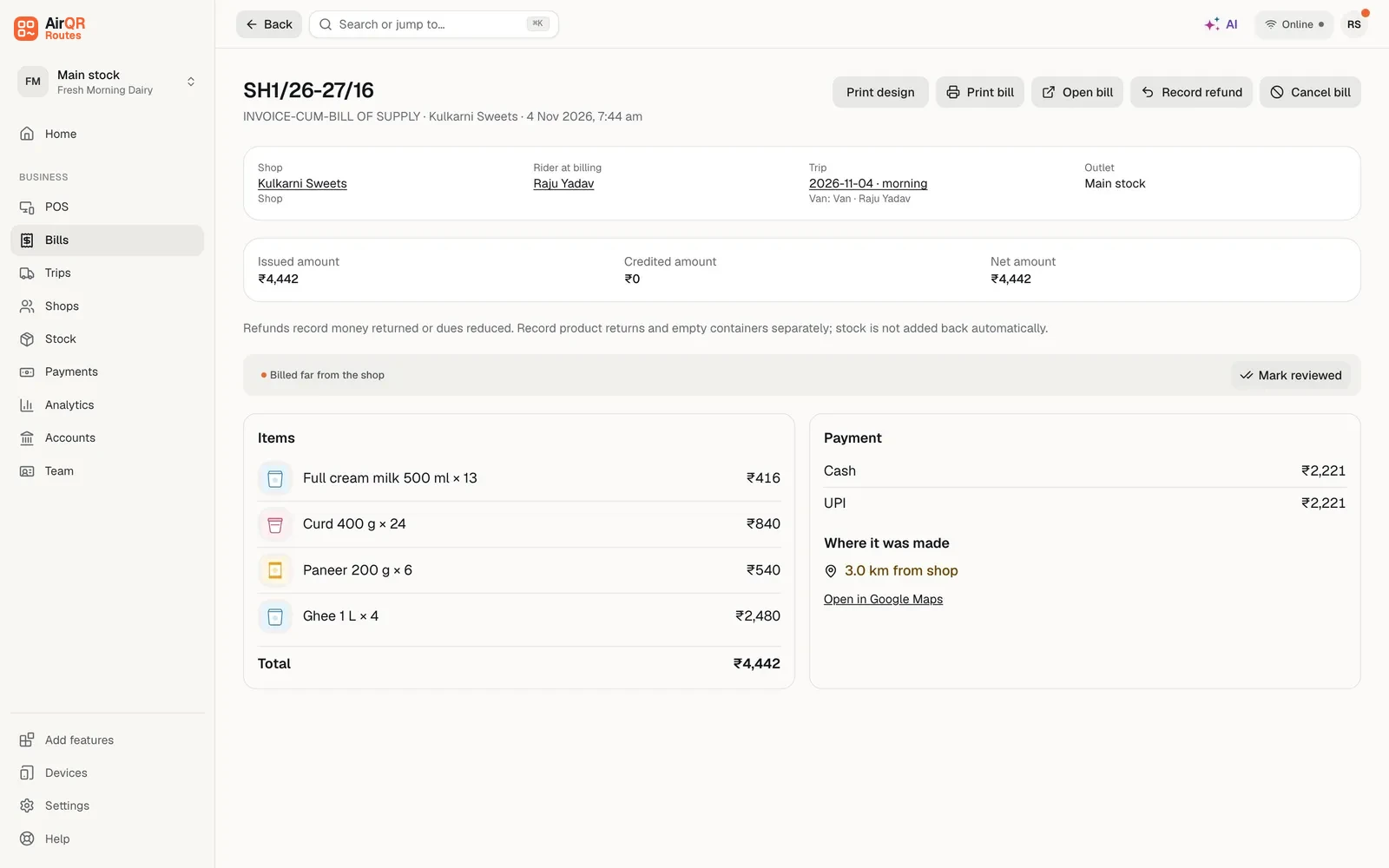
When a driver bills a shop, AirQR can save the place the phone was at that moment. You see it next to the bill as the distance from the shop's pin, such as 1.2 km from shop, with a link that opens the place in Google Maps. A bill made far from the shop is flagged, and you get an alert. The driver is asked once and may say no. This is a check on bills. It is not a map of your drivers.
- Distance from the shop on every bill
- Far-from-shop flag and owner alert
- The driver is asked once and can say no
The question this answers
A bill says a driver delivered to a shop. Most of the time that is true. Sometimes a bill is made on the way, at the tea stall, or at home in the evening, and the owner has no way to tell the difference. A bill that was made where the delivery happened is easier to trust.
AirQR answers one narrow question. Where was the phone when this bill was saved. It does not try to answer where the driver is right now, and it does not follow him through the day.
What you see on a bill
In Bills, each bill has a Where column. It compares the place the bill was made with the shop's saved pin.
Distance from the shop
For example 350 m from shop or 1.2 km from shop. The distance is shown in colour when it is more than 150 m.
No shop pin
The bill has a place, but the shop has no saved pin to compare it with. Add the pin on the customer page and later bills will show a distance.
No location
The driver did not allow location, or the phone could not tell where it was. Nothing is shown and the bill is not flagged.
Open in Google Maps
A link beside the text opens the place in Google Maps. AirQR shows the text and the link only. It does not draw a map.
Far from the shop flag
A bill made more than 150 m from the shop's pin gets the note Billed far from the shop. You mark the note as reviewed once you have looked.
A filter for it
In Bills you can filter to Billed far from the shop and see only those bills, together with the other filters.
How a place gets saved
- 01
The driver is asked once
The first time he accepts a load, the app explains what location is for and asks him to Allow location or choose Not now. He can say no and still do everything else in the app.
- 02
A point is saved at a few moments
When the app is opened or brought back, at most once every ten minutes while it stays open, and when he accepts the load, makes a bill, takes a payment, records a visit or ends the day.
- 03
Only on working days
Points are saved only on a day with a load, from the first time he opens the app with a load waiting until End day. Never after End day, never on a day with no trip, and never in the background.
- 04
The phone shows it is on
While location is allowed, the app shows Location on, so the driver always knows.
- 05
You read it on a page
You see the result next to the bill, on the Close the day screen and on the printed trip sheet as text. Nothing moves on your screen.
Far from the shop, and the alert
When a bill is made farther from the shop than the distance in Settings, the bill carries a note and you get a notification that says Driver billed far from the shop. You get at most one such alert in an hour for each driver, so one long road does not fill your phone with messages.
A bill with no location, or for a shop with no pin, is never flagged, because there is nothing to compare. The Close the day screen also lists the bills of the trip with where each was made, so you can look at the ones made far away before you approve the day.
Last seen
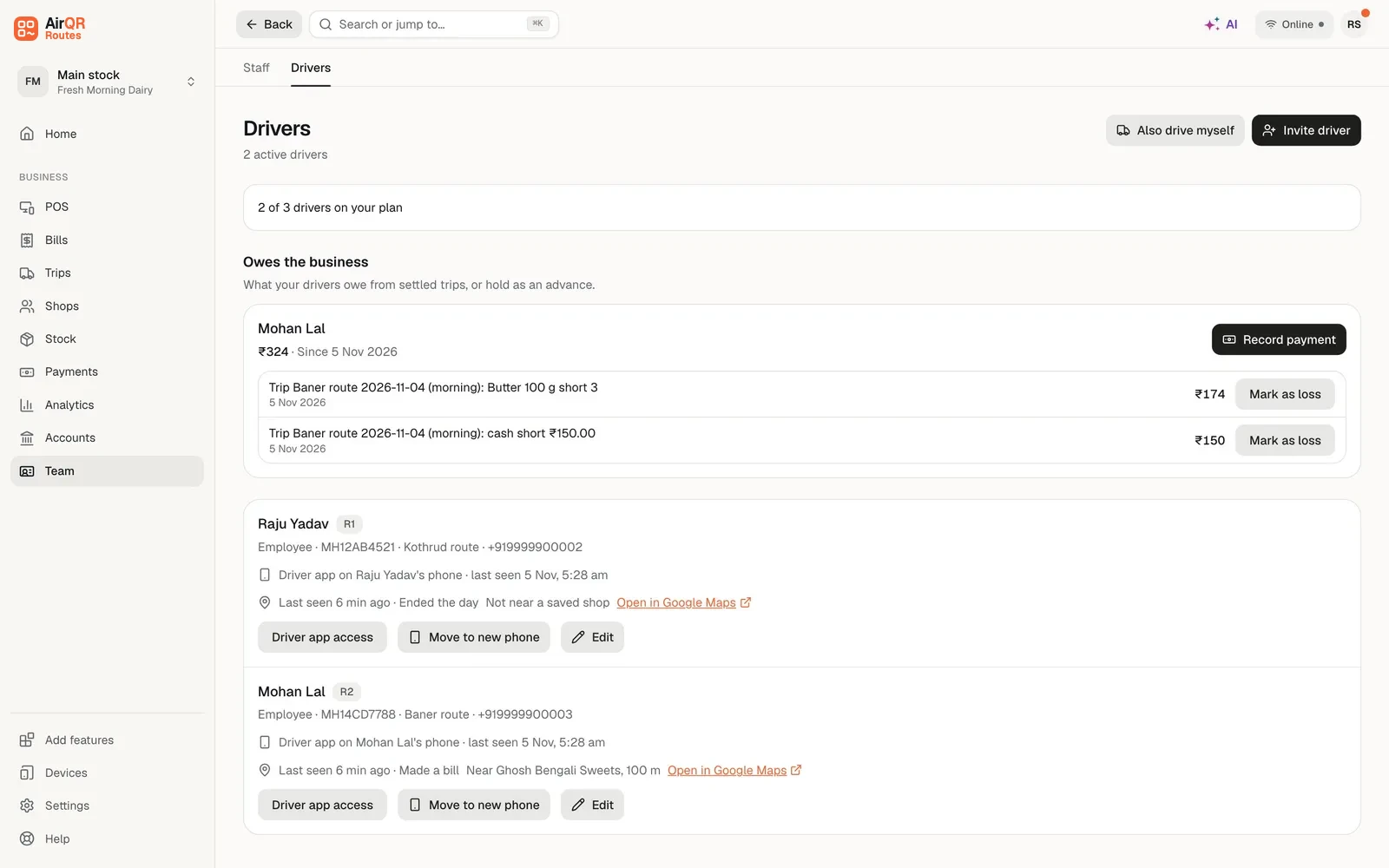
If the driver allowed it, Team → Drivers shows Last seen, for example Last seen 18 min ago. It says when the phone last saved a point and what that was, such as the app opened, the load accepted, a bill, a payment, a visit or the end of the day. It also says which saved shop the phone was near, such as Near Gupta Kirana, 120 m, or Not near a saved shop.
Last seen is read when the page loads. It is a note about the last moment the app saved a place. It is not where the driver is now.
What it is and what it is not
- Save the place of the phone when a bill is made
- AirQR Routes does notShow a map with moving drivers
- Show the distance from the shop on the bill
- AirQR Routes does notFollow a driver through the day
- Flag a bill made far from the shop
- AirQR Routes does notKeep a route history or a trail of where he went
- Show Last seen from the last saved point
- AirQR Routes does notSave a place in the background or after End day
- Ask the driver once and accept a no
- AirQR Routes does notMake the driver share location to bill
- Keep points for 90 days
- AirQR Routes does notKeep points for longer than that
Points are kept for 90 days and are then deleted.
Tell your drivers first, and a note on the law
A driver's place is personal data. India has a data protection law called the DPDP Act. Tell your drivers in plain words before you turn this on. Say what is saved, when it is saved, who sees it and how long it is kept. AirQR shows the driver an explanation and asks for his choice, but the talk with your team is yours to have.
This is not legal advice. If you want to be sure what applies to your business, ask your lawyer or your CA.
Questions
Does AirQR track my drivers?
No. It saves the phone's place at a few moments, such as when a bill is made or the day ends. You read it on a page. There is no moving map and no history of where a driver went.
Can a driver refuse to share location?
Yes. He is asked once, with a plain explanation, and can choose Not now. He can still bill, collect money and end his day. Those bills simply show No location.
How far is far from the shop?
150 m. A bill made farther than that from the shop's pin is flagged. A bill exactly at that distance is still counted as near.
How often will I get an alert?
At most once an hour for each driver, so one trip down a long road does not send you a message for every bill.
What do I need for the distance to show?
The shop needs a saved pin. Stand at the door and tap Use my current location on the customer page, or paste a Google Maps link. Without a pin the bill says No shop pin.
How long are the points kept?
90 days, and then they are deleted.
Does the location work without a network?
Yes. The place is saved on the phone with the bill and sent with it when the network returns.
Keep reading
Try AirQR Routes in your distribution business
28-day free trial. It runs on your drivers' own phones, even with no signal.