AirQR Routes
Load, bill, collect, settle. Every route, every rupee.
AirQR Routes is software for owner-run distributors whose drivers deliver to shops every day, such as milk, water jars, bread and packaged goods. You load each van in the morning, the driver bills and collects on their own phone, and in the evening you close the day at the warehouse. You see what every driver took, sold and collected as the bills reach you, and what they brought back when you count at the warehouse.
- Driver bills on their own phone, offline too
- Cash, UPI and udhaar tracked per shop
- Close and lock each trip
The notebook and the calculator
Every evening the same thing happens in a lot of distributor offices. The owner sits with a notebook and a calculator. A driver is short of cash. A few crates did not come back. One shop says it already paid. Another shop owes for three weeks and nobody remembers the amount. The owner adds up slips, phone calls and memory, and decides who to believe.
The trouble is not the drivers. It is that the day was never written down in one place. The load was a number said aloud in the morning. The bills were on paper in a bag. The collections were notes in the driver's pocket. By the time it all reaches the warehouse, nothing can be checked.
You can also open POS → Billing and bill from Main stock at the counter. Cash, UPI, card and split payments work for a walk-in. Choose a named customer to sell on credit. AirQR Routes records each sale as it happens. The load is recorded when the van leaves. Each bill, each payment and each empty crate is recorded at the shop. In the evening the book already says what should be on the van and in the driver's hand, so the counting at the warehouse is a check and not a quarrel.
Load, bill, collect, settle. Every route, every rupee. In Hindi, हर रूट, हर रुपया, हर क्रेट का हिसाब।
Control, cash and calm
Three things an owner wants from a delivery business, and what AirQR Routes does for each.
Control
The load for each van is suggested from the regular orders of the shops on the route, and the driver confirms on the phone what they really received. Every driver has their own bill number series, such as GD1/26-27/7 (a new series every financial year), and a number is never used twice, even for a cancelled bill. A bill made far from the shop's pin is flagged for you. When you close a trip, it locks.
Cash
Each bill is paid in cash, by UPI with a QR on the phone, on credit, or split between them. The driver counts the cash at End day. AirQR works out the cash that should be there and shows the difference. A shortage can be charged to the driver or written off, and what a driver owes stays on their own account, apart from your customers.
Calm
A repeat shop is billed from its regular order, with a direct Save for an unchanged cash bill. The driver app works with no signal and sends everything when the network returns. It runs in Hindi and English, and the bill goes to the shop on WhatsApp. Nobody has to install anything from an app store.
The day in four steps
The same four steps every day, on every route.
- 01
Load
Open Home and press Load a van, or Load on a route that has no load yet. The quantities come from the regular orders of the shops, plus a small buffer, rounded up to whole crates. Change what you like, pick a driver who is free and confirm. The stock moves from Main stock to the van, with the empties. The driver checks it on the phone and accepts.
- 02
Bill
At each shop the driver opens the shop, the regular order is already filled in, and they change a quantity if today is different. They record the empties left and taken back, choose cash, UPI, credit or split, and save. The bill goes to the shop on WhatsApp.
- 03
Collect
When a shop pays an old due, the driver presses Collect, types the amount and picks cash or UPI. The money clears that shop's oldest dues first. A visit with no sale is noted too, as shop closed or no order today.
- 04
Settle
At the end of the trip the driver counts the cash and what is left on the van and presses End day. At the warehouse you count stock, empties and cash against what the day recorded, decide each difference, and approve. The trip locks and a trip sheet is ready to print.
Who AirQR Routes is for
AirQR Routes is for a business where a driver carries stock on a van and sells it to shops or homes on an assigned route or an open trip. On an open trip the driver can bill any customer without a planned list of stops. The owner, or a manager, is the one who has to trust the numbers at night.
Milk distributors bill pouches and crates for a morning and an evening trip, with credit for the shops that pay at the month end. Water jar suppliers count the filled jars out and the empty ones back. Bread and bakery distributors deal with trays, unsold returns and a short shelf life. FMCG and food distributors run beats of kirana shops with many products and long credit.
The same workspace also suits eggs, ice cream, soda and juices, and fresh supplies to restaurants. When you sign up you pick your kind of business and it starts with its own products and its own words, such as beat for route.
Hindi and no network
Your drivers should not need to read English or to find a network signal to do their job. The driver app is in Hindi and English, and each person picks their own language. In Routes settings you can also change the words for route, driver, customer and empties, in both languages, to match what your people actually say.
The driver app opens on a phone and can be added to its home screen. Today, Shops, Bills and More put daily work and the driver’s own records together, and a tablet or computer adds a sidebar with Payments and Past trips. A second phone can look at the day without touching billing. An authorized manager can allow a driver to start open trips, fixed trips or both. There is no app store and no new device to buy. The driver connects once so the app can prepare the day. After that, accepting the load, billing, collecting, noting visits and ending the day are all saved on the phone and sent in order when the network is back. See how the driver app works offline. For Hindi readers there is a full page, AirQR Routes in Hindi.
What AirQR Routes is not
It is not a live tracker. A driver is asked once whether the app may save the phone's place, and can say no and still do everything. If allowed, a place is saved at a few moments, such as when the app is opened or a bill is made, and only on a day with a load. You see how far from the shop a bill was made, with a link to open that place in Google Maps. AirQR does not draw a map of where your drivers are now and keeps no trail of their journey. See bill locations.
At the counter, open Devices to connect a bill printer or a barcode scanner. Staff can print an issued customer bill with its original number. On a delivery, the driver can share the customer link on WhatsApp once the bill syncs.
It does not plan the best order of stops. You set the visiting order of each route yourself. It does not file GST returns or give tax advice. It keeps your bill records in order, and it decides between a bill of supply and a tax invoice from how you set up the tax of each product, which your CA should confirm. See GST billing for distributors.
One place for the counter, stock and collections
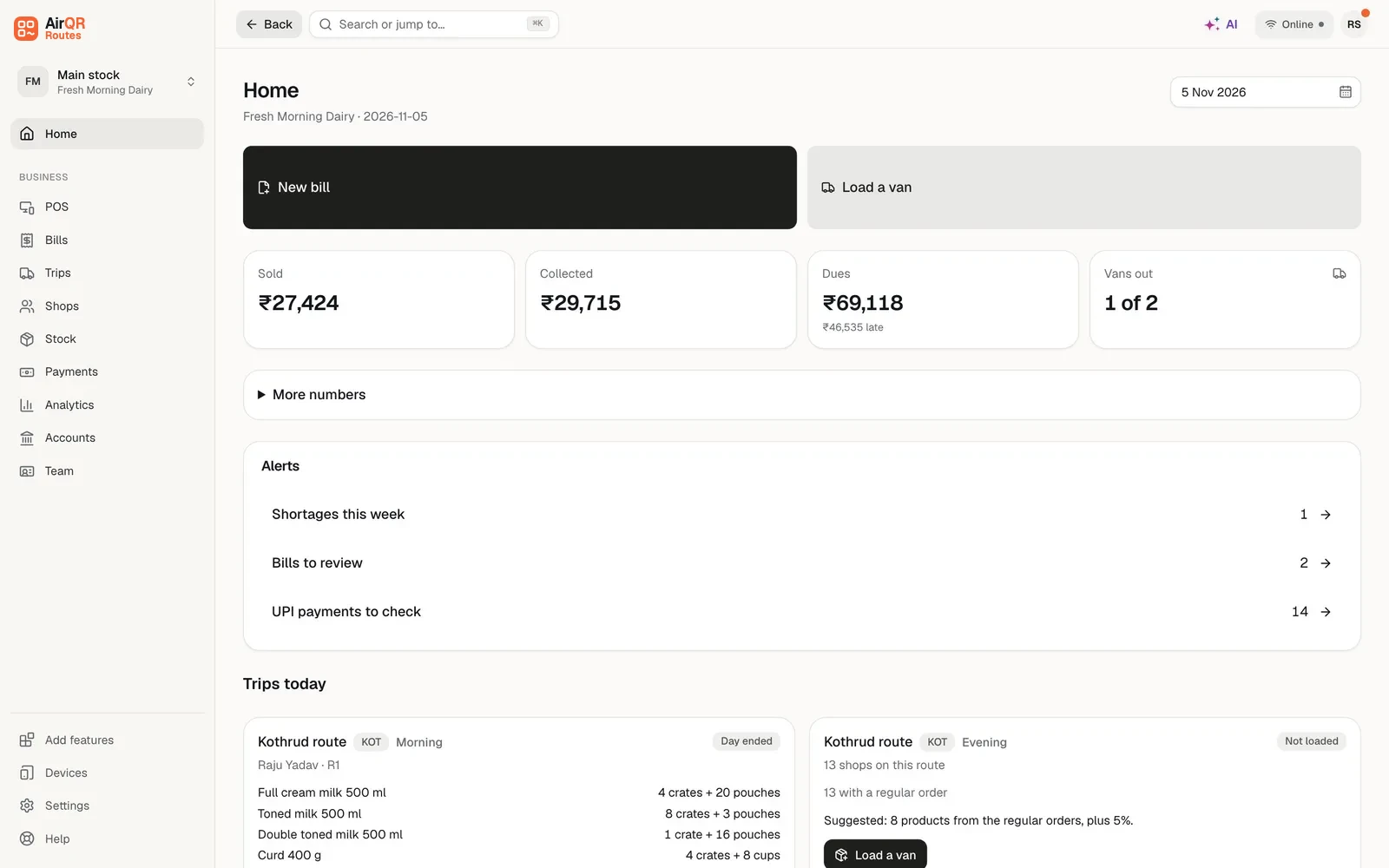
Trips lists fixed and open runs by business day. Give each trip its own name and optionally record Planned departure. The actual clock starts when the driver presses Start trip. The optional planned time stays separate. Active, To settle and Done tabs keep each trip to one row with its one next step. After sync, the trip page shows the load, the start, each bill and collection with its shop and saved location, the stock, the containers and the money. Home shows the day at a glance, with the day’s numbers, what needs you and every van grouped as On the road, Ready to leave, Not loaded yet, To settle, Free and Done today. POS opens Billing for people allowed to sell, with a photo catalog and the current bill side by side on a larger screen. Search for a shop, business or person, add a customer, or choose Walk-in, using the same Main stock as the godown. Bills has its own sidebar section with filters, issued and credited amounts, a net summary and daily bars. On credit at billing shows the original credit sale, rather than current dues. The counter needs an internet connection, while drivers keep their separate offline app.
Stock shows current Main, van and other-store quantities, restocking levels and returnable custody. Stock → Products lets you name up to eight pack sizes per product, such as crates of 12 and 24, cartons of 6 and trays of 30. Count more than one pack size with loose units on a bill or load. Stock stays in individual units and issued bills keep their original pack breakdown. Stock → Containers holds the business-named crates, jars and trays. Recorded purchases and permitted cost estimates help you review what arrived without pretending a purchase record is a supplier payment. Payments separates Received payments from Dues, and shows refunds and reversed collections. Analytics keeps Reports beside it, Accounts is in the sidebar, and driver profiles are under Team alongside Staff.
Ask the Business analyst about shop sales and collections you are allowed to see, or the Inventory assistant about stock, purchases and returnables. Both Routes and Routes Plus include these assistants. Questions use your existing AI wallet and usage limits. They use the outlet and permissions you are working with, including separate permission for costs. Read the stock guide, payments guide and AI guide.
Talk to us for pricing
Plans for every fleet size. Tell us about your routes and we will suggest the right plan. You can start with a free trial.
There are two plans, Routes and Routes Plus. Routes Plus includes more drivers and the advanced reports on drivers, customers and products, and extra drivers can be added on either plan. You start with a 28-day free trial that includes everything, so you can load a real van and close a real day before you decide. When you are ready, contact us and we will help you choose.
Questions
What is AirQR Routes?
It is software for distributors whose drivers deliver to shops on routes. The owner loads the van, the driver bills and collects on a phone, and the owner settles the day at the warehouse. It covers van stock, bills, cash, UPI, credit, empties and reports.
Do my drivers have to install an app from a store?
No. The driver app is a web app. The driver opens the address on their own phone and adds it to the home screen. There is no Android or iPhone store app.
Does it work when there is no mobile signal?
Yes. The driver connects once so the app can prepare the day. After that, bills, collections, visits and End day are saved on the phone and sent when the network returns. The top of the screen shows how many are waiting.
Is the driver app available in Hindi?
Yes. The driver app and the owner's dashboard run in Hindi and English. In Routes settings you can also change the words for route, driver, customer and empties in both languages.
Can I see where my drivers are on a map?
No. AirQR does not show a map of your drivers. If the driver allows it, it saves the phone's place at a few moments and shows how far from the shop each bill was made. You can open that place in Google Maps.
Does AirQR Routes file my GST returns?
No. It helps you keep bill records in order, and it picks a bill of supply or a tax invoice from the tax setup of your products. Your CA should confirm that setup, and AirQR does not give tax advice.
How does the free trial work?
You get 28 days with everything included. Load a van, bill a few shops and close a day. Before the trial ends you talk to us and we help you choose a plan.
Does it work for water jars and bread, not only milk?
Yes. Pick your kind of business when you sign up, such as milk and dairy, water jars, bread and bakery, or FMCG and food. Each one starts with its own products and its own words.
Keep reading
Try AirQR Routes in your distribution business
28-day free trial. It runs on your drivers' own phones, even with no signal.