AirQR Routes settlement
Close the day with each driver’s stock and cash counts in front of you
When a driver presses End day, AirQR Routes already knows what was loaded, billed, collected and taken back. At the warehouse you count the stock, the crates and the cash, and AirQR shows each difference in units and rupees. You decide what to do about it, approve, and the trip locks. What a driver owes stays on their own account.
- Stock, crates and cash side by side
- Decide every difference, one by one
- Approve once and the trip locks
The evening argument
Evening settlement is where a distributor loses a lot of time and some goodwill. The driver says the cash is right. The stock looks short. Nobody can say whether a shop was billed, whether a crate was left behind or whether a few notes went somewhere else. Everyone is tired, and the quickest answer is to let it go.
AirQR Routes changes what you start from. You do not start with a blank sheet and a driver's memory. You start with the whole day already recorded, a count the driver made themselves on the phone, and your own count at the warehouse. The gap between them is a number, and each number has a button for what to do next.
From End day to a locked trip
- 01
The driver ends the day
At the end of the trip the driver opens End day on the phone. They count the cash by notes and coins and see the total. They count what is left on the van for each product first, with nothing filled in, and then see Matches or Short by 3, with a reason to pick. A Your day card sums up the trip. They count the empties, add a note if needed and confirm. The driver never chooses who pays.
- 02
The trip waits for you
On Home the trip sits under To settle with Day ended and a Settle button that opens Close the day. Settling needs the permission to settle, which owners and managers have by default.
- 03
Count at the warehouse
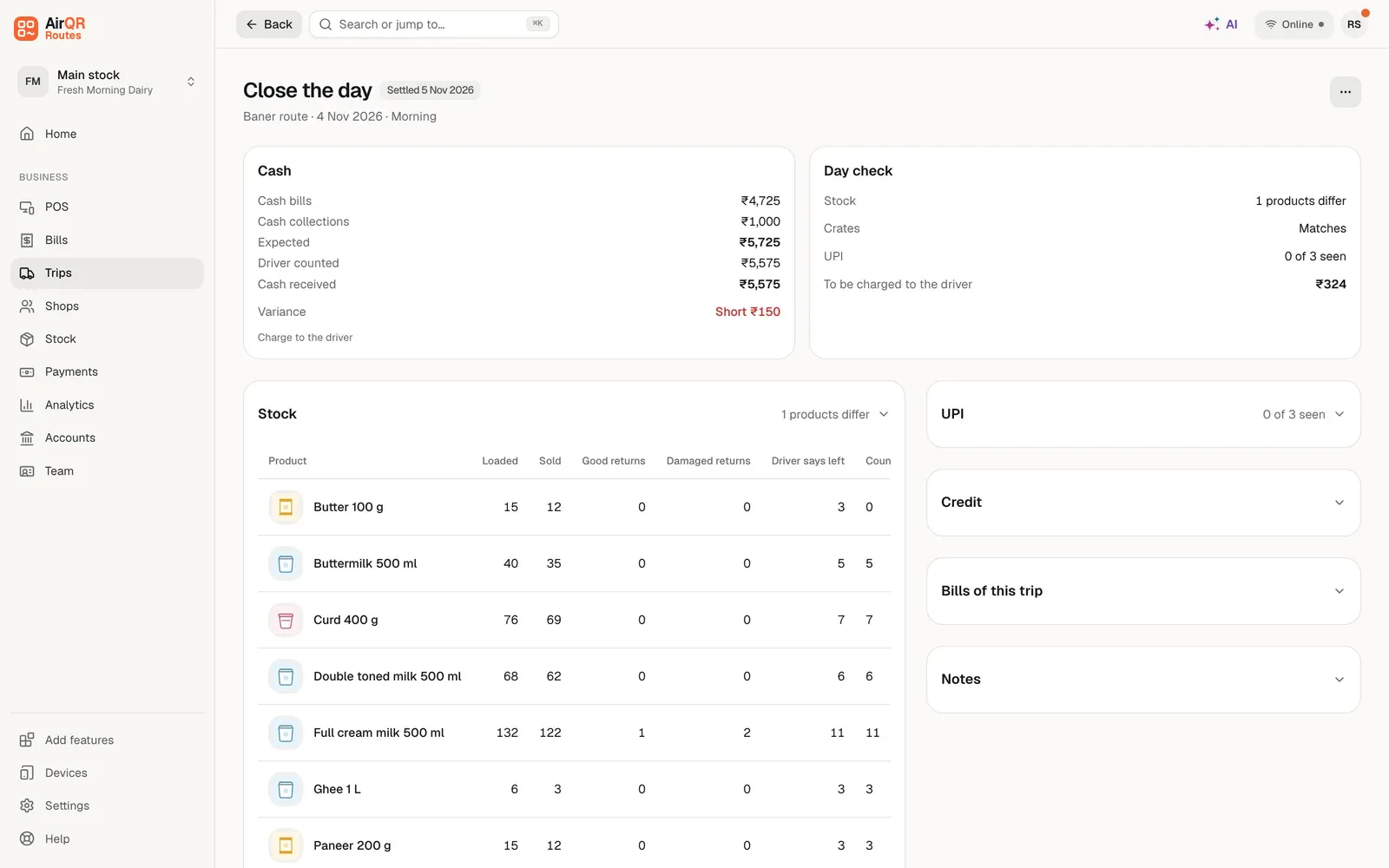
A Trip result line sums up the day, for example Sold 86% of the load, the cash counted against the cash expected, and Crates 38 of 42 back. For every product you see Loaded, Sold, Back good, Back damaged, Should be left, Counted, Difference and Value, in packs such as 5 crates + 3. Enter what you count as good and damaged. For every kind of empty you see what went out, what came back and what should have come back. Enter the cash you count, with a note-count helper.
- 04
Decide each difference
Short stock, missing empties, cash short and cash over each have their own choices, listed below. Every difference takes a reason (Missing, Damaged on the van, Expired or spoilt, Counting mistake or Other) and a note, saved with the choice.
- 05
Approve
Press Close the day. In one step AirQR moves the counted stock back to Main stock, records the empties, posts what you charged to the driver's own account and keeps the settlement. The trip locks. Pressing the button twice does nothing twice.
What you can do about each difference
Every difference is shown in units and in money, and you choose what happens to it.
- Short stock
- Your choicesCharge to the driver, valued at the selling price. Mark it as a loss, with a reason. Or Decide later, so the owner decides, and nothing is charged or booked as a loss until then.
- Extra stock
- Your choicesAdd it back to Main stock.
- Missing empties
- Your choicesCharge the driver at the empty's lost charge. Charge a customer you pick, recorded as lost by them. Mark them lost with no charge. Or Decide later.
- Cash short
- Your choicesCharge to the driver, mark it as a loss with a reason, or Decide later.
- Cash over
- Your choicesKeep it as cash over, with a reason, recorded as cash over with no bill and never counted as sales. Or put it on the driver's advance.
If stock is also short, AirQR does not let cash over be kept as cash over, because it can mean a sale was made without a bill. Make the missing bill, or put the excess on the driver's advance. Only the owner can mark a loss of ₹200 or more, the shortage alert amount. For anyone else it waits as Decide later, and the owner decides it later under Losses to decide.
What else is on the Close the day screen
Cash that should be there
Expected cash is the cash bills of the trip plus the cash collected from shops on it, less recorded cash refunds on the trip’s bills. The driver's own count from End day is shown beside yours.
UPI to tick off
The UPI bills and collections of the trip are listed with a tick box, Seen in bank, so you can check them against your account.
Credit for information
The credit given on the trip and the old dues collected on it are shown for information. They are not cash.
Bills of the trip
Every bill of the trip is listed with the shop, the amount and where it was made, such as No location, No shop pin or how far from the shop, with an Open in Google Maps link. A bill made more than 150 m from the shop's pin is flagged.
An alert for big shortages
If the shortage you charged is ₹200 or more, the owner gets a notification. A day closed with a difference left for later tells the owner too.
Losses to decide
A difference left for later shows under Losses to decide, on Home and on the trip. The owner picks Charge to the driver or Write off as business loss, with a reason. The count stays as it was closed.
A trip sheet to print
The Trip sheet opens a one-page sheet with every figure, the bills table, the action chosen for each difference, and signature lines for the driver and for whoever checked.
What a driver owes
When you charge a shortage to a driver, it becomes a due on the driver's own account. Team → Drivers shows Owes the business, with one card for each driver, the amount, the oldest item and the open items, for example Trip Kothrud, cash short ₹200. This is an illustration, not a real driver.
Record payment takes cash or UPI against what the driver owes, oldest item first. Mark as loss clears part or all of one item, with a reason. A driver's dues are never mixed with your customers' dues, and they work even when the Credit module is off for the business. Taking a payment and marking a loss need the permissions for collecting dues and managing credit.
A locked trip stays locked
Once a settlement is approved, the trip cannot be changed. A correction is a new entry, and the original stays as it was. This is what makes the figures worth trusting a month later, when someone asks what happened on a Tuesday.
If a phone was offline and a bill reaches the server after its trip was settled, the bill takes its stock from the warehouse and is marked Synced after settlement. Cancelling a bill of a settled trip puts the stock back in the warehouse. See van stock for how the load side works, and tracking crates and jars for empties.
Reports that read the same numbers
The Trip sheets report is the Close the day screen as a table, with one row for each trip. The Daily close report shows sales and collections for the day, including the counter, which is useful for checking against your books. On Routes Plus, Driver performance shows how many settlements found something short and how many were approved within a day of the day ending. Reports download as Excel or CSV. See Routes reports and credit and dues.
Questions
What does the driver do at the end of the day?
They open End day, enter the cash in hand or count it by notes, count what is left on the van (they see Matches or Short by after counting) and the empties, add a note if needed and confirm. The trip then waits for the owner to close it.
Who can close a driver’s trip?
Owners and managers can, by default, through the settle permission. Drivers use the driver app only.
What if the cash is more than expected?
You can keep it as cash over, with a reason, or put it on the driver's advance. If stock is also short, AirQR does not let you keep it as cash over, because a sale may have been made without a bill.
Can I charge a shortage to a driver?
Yes. Short stock, missing empties and short cash can each be charged to the driver. The amount becomes a due on the driver's own account in Team → Drivers, where you can record a payment or mark it as a loss.
Can a settled trip be edited?
No. Approving the settlement locks the trip. A correction is a new entry, not an edit of the old one.
Can I print the settlement?
Yes. The Trip sheet is a one-page sheet to print with every figure, the bills of the trip, the action chosen for each difference, and signature lines for the driver and the checker.
Does the settlement change Main stock?
Yes. Counted good stock moves from the van back to Main stock, damaged and short stock is written off or charged as you decide, and the van ends at zero.
Keep reading
Try AirQR Routes in your distribution business
28-day free trial. It runs on your drivers' own phones, even with no signal.