AirQR Routes · GST
Bills your driver makes on the road, kept in GST order
A distributor's driver makes dozens of bills a day, each one a bill of supply or a tax invoice. AirQR Routes decides which from your tax setup, gives every driver a number series of his own, never reuses a number, and records returned goods as credit notes. The bills then sit in the same GST reports as the rest of your business. AirQR helps keep your records. It does not file returns or give tax advice, and your CA should confirm the setup.
- Bill of supply or tax invoice from your setup
- A number series for every driver
- Credit notes for returned goods
Please read this first
AirQR does not file GST returns and does not give tax advice. The tax rates that come with the starter products are suggestions only. Ask your CA to confirm the rate, the HSN code and whether each product gets a bill of supply or a tax invoice before you start billing, and again if your products or your registration change.
Everything on this page describes how AirQR keeps and numbers your records. It is not a statement of what the law requires of you.
Bill of supply or tax invoice, from your setup
You tell AirQR whether you are not registered, registered or on composition, and you confirm the tax on each product. The driver does not choose. The document follows from the setup.
- Not registered for GST
- What the driver's bill is calledA Bill, with no tax shown on it
- Registered, and every item on the bill is exempt
- What the driver's bill is calledA Bill of Supply
- Registered, and every item on the bill is taxed
- What the driver's bill is calledA Tax Invoice
- Registered, and the bill mixes taxed and exempt items
- What the driver's bill is calledA Tax Invoice titled Invoice-cum-Bill of Supply
- Composition
- What the driver's bill is calledA Bill of Supply
Ask your CA to confirm which of these applies to you. AirQR never changes a rate you have set.
What AirQR does on each bill
Tax set once, per product
In setup you confirm the rate and the HSN code of each product. Starter products show Confirm tax until you do, and you can finish the review on Home after signup. Until all suggested rates are confirmed, the app issues bills of supply without GST.
Prices with or without GST
Choose whether the price you type already includes GST, or whether GST is added on top. The setting is in Settings.
A number series for each driver
Every driver gets his own till number, and his bills are numbered in that series, for example GD1/26-27/1 (outlet code, till number and financial year), and a new series starts each 1 April. A business that already had bills keeps GDN-R1-0001 style numbers until 31 March 2027. A phone can number its bills with no signal and two drivers never clash.
Numbers are never reused
A driver's number is never given to someone else, even when the driver is made inactive. A bill number that was taken is not used again, and a bill is never renumbered after it is printed. A bill the server refuses stays in your numbers as a cancelled bill.
A cancelled bill keeps its number
When you cancel a bill, the stock and empties go back to the van and any credit given is taken off the customer. The number stays on record as cancelled.
Credit notes for returned goods
Goods taken back are matched to the bill they came from, and a credit note for exactly those units, at that bill's price, is issued against it in your credit note series.
From the road to the GST report
- 01
Set your GST status
At signup you say whether you are not registered, regular or composition, and add your GSTIN if you are registered.
- 02
Confirm each product's tax
Check the suggested rate and HSN for every product with your CA, change them if they are wrong, and confirm.
- 03
The driver bills at the shop
The bill comes out as a bill of supply or tax invoice from the setup, with the next number in his series.
- 04
Returns get their credit note
When goods come back, AirQR matches them to the shop's bill of the last 30 days and issues the credit note against it. A return it can't match waits under Bills for you to check and credit.
- 05
Open the GST reports in Accounts
Route bills sit with the rest of your bills in GST & accounts, which has the sales register and the files your CA asks for. Your CA looks them over before anything is filed.
- 06
Check the day in Routes reports
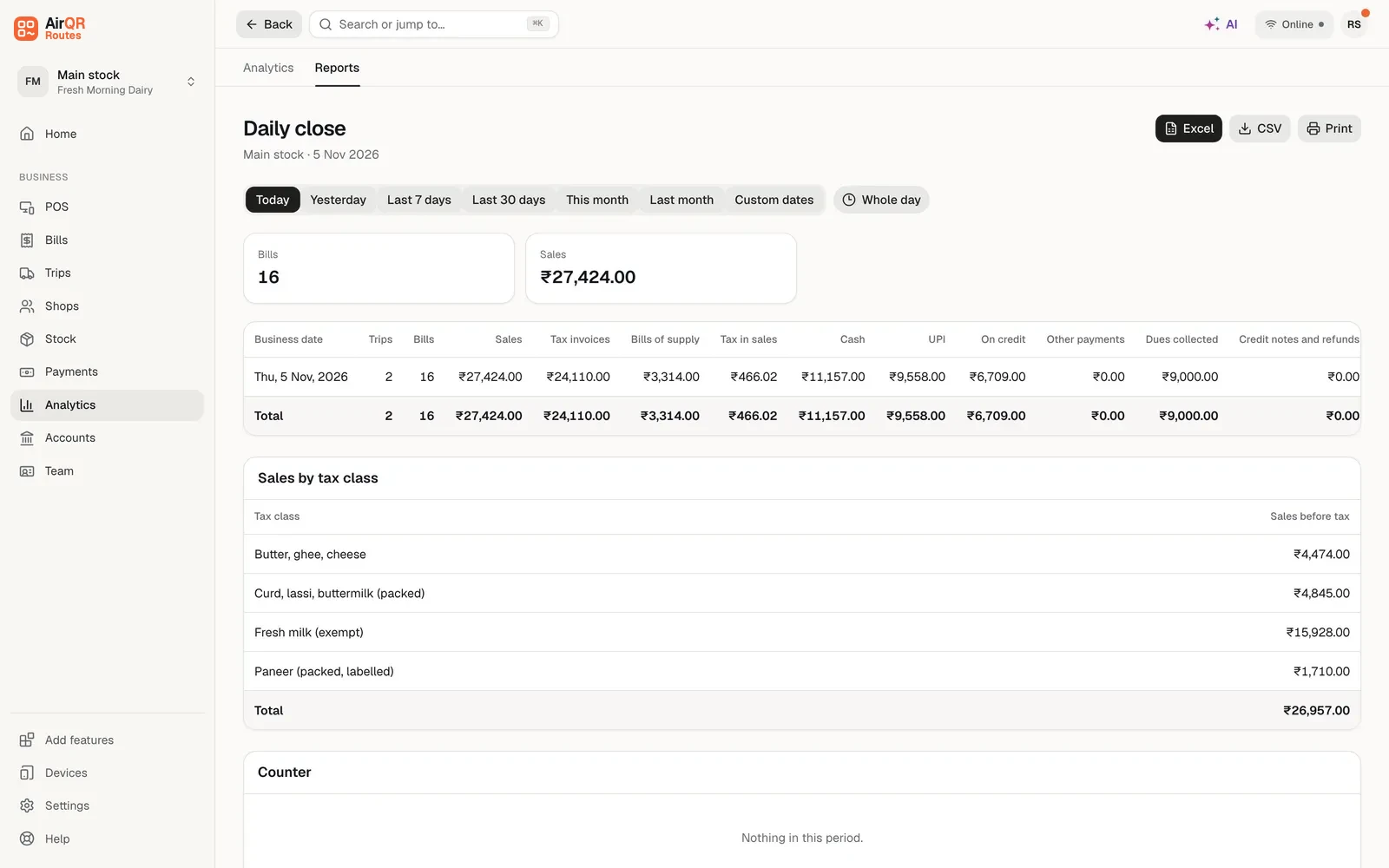
The Daily close report splits sales into tax invoices and bills of supply, shows the tax in sales and sales by tax class, and downloads as Excel or CSV.
Credit notes when goods come back
Shops return unsold or damaged goods. The driver presses Take back on the shop, the counter uses Take back goods and the office Record a return. Each product is marked good or damaged, and AirQR finds the shop's bill of the last 30 days the goods came from.
Only the units that came back are credited, at that bill's price. The credit note is issued against the original bill in your credit note series, and the amount comes off what the shop owes, is kept as an advance or is paid back. A return with no matching bill, or more than was billed, waits for you under Bills. A bill can give back no more than it took in.
Questions to take to your CA
Bring these along when you set up, so the answers are written down once.
- Am I registered, on composition or not registered
- What are the rate and HSN code for each of my products
- Which of my products are exempt and which are taxed
- Should my prices include GST or have it added on top
- How should returned goods be treated for each product
- Anything I should do when a bill is cancelled
Questions
Does AirQR file my GST returns?
No. AirQR keeps and numbers your records and gives your CA the reports. It does not file returns and it does not give tax advice.
Who decides between a bill of supply and a tax invoice?
The setup does, from your GST status and the tax on the items. Your CA should confirm that setup. The driver does not choose on the road.
Can two drivers make bills with the same number?
No. Each driver has his own series, so the numbers are different. A number is never used again.
What happens to the number of a cancelled bill?
It stays on record as cancelled and is never used again. The stock and empties go back to the van.
How are returned goods handled?
The driver, the counter or the office records what came back as good or damaged. AirQR issues a credit note against the original bill for those units at its price, or holds the return for you to check when no bill matches.
Are the rates in the starter products correct?
They are suggestions. Check them with your CA during signup or on Home afterwards. AirQR issues bills of supply until you confirm your rates.
Do these bills show in my GST reports?
Route bills are kept with your other bills, and the GST and accounts page in Accounts is where your CA finds the files. Ask your CA to look over the first month.
Keep reading
Try AirQR Routes in your distribution business
28-day free trial. It runs on your drivers' own phones, even with no signal.