AirQR Routes credit and dues
Udhaar that is written down once, at the shop, and followed up
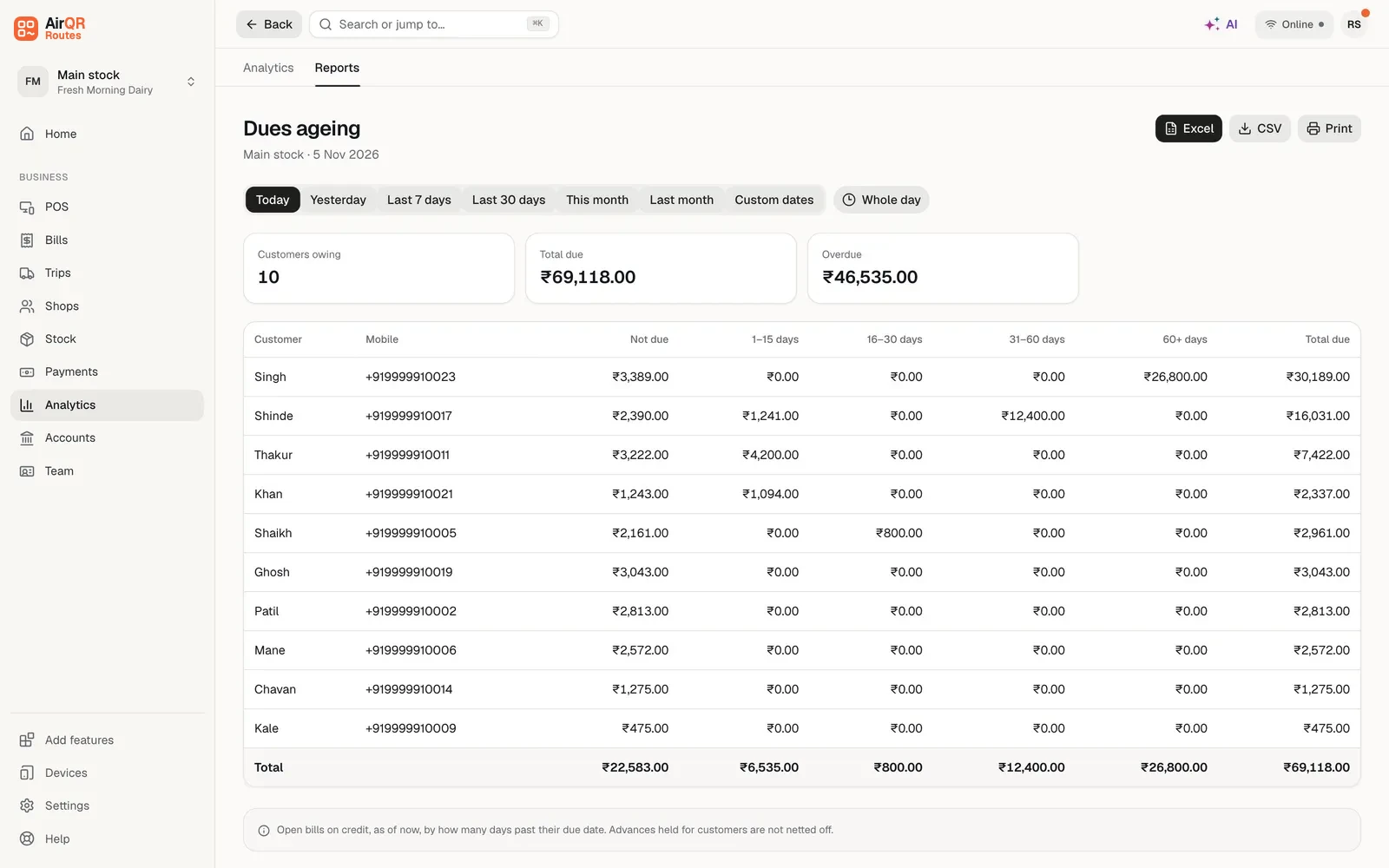
Most distributors sell on udhaar to some shops. In AirQR Routes the driver puts a bill on a shop's credit from the phone, the app checks the shop's limit, and the amount shows under Payments → Dues until it is paid. You can see who owes what and what is overdue. Dues are collected by the driver on the road or recorded by you at the warehouse.
- Credit given at the shop, with a limit
- Who owes and what is overdue, per shop
- Dues collected on the road or at the warehouse
Why udhaar gets lost
A shop takes the goods today and says it will pay on Saturday. The driver writes it on the bill, or in his own book, or remembers it. Saturday comes and the shop pays a little. A week later, nobody can say what the shop owes. The owner finds out in the month end, when the cash does not match the sales.
Credit is a big part of a distributor's business, and it is also where money quietly goes missing. The shops that owe the most are often the shops that order the most, so you cannot stop selling to them. You need to know the amount, and you need to know it while the driver is still at the shop.
How credit works from the van to the ledger
- 01
Allow credit for a shop
On the shop's page, switch on Credit allowed and set the days to pay and a credit limit. A balance you are carrying over from your old books can be entered as Already owes. Credit starts off for a new shop, which is cash only until someone with the credit permission turns it on. A limit left blank means no limit, so that is always your choice.
- 02
The driver bills on credit
At billing, the driver chooses Credit, or Split to take part in cash and put the rest on credit. The app asks in how many days the shop will pay. Credit is offered only to a shop that is allowed it.
- 03
The limit is checked on the phone
The app counts what the shop owed when the day began, less money collected since, plus credit given since. So two bills in a row cannot take a shop over its limit.
- 04
The driver collects
On the next visit the driver presses Collect on the shop. It is filled in with what the shop owes. They change the amount if it pays part, pick cash or UPI, and the money clears the oldest dues first. If the shop owes nothing, the money is kept as an advance.
- 05
You follow up
Payments → Dues shows who owes what and what is overdue. You can also record money received there, for example when a shop pays at the warehouse or sends it by bank transfer.
What helps you keep control
A limit for each shop
Set a credit limit and the days to pay for each shop. A shop that is blocked cannot be billed on credit.
Balance and overdue in the driver app
Each shop in the app shows what it owes and what is overdue, so the driver can ask for the money while standing there.
New shops start cash only
A shop added by a driver can be given credit only if you allowed that in Settings. Otherwise it is cash only until you decide.
Opening balances and import
Bring your shops in from a sheet with an opening balance for each. Importing the same file twice changes nothing, so no balance is counted twice.
Returned goods reduce the dues
When a shop hands goods back, to the driver, at the counter or at the office, AirQR finds the bill they came from and issues a credit note for just those units at that bill's price. It comes off what the shop owes, or is kept as an advance for the next bill.
A cancelled bill is taken off
If you cancel a bill, the credit given on it is taken off the shop's account, and the bill number stays as cancelled and is never reused.
Dues, apart from sales and apart from cash
Credit is a sale, not money in hand. A bill on credit counts in your sales on the day it was made, but it does not count as cash or UPI collected until the shop pays. Money collected later is shown as dues collected and is never counted as sales a second time.
This is why the Daily close report has separate columns for cash, UPI, on credit and dues collected. The money collected against old dues is its own line, never mixed into sales. See Routes reports.
What your drivers owe is kept separate
A driver can also owe the business, for example after a settlement where cash was short. That is kept on the driver's own account in Team → Drivers, with Record payment and Mark as loss, and it is never shown among your shops' dues. It also works when the Credit module is switched off. See end of day settlement.
Who can do what
Credit follows the same permissions as in the rest of AirQR. Owners can do everything. Managers can sell on credit by default. Recording money received, moving a due date and managing credit shops are separate permissions the owner can give to a manager. The driver in the app can bill on credit and collect, within the limit.
Credit & dues is the same module that restaurants use, where it is called Credit. You turn it on when you sign up, if you said you give credit, or later in Add features. See help with credit and dues and help with customers and regular orders.
What it does not do
AirQR Routes does not send reminders to your shops and it does not collect money for you. It records what a shop owes and what it paid, and you or your driver ask for the payment. On a shop's page there are Call and WhatsApp buttons that start a call or a message from your own phone. See also van stock for the stock side of the same trip.
Questions
Can a driver give credit to a shop from the phone?
Yes, if the shop is allowed credit. The driver chooses Credit or Split when billing, and the app asks in how many days the shop will pay. A blocked shop cannot be billed on credit.
How does AirQR stop a shop going over its limit?
The app counts what the shop owed when the day began, less money collected since, plus credit given since. A second bill in a row cannot take the shop over its limit.
Where do I see who owes me money?
Payments → Dues shows who owes what and what is overdue. Each shop's page shows its balance, and the driver app shows what a shop owes and what is overdue at the door.
Can I enter what shops already owe from my old notebook?
Yes. Enter it as Already owes on the shop's page, or put an opening balance column in the sheet when you import your shops.
What happens if a shop pays more than it owes?
The extra is kept as an advance on the shop's account.
Does AirQR send payment reminders to my shops?
No. It records what a shop owes. You or your driver ask for the payment, and the shop's page has Call and WhatsApp buttons on your own phone.
Is what a driver owes shown with my shops' dues?
No. A driver's dues are kept on the driver's own account in Team → Drivers and are never shown among your shops' dues.
Keep reading
Try AirQR Routes in your distribution business
28-day free trial. It runs on your drivers' own phones, even with no signal.