For milk agencies and dairy distributors
Milk agency software for pouch routes and named delivery trips
AirQR Routes is milk agency software for owner-run milk and dairy distributors in India. You load each van by the crate, the driver bills every shop on the phone, even with no signal, and the day ends with a cash count and a crate count. Credit shops, unsold pouches and crates left at each shop are written down at the door, not remembered at night.
- Crates counted out and back
- Trips named for your delivery runs
- Credit shops with a limit
What a milk agency needs from software
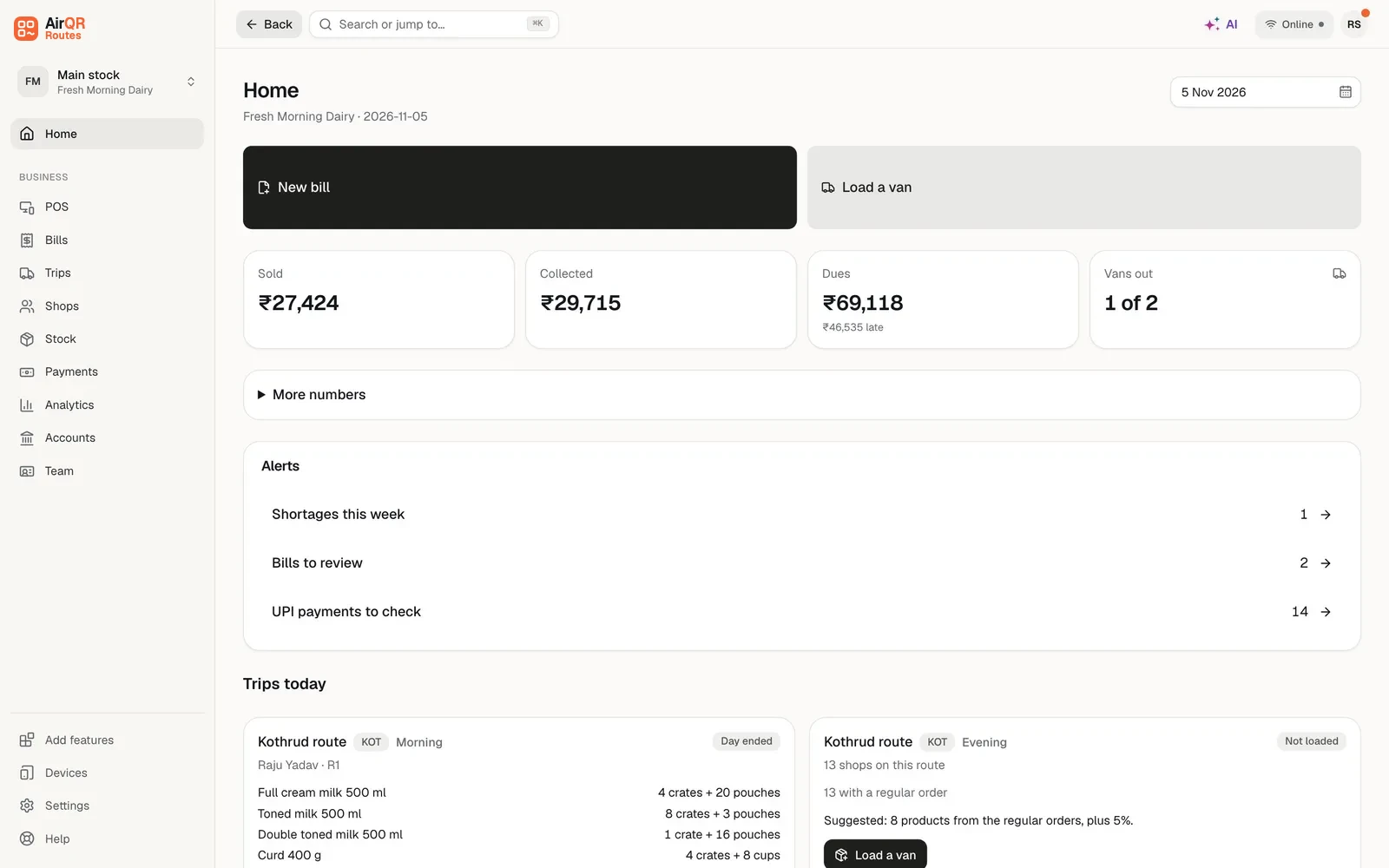
A milk agency runs on a tight clock. The van is loaded before light, the pouches go out in crates, and a driver has to reach every shop before the morning rush is over. Then there is an evening trip. Some shops pay cash, some pay by UPI and many take milk on credit and settle later. At the end of the day the crates must come back, and the owner wants to know that the cash in the driver's hand matches the bills.
On paper that means a notebook for each driver, a khata for each shop and a crate count nobody trusts. AirQR Routes puts the same work on the driver's own phone. The driver opens a web address, adds it to the home screen and bills from there. There is no app store download.
Good to know before you start. AirQR Routes does not plan the order of your stops for you, you set the order on each route. It does not show drivers moving on a map. When a driver allows it, the app saves where a bill was made and the owner sees the distance from the shop on the bill. For the full picture of the product, see AirQR Routes.
A day on a milk route
Here is how a morning and an evening can run when the owner and the driver share one system.
- 01
Plan the load
Open Home and press Load a van, or Load on a route under Not loaded yet. The quantities are filled in from the regular orders of the shops on that route, plus a small buffer (5 percent unless you changed it), rounded up to whole crates. Change any number, pick a driver who is free and press Confirm load. The stock moves from Main stock to the van, and the crates go with it.
- 02
The driver checks the van
The driver opens the Driver app, counts what is on the van and changes a number if a crate came short. A box asks why. Then the driver presses Start trip. Home marks the trip Accepted with differences if anything differed, and the trip page lists what.
- 03
Bill at the shop
The driver presses Bill on a shop. The regular order is already filled in. Change a quantity with the plus and minus buttons, say how many crates were left and how many were taken back, pick Cash, UPI, Credit or Split, and press Save bill. The driver can save an unchanged cash order straight from the bill.
- 04
Collect old dues
A shop that owes from last week pays a part at the door. The driver presses Collect, types the amount and picks Cash or UPI. The money goes against the oldest dues first.
- 05
Run the evening trip
Each named trip has its own load. Use Morning and Evening or add names such as School run and Round 3, with a different regular order for each. If a shop calls for more, the owner sends a top up to the van and it is recorded on the same trip.
- 06
End the day
The driver counts cash by notes and coins, checks what is left on the van and counts the crates on the van, then presses End day. The numbers are saved for the owner.
- 07
Close the day
The owner counts the stock, cash, UPI and crates that came back. AirQR shows every difference, and the owner decides what to do about each one. When the owner approves, the trip is locked.
Milk distributor features that match the work
Each of these comes from the way a milk route actually runs.
Regular orders for each trip
Each shop can have a regular order for any named trip, or an Each trip quantity that applies to every run. The load is built from them, so you start from what shops really take.
Crates as empties
The dairy setup names the empties Crate. A shop's crate count is on its page and each bill records crates left and taken back, so you can see who holds how many. See crate and jar tracking.
Credit shops
Give a shop credit with days to pay and a limit. The phone counts what the shop owed when the day began, so two bills in a row cannot pass the limit. See credit and dues.
Works with no signal
Bills, collections, visits and End day are saved on the phone and sent when the network returns. See working offline.
Bills on WhatsApp
After saving, the driver taps Send on WhatsApp and the bill goes to the shop's number as a message. Each driver has their own bill number series, and a number is never used twice.
Reports in Excel or CSV
Trip sheets, Product sales, Returns by product, Containers, Van stock check, Losses and Daily close come with every plan. Route sales, Shop sales, Product movement, Sales comparison and Collection efficiency are on Routes Plus. See the reports guide.
Crates sent out, left at the shop and brought back
A crate is not sold. It is lent to the shop and has to come back. In AirQR Routes the crate is an empties kind with its own name, deposit and lost charge, which you set in Stock → Containers. When you plan a load the crates are filled in from the packs you are sending. On each bill the driver records how many crates were left and how many were taken back.
For shops that already hold crates today, type that number on the customer page, or add a column to your import sheet. The count then starts right.
At the warehouse, settling shows each kind of empties with how many went out, how many were left with shops and taken back, how many should come back and the number you count. A missing crate can be charged to the driver at the lost charge you set, recorded as lost by a shop you pick, or marked lost with no charge. The Containers report lists every loss with its date and who it was charged to.
Unsold pouches and sale or return
Some shops take more than they sell and hand back what is left. In the dairy setup, whether customers can return unsold stock is a question you answer at signup, and it is pre-answered yes for dairy. You can change it later in Settings, and you can set it product by product.
When a product is on sale or return, the driver records the goods taken back as Good or Damaged by quantity on the same bill. The driver's phone never gives money back. The owner checks the returns in Bills and issues a credit note, either taken off what the shop owes or settled outside AirQR. See Bills, collections and ending the day.
Milk products and how AirQR starts them
At signup you tick the starter products you sell and type your own unit prices. These are starting pack sizes. In Stock → Products, keep up to eight named alternatives such as crate 12, crate 24, carton 6 or tray 30. Packs use the unit rate multiplied by their capacity, with tax following the product setup. Add any other product too.
- Full cream, toned and double toned milk 500 ml
- PackCrate of 24 pouches
- Tax at setupReady as exempt, still confirm
- Curd 400 g and buttermilk 500 ml
- PackCrate of 24
- Tax at setupConfirm tax before you start
- Paneer 200 g
- PackSold singly
- Tax at setupReady as nil, still confirm
- Butter 100 g
- PackBox of 20
- Tax at setupReady with a suggested rate
- Ghee 1 L
- PackBox of 12
- Tax at setupReady with a suggested rate
Every rate is a suggestion. Confirm each rate and HSN code with your CA. AirQR never changes a rate you set.
Bill of supply, tax invoice and your CA
Plain milk is usually billed without tax, so a registered distributor who sells only plain milk issues a bill of supply. Curd, butter and other dairy items may carry tax, and your CA decides what applies to you.
AirQR follows the tax setup of your products. If your business is not registered for GST, every bill is a plain Bill with no tax. If it is registered, a bill is a Tax Invoice when any item on it is taxed, and a Bill of Supply when every item is exempt. A shop that buys milk and curd in one visit can get a Tax Invoice. AirQR helps keep your records. It does not file returns or give tax advice. See GST billing for distributors.
Setting up your milk agency
Most of this is done once, in the first hour.
- Pick the Dairy and milk products category when you sign up
- Tick your starter products and type each price, then confirm each tax
- Check the Crate empties kind, its deposit and its lost charge
- Add your shops with name and mobile number, and drop a pin at the door
- Put the shops on a route in the order you visit them
- Name your delivery trips and set each shop's regular order for those runs
- Say which shops may take credit, with days to pay and a limit
- Invite each driver and ask them to add the Driver app to the home screen
Questions
What should milk agency software do?
It should build the load from regular orders, bill each shop on the phone, count crates out and back, keep shop credit and close the day with a cash count. AirQR Routes does all of this, and the driver can bill with no signal.
Can my drivers bill without a network?
Yes. Bills, collections, visits and End day are saved on the phone and sent when the network returns. Connect once in the morning so the phone can prepare the day.
Can I keep track of crates with each shop?
Yes. Every bill records the crates left and taken back, and each shop's page shows how many crates it holds. The Containers report shows crates sent out, collected back, with each shop now, and lost.
Can a shop take milk on credit?
Yes. Switch on credit for a shop and set the days to pay and a limit. A new shop starts as cash only. The driver sees what each shop owes and what is overdue, and can collect part payments at the door.
Can a shop return unsold pouches?
Yes, when the product is set as sale or return. The driver records goods taken back as Good or Damaged on the bill, and the owner then issues a credit note. The dairy setup starts with this on, and you can turn it off.
Is milk billed with tax?
That depends on the product and on your registration, so ask your CA. AirQR starts fresh milk as exempt and asks you to confirm every rate. A registered business gets a Bill of Supply when all items are exempt.
How much does it cost?
Talk to us for pricing. There are two plans, Routes and Routes Plus, for every fleet size. Tell us about your routes and we will suggest the right plan. The free trial lasts 28 days and includes everything.
Does the driver app work in Hindi?
Yes. The Driver app works in Hindi and English. You can also change the words for route, driver, customer and empties in Settings.
Keep reading
Try AirQR Routes in your distribution business
28-day free trial. It runs on your drivers' own phones, even with no signal.